Extension did not activate in an air-gapped network #15705

Description

This was initially reported at microsoft/vscode#113614 by @mrburrito
- VSCode Version: 1.52.1
- OS Version: CentOS 7.6
I'm using VSCode on an internal company network that is fully air-gapped. We are able to transfer files from the internet to the network, but are unable to reach out so I've been installing extensions manually by downloading them. I needed to work on a Python project today so I grabbed the MS Python extension and installed it, along with the Python Test Explorer extension. I started VSCode, opened my project, and thought everything was working because syntax highlighting was there. Then I tried to Ctrl-Click a function name to Go to Definition and it didn't work. Nor did code completion. I opened the dev console and finally saw an error from the Test Explorer extension that said it couldn't activate because it depended on the ms-python.python extension which was unable to activate. I looked through logs for hours today, trying multiple different configurations, including only the Python extension enabled, and bumping log level up to trace. The Python extension was completely silent. No errors. No mention of attempting to start. Nothing.
Finally, when I got home, I decided to try to replicate the issue. I downloaded the Python extension, disabled my networking, and started VSCode. Same problem. Nothing. Syntax highlighting worked, but autocompletion and code navigation didn't work. No output at all in the logs. So I turned networking back on and restarted VSCode. At that point, I got this error dialog telling me the Jupyter extension was a dependency and missing.
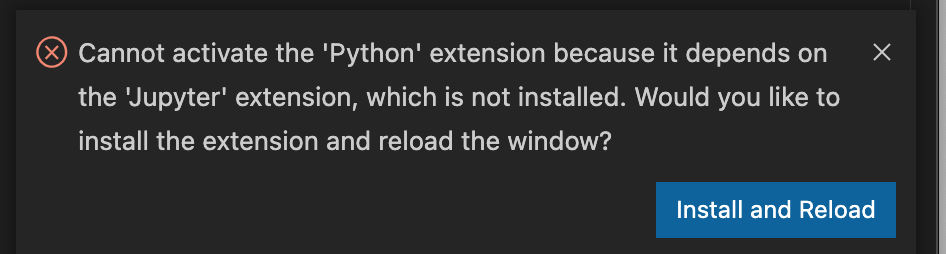
That dialog should be displayed regardless of whether or not VSCode can reach the marketplace! The dependencies are specified in the package.json of the extension! At a minimum, there needs to be some notification that an enabled extension could not activate and log messages indicating why -- particularly in the event of missing dependencies, since that is a pretty trivial problem to fix in most cases.
Once I downloaded and installed the Jupyter extension, disabled networking, and started VSCode, I could clearly see both extensions activating in the status bar and the Python extension behaved as expected.
Steps to Reproduce:
rm -rf ~/.vscode/extensions- Download Python extension (
ms-python.python-2020.12.424452561.vsix) code --install-extension /path/to/ms-python.python-2020.12.424452561.vsix- Disable all networking
code- Open Python file/project
- Attempt to use intellisense, "Go To" navigation, or other extension features; none work -- extension is not activated
- Verify extension non-activation by executing
Python: Select Interpretercommand; you will see error saying it is not configured
Does this issue occur when all extensions are disabled?: No -- the target extension must be enabled for the error to occur
Expected Behavior:
- Extensions generate logs indicating that they are attempting to activate and, particularly in the case of a failure, output logs that help troubleshoot activation failures.
- Missing dependency error is displayed in the UI even when unable to connect to the marketplace