Relative imports not recognized when "DJANGO_SETTINGS_MODULE" string is found #7062


Description

I know this ticket sounds weird!
I was getting this error on a larger project; I then reproduced it with a minimal example in a fresh environment. I am providing the reproduction repo, please check it.
Environment data
- VS Code version: 1.37.1
- Extension version (available under the Extensions sidebar): 2019.8.30787
- OS and version: macOS 10.14.6
- Python version (& distribution if applicable, e.g. Anaconda): 3.7.4 (pyenv)
- Type of virtual environment used (N/A | venv | virtualenv | conda | ...): virtualenv (pyenv)
- Relevant/affected Python packages and their versions: none
- Jedi or Language Server? (i.e. what is
"python.jediEnabled"set to; more info How to update the language server to the latest stable version #3977): Jedi
Expected behaviour
When I hover over a relative import, right click and choose Go To Definition, that always works.
Actual behaviour
When I hover over a relative import, right click and choose Go To Definition, that says: "No definition found for 'foo'":

This only happens when I have a file manage.py with a string (not even Python code!) DJANGO_SETTINGS_MODULE in it. If I alter the string as e.g. DJANGO_SETTINGS_MODULXXX, or simply remove it, or rename the file, relative imports start to work again.
Apparently there is some hidden Django detection mechanism somewhere that breaks something related to imports.
Steps to reproduce:
-
Clone the reproduction repo from https://github.com/IlyaSemenov/vscode-python-relative-import-repro
-
(Optional) Prepare a separate virtual env:
pyenv virtualenv 3.7.4 test
pyenv local test
- Make sure the project runs:
test ❯ python main.py
I am foo!
- Open the folder in vscode (
code .) and make sure it uses the proper interpreter:

- Try intellisense in
api/acme/acme/bar.py- it will not work.

- Edit first line in
api/manage.py(or simply remove it):

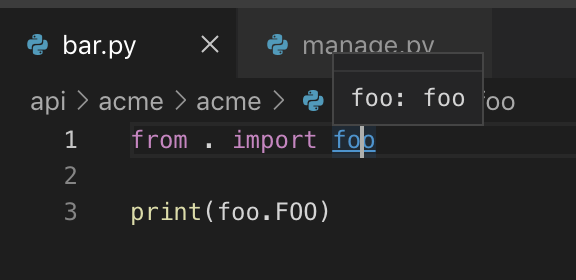
- Intellisense in
api/acme/acme/bar.pyworks:
- Revert changes in
api/manage.py, Intellisense for relative imports is broken again.
Jedi output
I tried to run Jedi manually for the 'broken' import line, and it worked fine:
(test) test ❯ pip install jedi
Collecting jedi
  Using cached https://files.pythonhosted.org/packages/55/54/da994f359e4e7da4776a200e76dbc85ba5fc319eefc22e33d55296d95a1d/jedi-0.15.1-py2.py3-none-any.whl
Collecting parso>=0.5.0 (from jedi)
  Using cached https://files.pythonhosted.org/packages/a3/bd/bf4e5bd01d79906e5b945a7af033154da49fd2b0d5b5c705a21330323305/parso-0.5.1-py2.py3-none-any.whl
Installing collected packages: parso, jedi
Successfully installed jedi-0.15.1 parso-0.5.1

(test) test ❯ python
Python 3.7.4 (default, Aug 13 2019, 19:24:01)
[Clang 10.0.1 (clang-1001.0.46.4)] on darwin
Type "help", "copyright", "credits" or "license" for more information.
>>> import jedi; jedi.set_debug_function();
>>> print(jedi.Script(path="api/acme/acme/bar.py", line=1).goto_definitions())
speed: init 21.161466121673584
speed: parsed 21.161591053009033
dbg: Start: goto_definitions
 speed: import () <ModuleContext: bar@1-3 is_stub=False> 0.0014009475708007812
 dbg: global search_module 'acme': <ModuleContext: acme@1-1 is_stub=False>
 dbg: search_module 'acme.acme' in paths ['/Users/semenov/tmp/test/api/acme']: <ModuleContext: acme@1-1 is_stub=False>
 dbg: finder.filter_name 'foo' in (<ModuleContext: acme@1-1 is_stub=False>): [<SubModuleName: string_name=foo start_pos=(1, 0)>]@None
 speed: import ['foo'] <ModuleContext: acme@1-1 is_stub=False> 0.05060410499572754
 dbg: search_module 'acme.acme.foo' in paths ['/Users/semenov/tmp/test/api/acme/acme']: <ModuleContext: foo@1-1 is_stub=False>
 dbg: finder._names_to_types: [<SubModuleName: string_name=foo start_pos=(1, 0)>] -> S{<ModuleContext: foo@1-1 is_stub=False>}
 dbg: after import: S{<ModuleContext: foo@1-1 is_stub=False>}
 dbg: Start: convert contexts
 dbg: End: convert contexts
dbg: End: goto_definitions
[<Definition full_name='acme.acme.foo', description='module foo'>]
Workaround
Since this hits me in a real project, I am using this workaround in manage.py:
def main():
    # This somehow fixes VSCode Intellisense
    os.environ.setdefault("DJANGO_" + "SETTINGS_MODULE", "acme.settings")
    ...
Logs
Output for Python in the Output panel (View→Output, change the drop-down the upper-right of the Output panel to Python)
User belongs to experiment group 'AlwaysDisplayTestExplorer - control'
User belongs to experiment group 'ShowPlayIcon - start'
> conda --version
> pyenv root
> python3.7 -c "import sys;print(sys.executable)"
> python3.6 -c "import sys;print(sys.executable)"
> python3 -c "import sys;print(sys.executable)"
> python2 -c "import sys;print(sys.executable)"
> python -c "import sys;print(sys.executable)"
> ~/.pyenv/versions/test/bin/python -c "import sys;print(sys.executable)"
> conda info --json
> ~/.pyenv/shims/python3.6 ~/.vscode/extensions/ms-python.python-2019.8.30787/pythonFiles/interpreterInfo.py
> ~/.pyenv/shims/python3.6 ~/.vscode/extensions/ms-python.python-2019.8.30787/pythonFiles/interpreterInfo.py
> ~/bin/python3.4 ~/.vscode/extensions/ms-python.python-2019.8.30787/pythonFiles/interpreterInfo.py
> ~/bin/python3.4 ~/.vscode/extensions/ms-python.python-2019.8.30787/pythonFiles/interpreterInfo.py
Starting Jedi Python language engine.
> conda info --json
> conda --version
> ~/.pyenv/versions/test/bin/python -c "import sys;print(sys.prefix)"
cwd: ~/tmp/test
> ~/.pyenv/versions/test/bin/python -c "import sys;print(sys.prefix)"
cwd: ~/tmp/test
> ~/.pyenv/versions/test/bin/python -c "import sys;print(sys.executable)"
cwd: ~/tmp/test
> ~/.pyenv/versions/test/bin/python -c "import sys;print(sys.executable)"
cwd: ~/tmp/test
> ~/.pyenv/versions/test/bin/python -c "from distutils.sysconfig import get_python_lib; print(get_python_lib())"
cwd: ~/tmp/test
> ~/.pyenv/versions/test/bin/python -c "from distutils.sysconfig import get_python_lib; print(get_python_lib())"
cwd: ~/tmp/test
> ~/.pyenv/versions/test/bin/python -m site --user-site
cwd: ~/tmp/test
> ~/.pyenv/versions/test/bin/python -m site --user-site
cwd: ~/tmp/test
> ~/.pyenv/versions/test/bin/python completion.py
cwd: ~/.vscode/extensions/ms-python.python-2019.8.30787/pythonFiles
> ~/.pyenv/versions/test/bin/python completion.py
cwd: ~/.vscode/extensions/ms-python.python-2019.8.30787/pythonFiles
Output from Console under the Developer Tools panel (toggle Developer Tools on under Help; turn on source maps to make any tracebacks be useful by running Enable source map support for extension debugging)
It's lengthy so I created a gist: https://gist.github.com/IlyaSemenov/1018446c06a3045fb08bd94c306bf928