Problem matcher with type "shell" randomly fails to match on Linux when the terminal is not "reused" #111068


Description

- VSCode Version: 1.52.0-insider (also repros with 1.51.0)
- OS Version: Ubuntu 20 (via Windows/WSL)
Steps to Reproduce:
- You may need to install gcc (sudo apt-get install gcc).
- Open folder.
- Create a test.c file with
int main(void) {
    int i;
    &printf("Hello");
    &printf("Hello");
    &printf("Hello");
    return 0;
}
- Create a tasks.json with
{
	"version": "2.0.0",
	"tasks": [
		{
			"label": "build",
                        "type": "shell",
			"command": "/usr/bin/gcc",
			"args": [
				"-Wall",
				"${workspaceFolder}/test.c",
				"-o",
				"helloWorld"
			],
			"problemMatcher": {
				"owner": "cpp",
                               "source": "gcc",
				"fileLocation": [
					"autoDetect",
					"${workspaceFolder}"
				],
				"pattern": {
					"regexp": "^(.*?):(\\d+):(\\d*):?\\s+(?:fatal\\s+)?(warning|error):\\s+(.*)$",
					"file": 1,
					"line": 2,
					"column": 3,
					"severity": 4,
					"message": 5
				}
			},
			"group": {
				"kind": "build",
				"isDefault": true
			}
		}
	]
  }
If you're on VS Code non-Insiders, you'll need to save and Reload Window due to a bug that's fixed in Insiders.
4. Use Configure Default Build Task (I didn't originally think this was required because the tasks.json was already marked as isDefault).
5. Ctrl+Shift+B (Run Build Task).
6. You can repeat the repro via enter a key in the Terminal window and using Ctrl+Shift+B again (or doing a Reload Window, which is slower). Another alternative to repeat the repro is to use Ctrl+Shift+B quickly 2 times in a row (one time won't work).
Bug: The problem matcher gives random results 0-5.



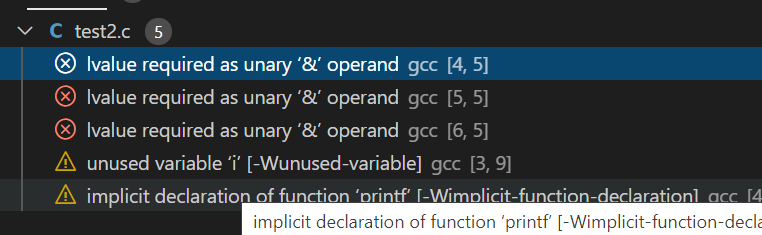
Note: Screenshot uses test2.c instead of test.c (it doesn't matter).
Does this issue occur when all extensions are disabled?: Yes
Repros with the C/C++ disabled or enabled. With the C/C++ extension disabled with the "cppbuild" task, the bug repros still and also doesn't require step 6 to "reset" the repro (i.e. you can just use Ctrl+Shift+B repeatedly).