CodeLens config issue #130480


Description

Does this issue occur when all extensions are disabled?: Yes/No
- VS Code Version: 1.59.0
- OS Version: win10
Steps to Reproduce:
1.Check the code lens option in the User configuration
2.Open a file that can display code lens information, when the code lens information is displayed normally
3.Add language-specific settings in workspace config, close code lens:
"[xxxx]": {
"editor.codeLens": false
},
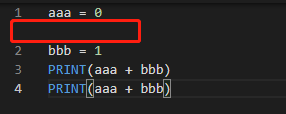
4.When you start vs code to activate the plugin, the code lens message is indeed not prompted anymore, but the empty lines are still preserved. Normal display after switching files. But I don't think it should be necessary to switch files
The empty lines in the red box should not appear, that is where the old codelens appeared