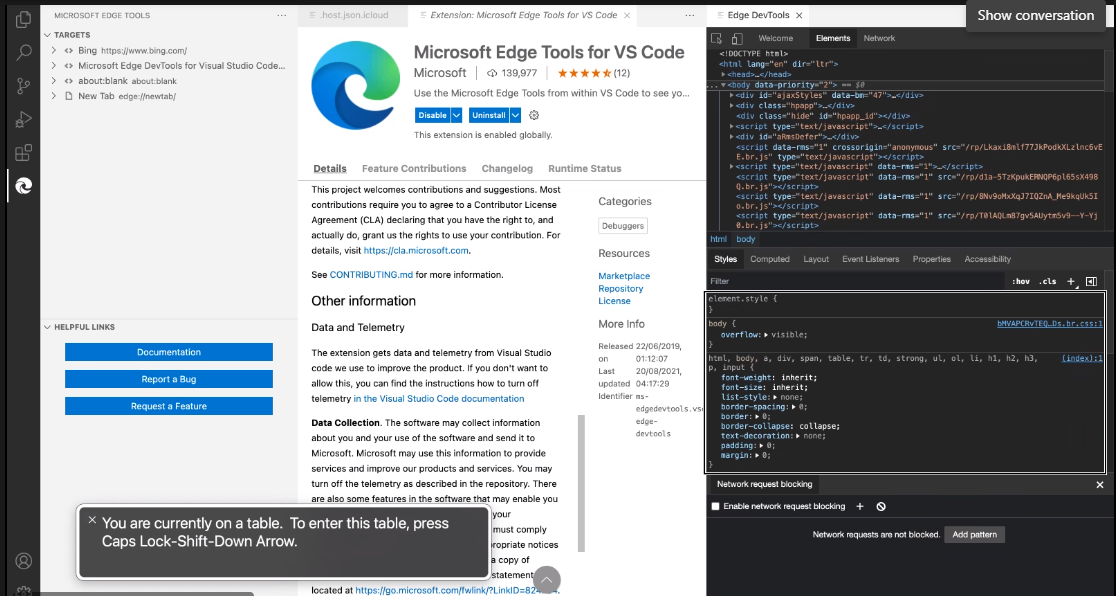
VoiceOver: DOM tree, targets pane and content in 'styles tab' are defined as a table elements #131959


Description

Check out Accessibility Insights! - Identify accessibility bugs before check-in and make bug fixing faster and easier.
GitHubTags:#A11y_VSCode;#A11ySev2;#A11yTCS;#DesktopApp;#Visual Studio Code Client;#VoiceOver;#WCAG4.2.1;#DesktopApp;#Win10;#VisualStudioCode-Win32-Apr2021;#A11yMAS;
Repro Steps:
- Launch Visual Studio code application with installed Elements for 'Microsoft edge extension .
- Start screen reader
- Navigate to 'targets' pane and observe voice over announcement.
Similarly navigate to DOM tree in developer tools and to the 'Styles' tab.
Actual Result:
DOM is defined as table. When trying to interact with the table using (Ctrl+Option+Shift+Down arrow), Voiceover announces as 'Use navigation keys to interact.
Expected Result:
Elements in code editor field should not be defined as a table. They should be defined as list items since we are able to navigate to the elements using down arrow keys.
User Impact:
screen reader users will get the wrong information of content