Multiroot project, cannot attach breakpoint using jest after the latest update TS #133138


Description

Does this issue occur when all extensions are disabled?: Yes
- VS Code Version: 1.60
- OS Version: Win 10
On older versions >=1.58 everything was working fine and as a workaround I'm going to downgrade vs Code, but I would like to get this issues solved so.
Steps to Reproduce:
-
I have 2 folders(projects)
├───ProjectA
│ Component A.ts
| Unit_tests.spec.ts
├───ProjectB
│ ComponentB.ts
| UnitTestsForB.spec.ts -
Project B is referenced(linked) in ProjectA with npm link..
-
I have unit tests for both projects. some unit tests in ProjcetA are using component B from ProjectB.
-
Place breakpoints in Unit_test.spec.ts ComponentA and ComponentB.
-
Debug some test in ProjectA and when debugger is attached breakpoints from ComponentB disappears. The test finished successfully.
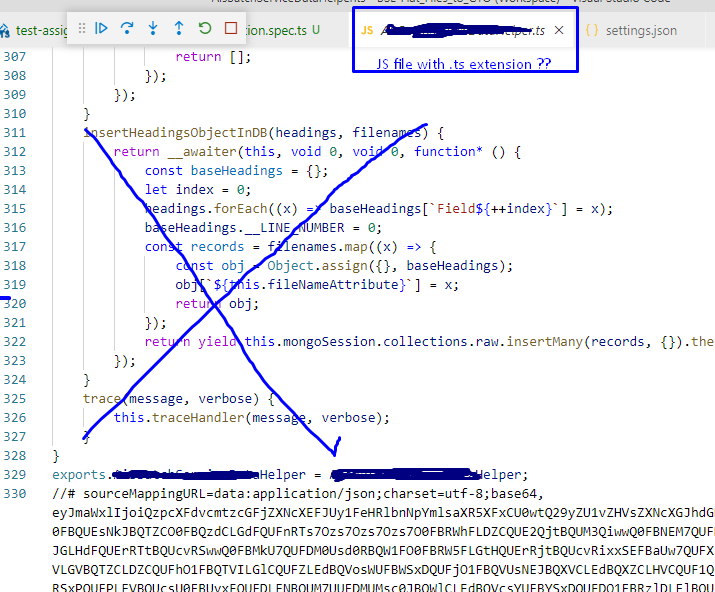
- insert debugger; in componentB and the debugger will stop but in some hidden generated file(js file with sourmapping) not the original .ts file where I expecting.
Note: If I debug test from ProjectB then the debugger is working as expected. Only when the debugger needs to jump from ProjectA to some component in ProjectB
Debug Configuration used in both projects:
{
"type": "node",
"request": "launch",
"name": "Debug Jest Current File Work",
"port": 9229,
"runtimeArgs": [
	"--inspect-brk",
	"${workspaceFolder}/node_modules/jest/bin/jest",
	"--runInBand",
	"${fileBasename}"
],
"console": "integratedTerminal",
"internalConsoleOptions": "neverOpen",
},
{
"type": "node",
"request": "attach",
"name": "Attach Work",
"port": 9229,
}
Hidden generated file where the debugger stops:
TsConfig:
"compilerOptions": {
        "target": "es6",
        "module": "commonjs",
        "sourceMap": true,
        "typeRoots": [
            "./node_modules/@types",
            "@types"
        ],
        "types": ["node", "jest"],
        "watch": false,
        "declaration" : true,
        "forceConsistentCasingInFileNames": true,
    },....