Tab bar display is not correctly updated when editors open and close #145518


Description

Does this issue occur when all extensions are disabled?: Yes
- VS Code Version: 1.65.2
- OS Version: Windows 10
Steps to Reproduce:
- open and close many tabs
I originally planned to submit this based on
-
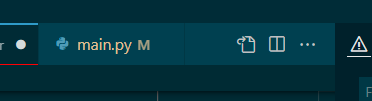
the last tab sometimes had the x for close after the menus icons in the tab bar
when hovering over the tab the "X" to close would show to the right of the icons
-
the last tab would hide the menu icons in the tab bar
I can't seem to reproduce those two issues with today's version of vscode, but I am including them for completeness.
However, there are still some things that don't look right.
Based on what I see today, maybe it is only:
- last tab is longer than necessary and puts the close "X" at the right edge of the panel, when all other tabs are sized based on title content. The below image without hovering shows the modified file "dot", but hovering would put the "X" there too.
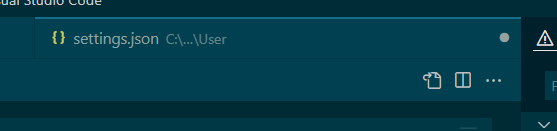
- sometimes a tab is left on a second line when there is clearly room for both it and the menu icons on the first line. Added to the previous problem it looks very strange.

Just a thought, but it might also help to always have the menu icons at the end of the first line, even if there are multiple lines. That would leave less of a gap after the last tab when the next tab and the menu icons won't both fit on the first line.