MacOS soft linked directory in Project directory listing/access not permitted within VSCode #146992


Description

Does this issue occur when all extensions are disabled?: Yes
- VS Code Version: 1.66.0; Commit: e18005f
- OS Version: MacOS 12.3; BuildVersion: 21E230; arm64
- FS: APFS
Steps to Reproduce:
- in os native terminal (iTerm; ZSH) create a softlink to a directory - this works as expected
$ ln -s ~/Documents/project-files/hls project-files
$ ls -lah project-files
lrwxr-xr-x 1 kaspi 40 Apr  7 12:03 project-files -> /Users/kaspi/Documents/project-files/hls

$ ls -lah project-files/
total 14M
drwxrwxr-x 14 kaspi  448 Apr  7 11:05  .
drwxrwxr-x  9 kaspi  288 Apr  7 11:33  ..
-rw-r--r--  1 kaspi 133K Jul 22  2020  0420_h20_Icon_Paket.zip
-rw-r--r--  1 kaspi  12K Sep  7  2021  96559652.json
...
-
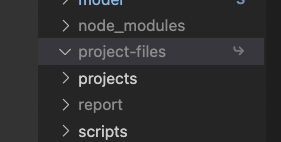
In VSCode the directory is shown in the file explorer and indicates that it is a link – unfolding shows no file contents though
-
In VSCode's integrated Terminal the directory soft link is visible, but it seems to have no permission to list the contents (unlike the real terminal)
$ ls -lah project-files
lrwxr-xr-x 1 kaspi 40 Apr  7 12:03 project-files -> /Users/kaspi/Documents/project-files/hls

$ ls -lah project-files/
gls: cannot open directory 'project-files/': Operation not permitted
This used to work before. This soft linked project-files directory is part of my workflow.
It is git ignored with global gitignore file.
I have no idea what changed to make my soft linked directory inaccessible by VSCode. Finder, iTerm it is normally accessible, as ever.
PS:
Having the project opened in VSCode.
Trying to open a file from within that soft linked dir with iTerm switches the focus to the VSCode window, but nothing opens.
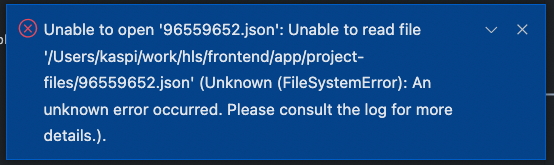
[2022-04-07 12:22:48.373] [renderer1] [error] Error: Unable to read file '/Users/kaspi/work/hls/frontend/app/project-files/96559652.json' (Unknown (FileSystemError): An unknown error occurred. Please consult the log for more details.)
    at Object.error (vscode-file://vscode-app/Applications/Visual%20Studio%20Code.app/Contents/Resources/app/out/vs/workbench/workbench.desktop.main.js:610:34069)
    at Object.onError (vscode-file://vscode-app/Applications/Visual%20Studio%20Code.app/Contents/Resources/app/out/vs/workbench/workbench.desktop.main.js:67:28863)
    at vscode-file://vscode-app/Applications/Visual%20Studio%20Code.app/Contents/Resources/app/out/vs/workbench/workbench.desktop.main.js:67:27958
    at vscode-file://vscode-app/Applications/Visual%20Studio%20Code.app/Contents/Resources/app/out/vs/workbench/workbench.desktop.main.js:67:26139
    at Array.forEach (<anonymous>)
    at I.emitError (vscode-file://vscode-app/Applications/Visual%20Studio%20Code.app/Contents/Resources/app/out/vs/workbench/workbench.desktop.main.js:67:26128)
    at I.error (vscode-file://vscode-app/Applications/Visual%20Studio%20Code.app/Contents/Resources/app/out/vs/workbench/workbench.desktop.main.js:67:25789)
    at vscode-file://vscode-app/Applications/Visual%20Studio%20Code.app/Contents/Resources/app/out/vs/workbench/workbench.desktop.main.js:606:30002
    at S.invoke (vscode-file://vscode-app/Applications/Visual%20Studio%20Code.app/Contents/Resources/app/out/vs/workbench/workbench.desktop.main.js:67:145)
    at s.fire (vscode-file://vscode-app/Applications/Visual%20Studio%20Code.app/Contents/Resources/app/out/vs/workbench/workbench.desktop.main.js:67:1856)
    at $ (vscode-file://vscode-app/Applications/Visual%20Studio%20Code.app/Contents/Resources/app/out/vs/workbench/workbench.desktop.main.js:83:3413)
    at T.onResponse (vscode-file://vscode-app/Applications/Visual%20Studio%20Code.app/Contents/Resources/app/out/vs/workbench/workbench.desktop.main.js:83:4386)
    at T.onBuffer (vscode-file://vscode-app/Applications/Visual%20Studio%20Code.app/Contents/Resources/app/out/vs/workbench/workbench.desktop.main.js:83:4226)
    at vscode-file://vscode-app/Applications/Visual%20Studio%20Code.app/Contents/Resources/app/out/vs/workbench/workbench.desktop.main.js:83:1817
    at S.invoke (vscode-file://vscode-app/Applications/Visual%20Studio%20Code.app/Contents/Resources/app/out/vs/workbench/workbench.desktop.main.js:67:145)
    at s.fire (vscode-file://vscode-app/Applications/Visual%20Studio%20Code.app/Contents/Resources/app/out/vs/workbench/workbench.desktop.main.js:67:1856)
    at EventEmitter.j (vscode-file://vscode-app/Applications/Visual%20Studio%20Code.app/Contents/Resources/app/out/vs/workbench/workbench.desktop.main.js:65:51039)
    at EventEmitter.emit (node:events:390:28)
    at Object.onMessage (node:electron/js2c/renderer_init:81:881)
[2022-04-07 12:22:49.814] [renderer1] [error] ENOENT: no such file or directory, open 'rendererLog': Error: ENOENT: no such file or directory, open 'rendererLog'
[2022-04-07 12:22:51.331] [renderer1] [error] ENOENT: no such file or directory, open 'rendererLog': Error: ENOENT: no such file or directory, open 'rendererLog'
[2022-04-07 12:22:52.842] [renderer1] [error] ENOENT: no such file or directory, open 'rendererLog': Error: ENOENT: no such file or directory, open 'rendererLog'
[2022-04-07 12:22:54.355] [renderer1] [error] ENOENT: no such file or directory, open 'rendererLog': Error: ENOENT: no such file or directory, open 'rendererLog'
[2022-04-07 12:22:55.855] [renderer1] [error] ENOENT: no such file or directory, open 'rendererLog': Error: ENOENT: no such file or directory, open 'rendererLog'
[2022-04-07 12:22:57.369] [renderer1] [error] ENOENT: no such file or directory, open 'rendererLog': Error: ENOENT: no such file or directory, open 'rendererLog'
[2022-04-07 12:22:58.899] [renderer1] [error] ENOENT: no such file or directory, open 'rendererLog': Error: ENOENT: no such file or directory, open 'rendererLog'