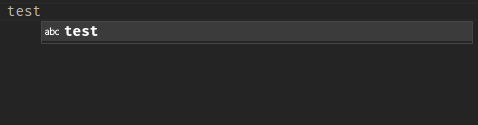
Suggestions can be equal to typed text #166994


Description

Does this issue occur when all extensions are disabled?: Yes
- VS Code Version: 1.73.1
- OS Version: Fedora
Steps to Reproduce:
- Set
editor.quickSuggestionsto true for all in settings.json:
"editor.quickSuggestions": {
    "other": true,
    "comments": true,
    "strings": true
  },
- In any text file, type a word more than once (for example test test)
When I fully typed the word twice, I get a suggestion that only shows exactly what I have typed already. So the only thing the suggestion does is that when I hit enter, I don't get into a new line but nothing happens (because it triggers the suggestion that makes no difference). I think suggestions shouldn't pop up, if they are'nt different to the already typed text: