- VSCode Version: 1.13.0
- OS Version: macOS Sierra 10.12.5
Steps to Reproduce:
- Set git conflict style to
diff3. In ~/.gitconfig:
[merge]
    conflictstyle = diff3
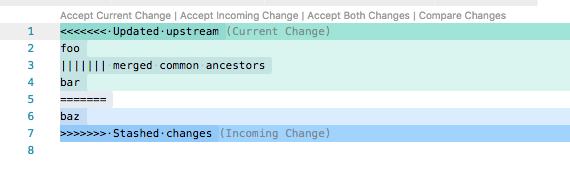
- This results in merge conflict format as shown below. You can copy paste this into a blank tab:
<<<<<<< Updated upstream
foo
||||||| merged common ancestors
bar
=======
baz
>>>>>>> Stashed changes
- Screenshot:
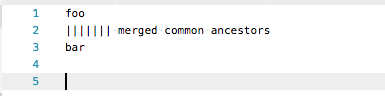
- If you click "Accept Current Change", the "merged common ancestors" remains:
Some other notes:
- "Accept Incoming Change" works as expected.
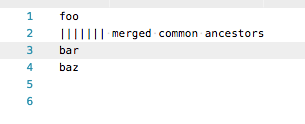
- "Accept Both Changes" results in the following:
- "Compare Changes" fails with error if not in git repository, or something like this:

(Note the trailing "merged common ancestors" on the left side)


Steps to Reproduce:
diff3. In~/.gitconfig:Some other notes:
(Note the trailing "merged common ancestors" on the left side)