Summary
Two related issues with chat.hookFilesLocations in VS Code Copilot Chat:
- Bug:
chat.hookFilesLocations rejects UNC paths and absolute paths that chat.pluginLocations already accepts — inconsistent validation.
- Feature request: Hooks defined inside a registered agent plugin should be auto-discovered, just like skills, agents, and MCP servers are already discovered automatically from plugin directories.
Bug: chat.hookFilesLocations rejects UNC/absolute paths (inconsistent with chat.pluginLocations)
Error
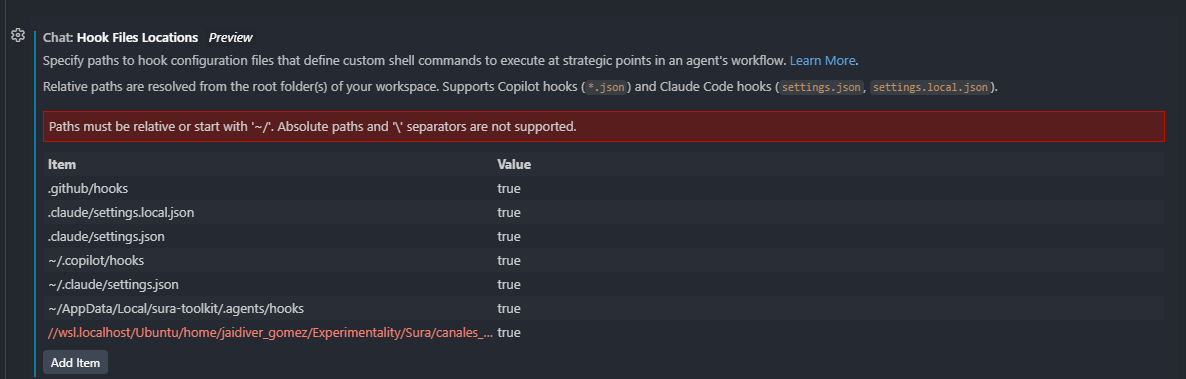
When adding a UNC path (e.g., //wsl.localhost/Ubuntu/home/user/project/.agents/hooks) to chat.hookFilesLocations, the VS Code Settings UI shows:
"Paths must be relative or start with '~/'. Absolute paths and '' separators are not supported."
But chat.pluginLocations accepts the same paths
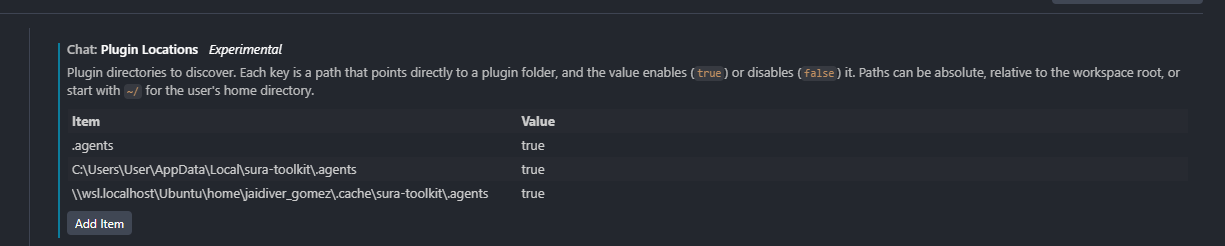
The exact same UNC path format (e.g., \\wsl.localhost\Ubuntu\home\jaidiver_gomez\cache\sura-toolkit\.agents) is accepted by chat.pluginLocations without any validation error.
Screenshots
chat.hookFilesLocations — UNC path rejected (see red error banner):
chat.pluginLocations — Same UNC path format accepted without error:
Steps to Reproduce
- Open VS Code Settings (Ctrl+,) → search for
chat.hookFilesLocations
- Click Add Item and enter a UNC path:
//wsl.localhost/Ubuntu/home/<user>/project/.agents/hooks
- Observe the red validation error: "Paths must be relative or start with '~/'. Absolute paths and '' separators are not supported."
- Now open settings for
chat.pluginLocations
- Click Add Item and enter the equivalent UNC path:
\\wsl.localhost\Ubuntu\home\<user>\project\.agents
- Observe: no error shown, path is accepted
Expected Behavior
Both settings should apply consistent path validation rules. chat.hookFilesLocations should support the same formats that chat.pluginLocations already accepts, including:
- UNC paths:
//wsl.localhost/...
- Absolute Windows paths:
C:\Users\...
- Absolute Linux paths from WSL:
/home/user/...
This is especially important for users who run VS Code on Windows with WSL2, where project files live in the Linux filesystem and are accessed via UNC paths.
Feature Request: Auto-Discover Hooks from Registered Agent Plugins
This inconsistency highlights a deeper UX gap: hooks defined inside an agent plugin are not auto-discovered, even when that plugin is already registered in chat.pluginLocations.
Current behavior — plugin capabilities are inconsistently discovered
When a plugin directory is registered in chat.pluginLocations, VS Code automatically discovers:
- ✅ MCP servers (from
.mcp.json inside the plugin)
- ✅ Skills (from
skills/ subdirectory)
- ✅ Agents and prompt files
But:
- ❌ Hooks (
hooks.json inside the plugin) are ignored — user must additionally register the hook path manually in chat.hookFilesLocations
This means users must maintain redundant configuration:
- Register the plugin in
chat.pluginLocations (gives skills, agents, MCP)
- Also manually add the plugin's hook path in
chat.hookFilesLocations (gives hooks)
And step 2 currently fails for WSL/UNC paths due to the bug described above.
Proposed Behavior
When a plugin directory is registered in chat.pluginLocations, VS Code should automatically discover and register any hook definition files found in the plugin's standard hook locations — consistent with how other plugin capabilities are discovered today.
Current vs. Expected Flow
Current:
User adds plugin to chat.pluginLocations
  → Skills auto-discovered      ✅
  → Agents auto-discovered      ✅
  → MCP servers auto-discovered ✅
  → hooks.json IGNORED          ❌ (requires separate manual step)

User must ALSO add hook path to chat.hookFilesLocations
  → May fail with UNC path validation error ❌
Expected:
User adds plugin to chat.pluginLocations
  → Skills auto-discovered      ✅
  → Agents auto-discovered      ✅
  → MCP servers auto-discovered ✅
  → hooks.json auto-discovered  ✅ (no extra step needed)
Environment
- VS Code Version: 1.114.0
- OS: Windows 11 with WSL2 (Ubuntu)
- Extension: GitHub Copilot Chat
Related Issues / Docs


Summary
Two related issues with
chat.hookFilesLocationsin VS Code Copilot Chat:chat.hookFilesLocationsrejects UNC paths and absolute paths thatchat.pluginLocationsalready accepts — inconsistent validation.Bug:
chat.hookFilesLocationsrejects UNC/absolute paths (inconsistent withchat.pluginLocations)Error
When adding a UNC path (e.g.,
//wsl.localhost/Ubuntu/home/user/project/.agents/hooks) tochat.hookFilesLocations, the VS Code Settings UI shows:But
chat.pluginLocationsaccepts the same pathsThe exact same UNC path format (e.g.,
\\wsl.localhost\Ubuntu\home\jaidiver_gomez\cache\sura-toolkit\.agents) is accepted bychat.pluginLocationswithout any validation error.Screenshots
chat.hookFilesLocations— UNC path rejected (see red error banner):chat.pluginLocations— Same UNC path format accepted without error:Steps to Reproduce
chat.hookFilesLocations//wsl.localhost/Ubuntu/home/<user>/project/.agents/hookschat.pluginLocations\\wsl.localhost\Ubuntu\home\<user>\project\.agentsExpected Behavior
Both settings should apply consistent path validation rules.
chat.hookFilesLocationsshould support the same formats thatchat.pluginLocationsalready accepts, including://wsl.localhost/...C:\Users\.../home/user/...This is especially important for users who run VS Code on Windows with WSL2, where project files live in the Linux filesystem and are accessed via UNC paths.
Feature Request: Auto-Discover Hooks from Registered Agent Plugins
This inconsistency highlights a deeper UX gap: hooks defined inside an agent plugin are not auto-discovered, even when that plugin is already registered in
chat.pluginLocations.Current behavior — plugin capabilities are inconsistently discovered
When a plugin directory is registered in
chat.pluginLocations, VS Code automatically discovers:.mcp.jsoninside the plugin)skills/subdirectory)But:
hooks.jsoninside the plugin) are ignored — user must additionally register the hook path manually inchat.hookFilesLocationsThis means users must maintain redundant configuration:
chat.pluginLocations(gives skills, agents, MCP)chat.hookFilesLocations(gives hooks)And step 2 currently fails for WSL/UNC paths due to the bug described above.
Proposed Behavior
When a plugin directory is registered in
chat.pluginLocations, VS Code should automatically discover and register any hook definition files found in the plugin's standard hook locations — consistent with how other plugin capabilities are discovered today.Current vs. Expected Flow
Current:
Expected:
Environment
Related Issues / Docs
chat.plugins.paths: Avoid absolute paths #297365 —chat.plugins.paths: Avoid absolute paths (closed, 1.111.0)chat.pluginLocations: Allow workspace-relative paths in workspace settings