- VSCode Version: 1.21.1
- OS Version: Windows 10 Enterprise
Steps to Reproduce:
- Download a zip package of VSCode for Windows
- Unzip it into a fold
c:\vscode.
- Open a command line console, and go to that fold by
cd c:\vscode
- Run
code --list-extensions from that command line console
- It just opens a new VSCode instance without listing all the extensions on the console if there is no VSCode instance running, or bring the VSCode to the front still without listing all the extensions on the console if there is one already running. In short,
code --list-extensions doesn't work for VSCode installed by unzipping from a VSCode zip package.
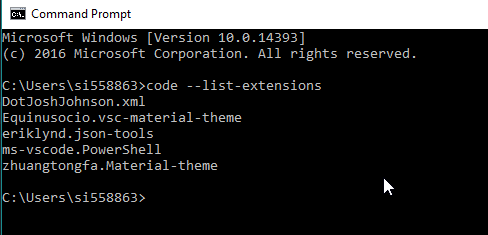
I would expect it still work same as for a VSCode installed from a VSCode installer as shown below

Steps to Reproduce:
c:\vscode.cd c:\vscodecode --list-extensionsfrom that command line consolecode --list-extensionsdoesn't work for VSCode installed by unzipping from a VSCode zip package.I would expect it still work same as for a VSCode installed from a VSCode installer as shown below
