I'm using Ninja build system to build a C project. I'm using the extension C/Cpp. When i build the project with the Build task, the extension shows the warnings and the errors int the problems panel, but the paths to the files are wrong: they point to upper directories in the file system tree.
Steps to Reproduce:
- Go to the ${workspaceRoot} directory of a C project. I'm actually workign on this
- Create the build directory with Meson:
meson build
- Configure the Build task as
        {
            "label": "Build",
            "type": "shell",
            "command": "ninja",
            "group": {
                "kind": "build",
                "isDefault": true
            },
            "options": {
                "cwd": "${workspaceRoot}/build"
            },
            "problemMatcher": [
                "$gcc"
            ]
        }
- Launch build task
- Look at the output: the warnings should point to files in the ${workspaceRoot} directory, but actually for me they point to some other locations. Example:
Console output with warnings
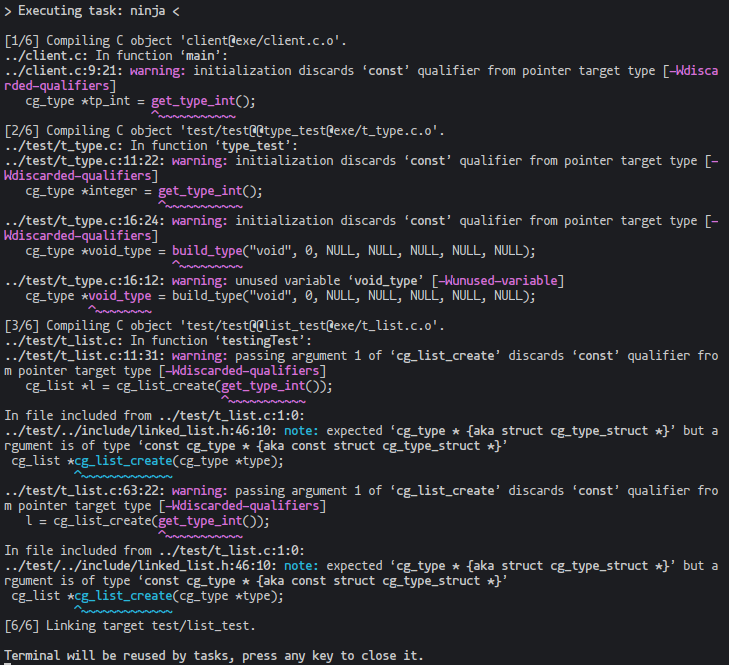
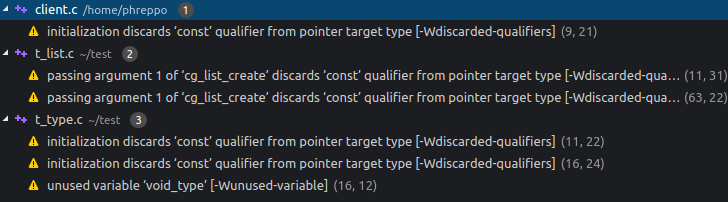
Problems panel(pointing to the wrong directory, because my project is located in /home/phreppo/CGen)
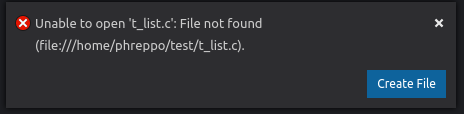
Dialog window that appears when I click on one warning. In this particular example the file that should be opened is /home/phreppo/CGen/test/t_list.c
Does this issue occur when all extensions are disabled?: No, but just because C/Cpp extension is needed to show problems.


I'm using Ninja build system to build a C project. I'm using the extension C/Cpp. When i build the project with the Build task, the extension shows the warnings and the errors int the problems panel, but the paths to the files are wrong: they point to upper directories in the file system tree.
Steps to Reproduce:
meson buildConsole output with warnings
Problems panel(pointing to the wrong directory, because my project is located in
/home/phreppo/CGen)Dialog window that appears when I click on one warning. In this particular example the file that should be opened is
/home/phreppo/CGen/test/t_list.cDoes this issue occur when all extensions are disabled?: No, but just because C/Cpp extension is needed to show problems.