Issue Type: Bug
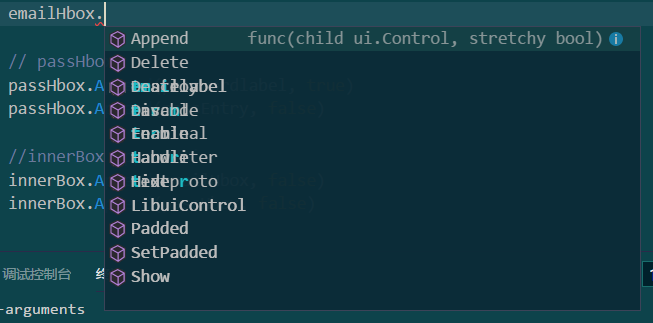
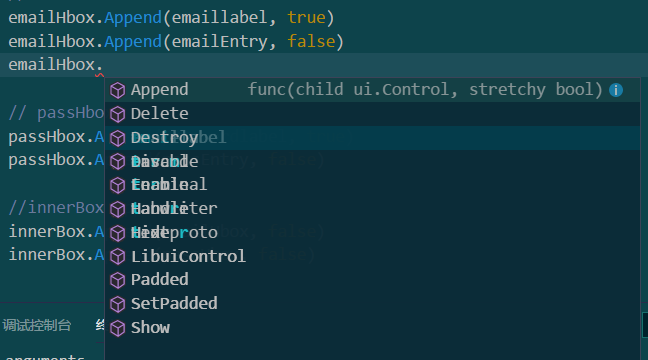
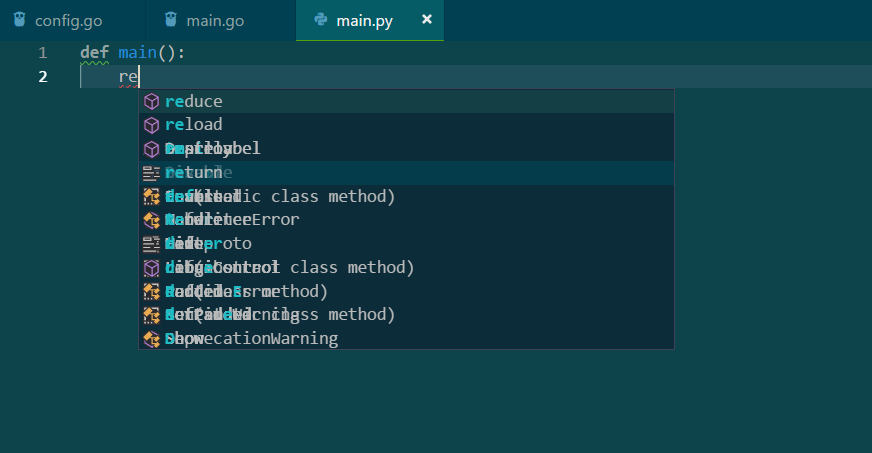
The editor's smart prompts overlap and cannot be displayed properly.
Same as the one shown in the screenshot below.But when i reload window or reopen the VS Code ,this situation will disappear.
VS Code version: Code - Insiders 1.26.0-insider (bd95324, 2018-07-06T05:17:37.386Z)
OS version: Windows_NT x64 10.0.17134
System Info
| Item |
Value |
| CPUs |
Intel(R) Core(TM) i5-8250U CPU @ 1.60GHz (8 x 1800) |
| GPU Status |
2d_canvas: enabled
flash_3d: enabled
flash_stage3d: enabled
flash_stage3d_baseline: enabled
gpu_compositing: enabled
multiple_raster_threads: enabled_on
native_gpu_memory_buffers: disabled_software
rasterization: disabled_software
video_decode: enabled
video_encode: enabled
vpx_decode: enabled
webgl: enabled
webgl2: enabled |
| Memory (System) |
3.88GB (1.26GB free) |
| Process Argv |
D:\Program Files\Microsoft VS Code Insiders\Code - Insiders.exe |
| Screen Reader |
no |
| VM |
0% |
Extensions (29)
| Extension |
Author (truncated) |
Version |
| ng-template |
Ang |
0.1.9 |
| dart-code |
Dar |
2.15.0 |
| flutter |
Dar |
2.15.0 |
| tslint |
eg2 |
1.0.33 |
| code-runner |
for |
0.9.3 |
| Kotlin |
mat |
1.6.0 |
| vscode-cosmosdb |
ms- |
0.8.0 |
| vscode-language-pack-zh-hans |
MS- |
1.25.3 |
| python |
ms- |
2018.6.0 |
| vscode-ai |
ms- |
0.1.9 |
| azure-account |
ms- |
0.4.1 |
| cpptools |
ms- |
0.17.6 |
| csharp |
ms- |
1.15.2 |
| Go |
ms- |
0.6.84 |
| js-atom-grammar |
ms- |
0.1.14 |
| jscs |
ms- |
0.1.9 |
| mono-debug |
ms- |
0.15.8 |
| PowerShell |
ms- |
1.7.0 |
| typescript-javascript-grammar |
ms- |
0.0.42 |
| vetur |
oct |
0.12.5 |
| java |
red |
0.28.0 |
| vscode-yaml |
red |
0.0.13 |
| rust |
rus |
0.4.6 |
| vscode-arduino |
vsc |
0.2.17 |
| vscode-java-debug |
vsc |
0.10.0 |
| vscode-java-pack |
vsc |
0.3.0 |
| vscode-java-test |
vsc |
0.7.0 |
| vscode-maven |
vsc |
0.9.0 |
| JavaScriptSnippets |
xab |
1.7.0 |
(1 theme extensions excluded)


Issue Type: Bug
The editor's smart prompts overlap and cannot be displayed properly.
Same as the one shown in the screenshot below.But when i reload window or reopen the VS Code ,this situation will disappear.
VS Code version: Code - Insiders 1.26.0-insider (bd95324, 2018-07-06T05:17:37.386Z)
OS version: Windows_NT x64 10.0.17134
System Info
flash_3d: enabled
flash_stage3d: enabled
flash_stage3d_baseline: enabled
gpu_compositing: enabled
multiple_raster_threads: enabled_on
native_gpu_memory_buffers: disabled_software
rasterization: disabled_software
video_decode: enabled
video_encode: enabled
vpx_decode: enabled
webgl: enabled
webgl2: enabled
Extensions (29)
(1 theme extensions excluded)