I was writing up my .htaccess for one of my sites and no matter what the code editor felt it needed to save it as a .txt This doesn't work for me I need it to save as a .htaccess if I open up nano editor in command line things work great however its sad that i can't edit these things on my computer and upload them properly to my server.
Here is a snipbit of what i was working on and got frustrated with..
<files ~ "^.*\.([Hh][Tt][Aa])">
order allow,deny
deny from all
satisfy all
</files>

<files wp-config.php>
order allow,deny
deny from all
</files>

Order deny,allow
   Deny from all
   <Files ~ ".(xml|css|jpe?g|png|gif|js)$">
   Allow from all
   </Files>

<IfModule mod_rewrite.c>
RewriteEngine On
RewriteBase /
RewriteRule ^wp-admin/includes/ - [F,L]
RewriteRule !^wp-includes/ - [S=3]
RewriteRule ^wp-includes/[^/]+\.php$ - [F,L]
RewriteRule ^wp-includes/js/tinymce/langs/.+\.php - [F,L]
RewriteRule ^wp-includes/theme-compat/ - [F,L]
</IfModule>

# disable directory browsing
Options All -Indexes

php_value upload_max_filesize 64M
php_value post_max_size 128M
php_value memory_limit 256M
php_value max_execution_time 300
php_value max_input_time 300

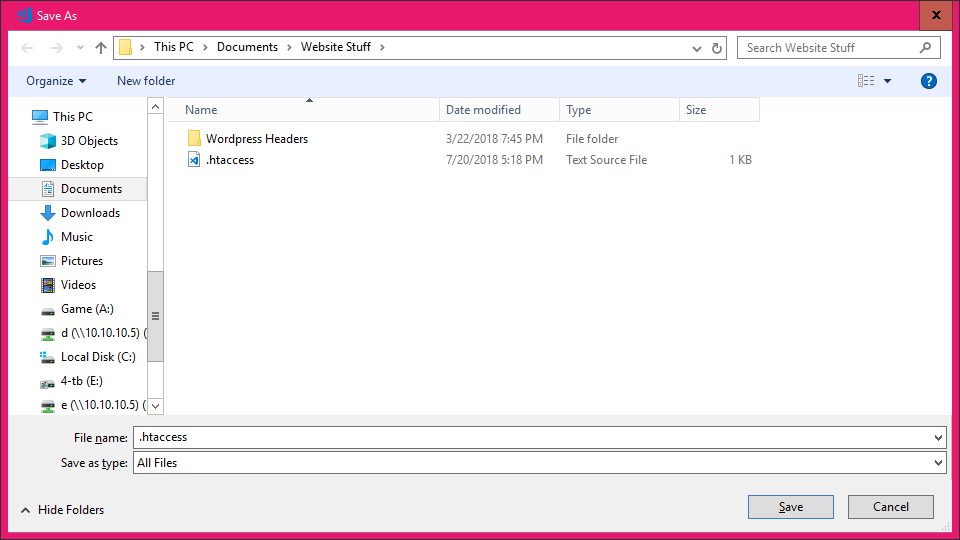
Wtf?? Why does it keep reverting back to a text file when i save it as all files?? This doesn't make sense?
I guess back to command line copy and paste inside of nano i go but this is retarded that the system can figure leave well enough alone with my files and force a .txt I am not sure if this is a Windows issue or the editors fault.
So why does the editor not allow me to save this as an .htaccess when forcing it


I was writing up my .htaccess for one of my sites and no matter what the code editor felt it needed to save it as a .txt This doesn't work for me I need it to save as a .htaccess if I open up nano editor in command line things work great however its sad that i can't edit these things on my computer and upload them properly to my server.
Here is a snipbit of what i was working on and got frustrated with..
Wtf?? Why does it keep reverting back to a text file when i save it as all files?? This doesn't make sense?
I guess back to command line copy and paste inside of nano i go but this is retarded that the system can figure leave well enough alone with my files and force a .txt I am not sure if this is a Windows issue or the editors fault.
So why does the editor not allow me to save this as an .htaccess when forcing it