Hi VSCode Team,
Problem#01:
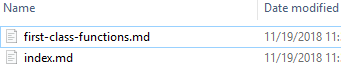
After upgrading to v1.29.1 files vscode icon which is associated with VSCode is not showing up in any icon view.
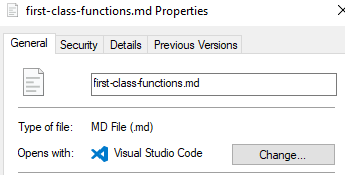
The default program in following file is set as VSCode and before upgrading to v1.29.1 vscode icon was showing there.
Default app setup:
Problem#02:
In the latest October 2018 release v1.29.1 a new feature added Files and folder icons in IntelliSense where in IntelliSense it show the icons associated with that file type. But when I try to import a css file the icon is not showing there and even the files that is resides in the css file folder not showing up in intellisense suggestion.

In the above in the folder where the foo.css resides there is other .css, .ts files but it is not showing when I called the "@import" command. Or, is there something I am missing?
For both above issue my vscode version is:

You can refer to my stream to reproduce the issue where I try to use the Files and folder icons in IntelliSense: https://www.twitch.tv/videos/347992950


Hi VSCode Team,
Problem#01:
After upgrading to v1.29.1 files vscode icon which is associated with VSCode is not showing up in any icon view.
The default program in following file is set as VSCode and before upgrading to v1.29.1 vscode icon was showing there.

Default app setup:

Problem#02:
In the latest October 2018 release v1.29.1 a new feature added Files and folder icons in IntelliSense where in IntelliSense it show the icons associated with that file type. But when I try to import a css file the icon is not showing there and even the files that is resides in the css file folder not showing up in intellisense suggestion.
In the above in the folder where the foo.css resides there is other .css, .ts files but it is not showing when I called the "@import" command. Or, is there something I am missing?
For both above issue my vscode version is:
You can refer to my stream to reproduce the issue where I try to use the Files and folder icons in IntelliSense: https://www.twitch.tv/videos/347992950