Find/replace in a single file is exceedingly difficult for newbs #65149


Description

Currently on MacOS and the November 2018 version of VSCode.
Background:
I come from Webstorm, which is an excellent IDE, but I sometimes work on an older Mac machine and Webstorm sucks up too much resources so I use VSCode. Webstorm has a very intuitive find/replace functionality for a single file - and when I try to do the same on VSCode it makes me want to suicide myself lol.
Here is a simple example of my problem:

So like I explain below the "files to include" / "files to exclude" functionality is a little wonky. I put a single file in the files to include (the absolute path to the file) and nothing in the files to exclude field, and yet VSCode still wants to replace text occurrences in 2 files not 1 file.
UI SUGGESTION:
Find all the files that have the text occurrence, list them, and have the user check/uncheck which files to have the replace run. Put the files that are currently open in the editor at the top of this list. Like this:
- /this/file/is/currently/opened/in/the/editor.ts
- /this/file/is/also/currently/opened/in/the/editor.ts
- /this/file/is/not/opened/but/has/a/matching/text/occurrence-a.ts
- /this/file/is/not/opened/but/has/a/matching/text/occurrence-b.ts
- /this/file/is/not/opened/but/has/a/matching/text/occurrence-c.ts
- /this/file/is/not/opened/but/has/a/matching/text/occurrence-d.ts
- /this/file/is/not/opened/but/has/a/matching/text/occurrence-e.ts
- /this/file/is/not/opened/but/has/a/matching/text/occurrence-f.ts
- /this/file/is/not/opened/but/has/a/matching/text/occurrence-g.ts
If you can do the above UI thing, you will have a better UI than Webstorm/Jetbrains, so that's a win.
MORE DETAILS
In order to replace a text occurrence in a single file, I have to use
ctrl+shift+F
and then I see this:
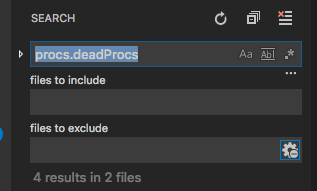
but I want to replace the text occurrence, not just search for it and I want to do it in a single file (the file that's currently open). So I click the caret on the left and it opens another textbox:
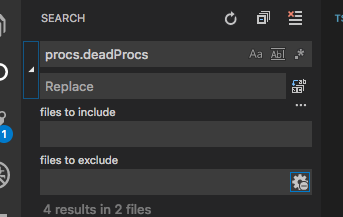
But the problem is that I want to find/replace only in a single file, not multiple files. The "files to include" and "files to exclude" is quite cumbersome.
here is the DANGER:
I have accidentally replaced all occurrences of a string of text in a project (100s of files) and it's really a nightmare, especially when you don't realize that it happened and you thought you were only doing the replacing in one file. That danger needs to be mitigated by an easy way to replace on the text occurrences in a specific file, and allow the user to tightly/easily control which file that is.
SUGGESTION:
-
a right click option - find/replace in the current file is such a common need (IMO), it should be a right-click option when you click in the file itself:
-
A right-click option would be ideal, but if not that, then at least ctrl+R or ctrl+shift+R should open a find/replace window and it should default to the current open file only. (The last file you clicked on or typed in).
UIs rock when they are excellent.