Issue Type: Bug
Found while testing #67298
Install Debugger for Chrome extension
Don't activate the extension
Uninstall the extension
See that the extension has been uninstalled since the install button is now active in the extension viewlet
View command palette - note that chrome extension commands are still visible:
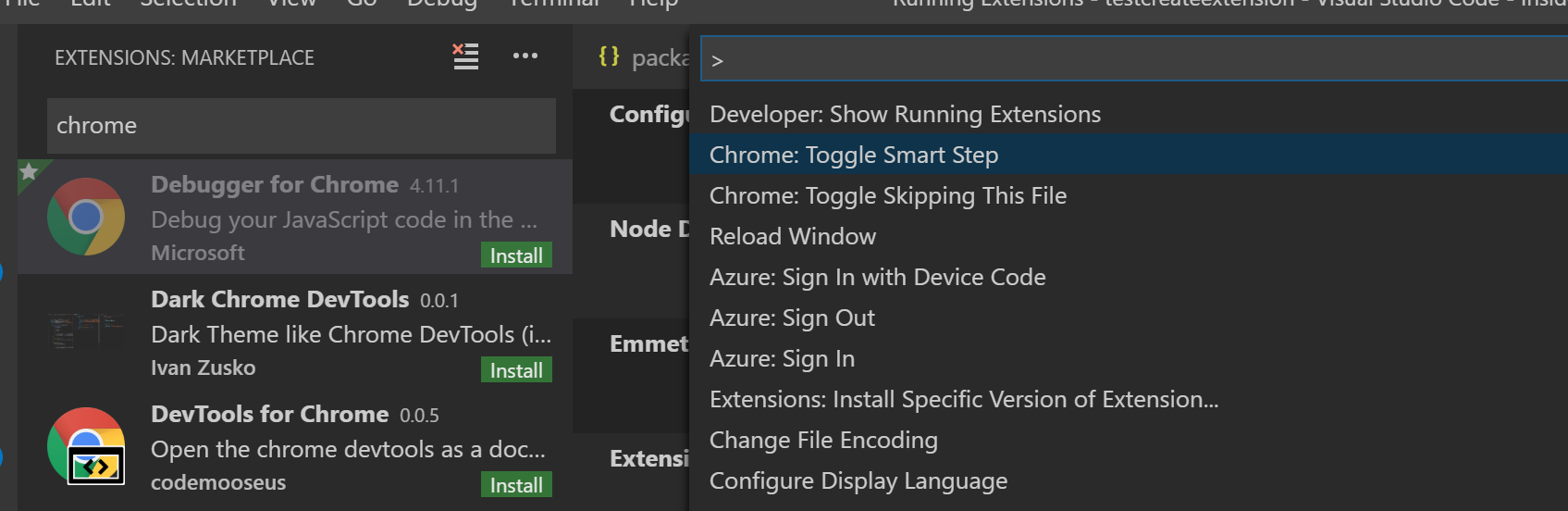
VS Code version: Code - Insiders 1.31.0-insider (acc7365, 2019-01-29T06:20:23.551Z)
OS version: Windows_NT x64 10.0.17763
System Info
| Item |
Value |
| CPUs |
Intel(R) Core(TM) i7-8650U CPU @ 1.90GHz (8 x 2112) |
| GPU Status |
2d_canvas: enabled
checker_imaging: disabled_off
flash_3d: enabled
flash_stage3d: enabled
flash_stage3d_baseline: enabled
gpu_compositing: enabled
multiple_raster_threads: enabled_on
native_gpu_memory_buffers: disabled_software
rasterization: enabled
surface_synchronization: enabled_on
video_decode: enabled
webgl: enabled
webgl2: enabled |
| Memory (System) |
15.93GB (3.88GB free) |
| Process Argv |
|
| Screen Reader |
no |
| VM |
0% |
Extensions (5)
| Extension |
Author (truncated) |
Version |
| tslint |
eg2 |
1.0.27 |
| python |
ms- |
2018.8.0 |
| azure-account |
ms- |
0.8.0 |
| debugger-for-chrome |
msj |
4.11.1 |
| test-search-rg |
rob |
0.0.3 |


Issue Type: Bug
Found while testing #67298
Install Debugger for Chrome extension
Don't activate the extension
Uninstall the extension
See that the extension has been uninstalled since the install button is now active in the extension viewlet
View command palette - note that chrome extension commands are still visible:
VS Code version: Code - Insiders 1.31.0-insider (acc7365, 2019-01-29T06:20:23.551Z)
OS version: Windows_NT x64 10.0.17763
System Info
checker_imaging: disabled_off
flash_3d: enabled
flash_stage3d: enabled
flash_stage3d_baseline: enabled
gpu_compositing: enabled
multiple_raster_threads: enabled_on
native_gpu_memory_buffers: disabled_software
rasterization: enabled
surface_synchronization: enabled_on
video_decode: enabled
webgl: enabled
webgl2: enabled
Extensions (5)