There are times when I would like the editor to ALWAYS be on top of other widows, such as when I am writing JavaScript code for the browser and I am limited on screen space, I would sometimes like to have vscode on top of my browser even when the browser has focus.
I have a Windows 10 extension to do this when I right click on a Windows window, an option shows to keep the window on top (This is also built into Ubuntu):

This works for most windows, but when using the "window.titleBarStyle": "custom" option in vscode that Always on top doesn't exist any more as seen here:
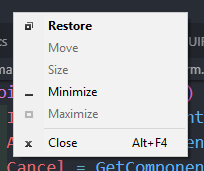
I see that Electron has an option for this, but it isn't utilized in vscode
https://github.com/Microsoft/vscode/blob/master/src/vs/code/electron-main/window.ts#L127
new BrowserWindow({ alwaysOnTop: true })It would be helpful (at least for me) if either:
A. Additional window options were added to the title bar.
B. There was a command that toggled forcing the window to stay on top.

There are times when I would like the editor to ALWAYS be on top of other widows, such as when I am writing JavaScript code for the browser and I am limited on screen space, I would sometimes like to have vscode on top of my browser even when the browser has focus.
I have a Windows 10 extension to do this when I right click on a Windows window, an option shows to keep the window on top (This is also built into Ubuntu):
This works for most windows, but when using the
"window.titleBarStyle": "custom"option in vscode thatAlways on topdoesn't exist any more as seen here:I see that Electron has an option for this, but it isn't utilized in vscode
https://github.com/Microsoft/vscode/blob/master/src/vs/code/electron-main/window.ts#L127
It would be helpful (at least for me) if either:
A. Additional window options were added to the title bar.
B. There was a command that toggled forcing the window to stay on top.