Issue Type: Bug
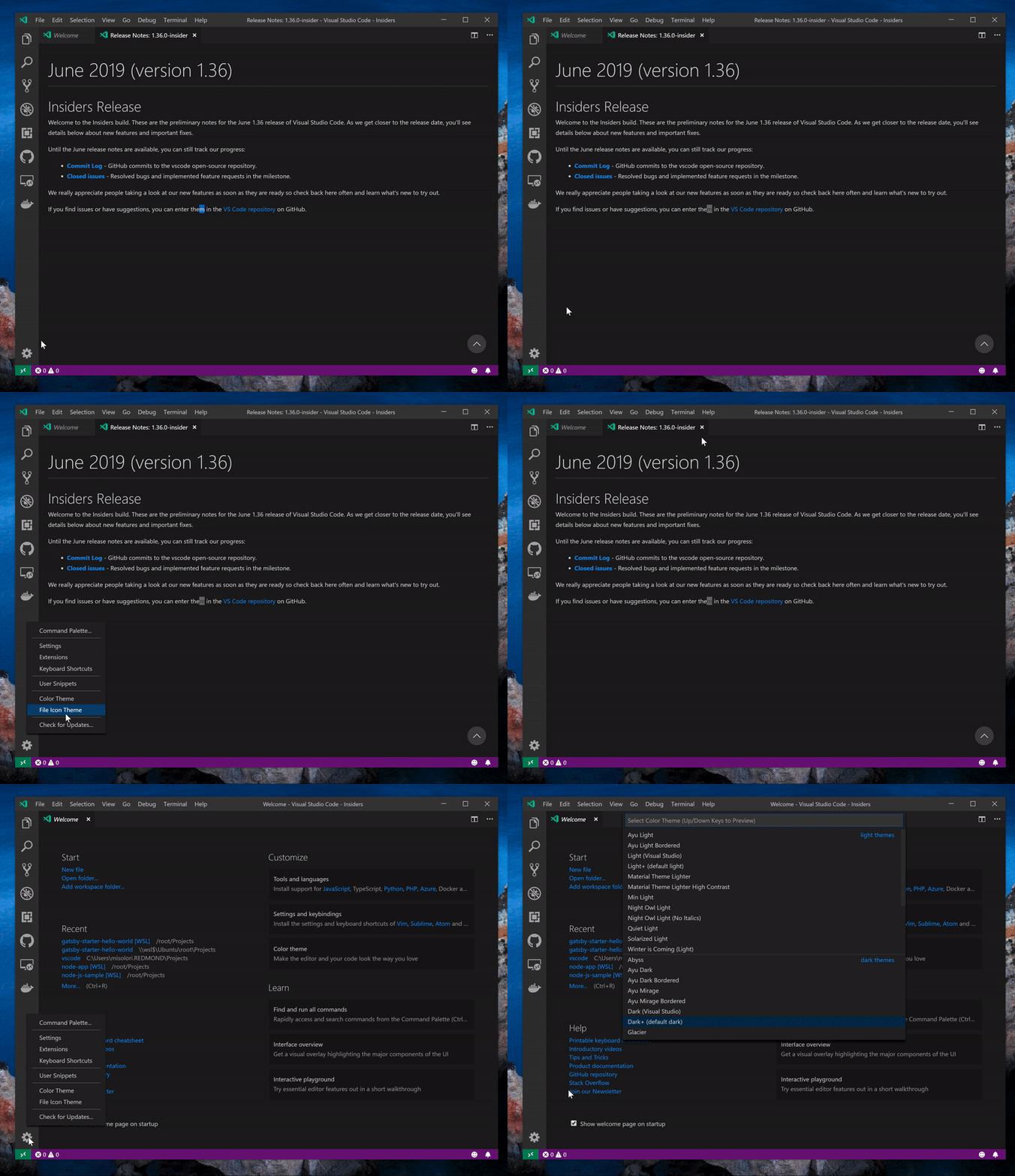
When I have the release notes open I can't seem to open the any quick pick item (Command palette, color theme, file icons) as it is immediately closed. You can't see it in the GIF because it is sped up but it briefly flashes. This only repros on Windows and on release notes (doesn't happen on Welcome/Interactive playground pages).
Repro Steps:
- Open Insiders
- Open Release Notes (if not open)
- Open any quick pick via the Settings gear (command palette, color/file icon theme)
- 🐛 Quick pick does not open
cc @chrmarti @mattbierner unsure if this is related specifically to webviews
VS Code version: Code - Insiders 1.36.0-insider (c089daa, 2019-06-07T05:19:15.188Z)
OS version: Windows_NT x64 10.0.18362
System Info
| Item |
Value |
| CPUs |
Intel(R) Core(TM) i7-7920HQ CPU @ 3.10GHz (4 x 3096) |
| GPU Status |
2d_canvas: enabled
flash_3d: enabled
flash_stage3d: enabled
flash_stage3d_baseline: enabled
gpu_compositing: enabled
multiple_raster_threads: enabled_on
native_gpu_memory_buffers: disabled_software
oop_rasterization: unavailable_off
protected_video_decode: unavailable_off
rasterization: unavailable_off
skia_deferred_display_list: disabled_off
skia_renderer: disabled_off
surface_synchronization: enabled_on
video_decode: enabled
viz_display_compositor: disabled_off
webgl: enabled
webgl2: enabled |
| Load (avg) |
undefined |
| Memory (System) |
3.98GB (0.72GB free) |
| Process Argv |
|
| Screen Reader |
no |
| VM |
67% |
Extensions: none


Issue Type: Bug
When I have the release notes open I can't seem to open the any quick pick item (Command palette, color theme, file icons) as it is immediately closed. You can't see it in the GIF because it is sped up but it briefly flashes. This only repros on Windows and on release notes (doesn't happen on Welcome/Interactive playground pages).
Repro Steps:
cc @chrmarti @mattbierner unsure if this is related specifically to webviews
VS Code version: Code - Insiders 1.36.0-insider (c089daa, 2019-06-07T05:19:15.188Z)
OS version: Windows_NT x64 10.0.18362
System Info
flash_3d: enabled
flash_stage3d: enabled
flash_stage3d_baseline: enabled
gpu_compositing: enabled
multiple_raster_threads: enabled_on
native_gpu_memory_buffers: disabled_software
oop_rasterization: unavailable_off
protected_video_decode: unavailable_off
rasterization: unavailable_off
skia_deferred_display_list: disabled_off
skia_renderer: disabled_off
surface_synchronization: enabled_on
video_decode: enabled
viz_display_compositor: disabled_off
webgl: enabled
webgl2: enabled