Currently, it's very difficult to develop / debug complex types and there seems to be no official tool for prototyping, or not one the community is aware of.
Copy pasted from StackOverflow
https://stackoverflow.com/questions/58500139/tool-for-prototyping-typescript-types-faster
Is there an online tool, IDE or VSCode settings option/extension that allows to prototype type definitions (easier/faster)?
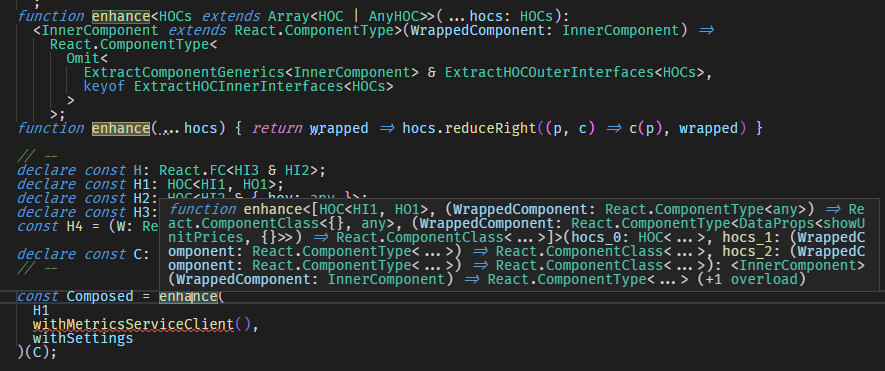
The only option I am aware of is to hover over a typed statement which displays the associated type in a tooltip. It's very impractical to use as the types are trimmed and non-interactive, i.e. I cannot hover over a type sub-component to see the trimmed part. Also it's impossible to say which sub-type failed as it's not highlighted.
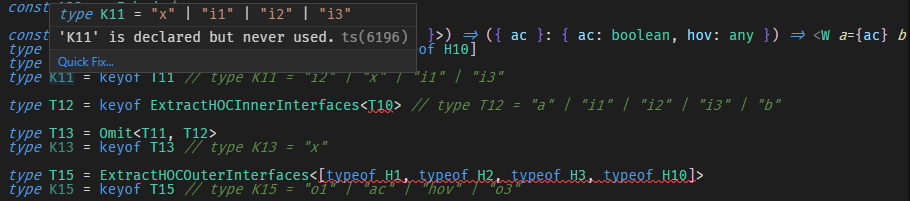
If I need to step through a complex type to discover the error, I have to deconstruct it like below and then keep hovering over each statement, which is very inconvenient. Maybe if only the IDE could generate those "result comments" automatically, that would make life easier.


Currently, it's very difficult to develop / debug complex types and there seems to be no official tool for prototyping, or not one the community is aware of.
Copy pasted from StackOverflow
https://stackoverflow.com/questions/58500139/tool-for-prototyping-typescript-types-faster
Is there an online tool, IDE or VSCode settings option/extension that allows to prototype type definitions (easier/faster)?
The only option I am aware of is to hover over a typed statement which displays the associated type in a tooltip. It's very impractical to use as the types are trimmed and non-interactive, i.e. I cannot hover over a type sub-component to see the trimmed part. Also it's impossible to say which sub-type failed as it's not highlighted.

If I need to step through a complex type to discover the error, I have to deconstruct it like below and then keep hovering over each statement, which is very inconvenient. Maybe if only the IDE could generate those "result comments" automatically, that would make life easier.
