Every time I open a workspace and open a JS/TS file I get this prompt (that I subsequently have to deal with):
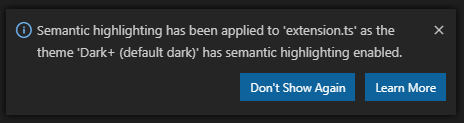
I don't know why I'm being told this (how many people know what semantic highlighting even is?) but now I have to click on Learn More or take an action, even though the message is telling me semantic highlighting is turned on because the theme has it enabled, which I had nothing to do with as a user.
Even after reading the release notes, I still wonder "why are you telling me this?". It seems like a good thing. And, it is sort of a weird message ... It is like walking into a room and Alexa announcing "The light is on because the light switch is on".


Every time I open a workspace and open a JS/TS file I get this prompt (that I subsequently have to deal with):
I don't know why I'm being told this (how many people know what semantic highlighting even is?) but now I have to click on
Learn Moreor take an action, even though the message is telling me semantic highlighting is turned on because the theme has it enabled, which I had nothing to do with as a user.Even after reading the release notes, I still wonder "why are you telling me this?". It seems like a good thing. And, it is sort of a weird message ... It is like walking into a room and Alexa announcing "The light is on because the light switch is on".