Issue Type: Bug
- Press Ctrl+Shift+F
- Press every button on the search to try to close it.
- Press Ctrl+Shift+F again to try to close it.
- Realize you can't intuitively close it without switching to another left bar menu.
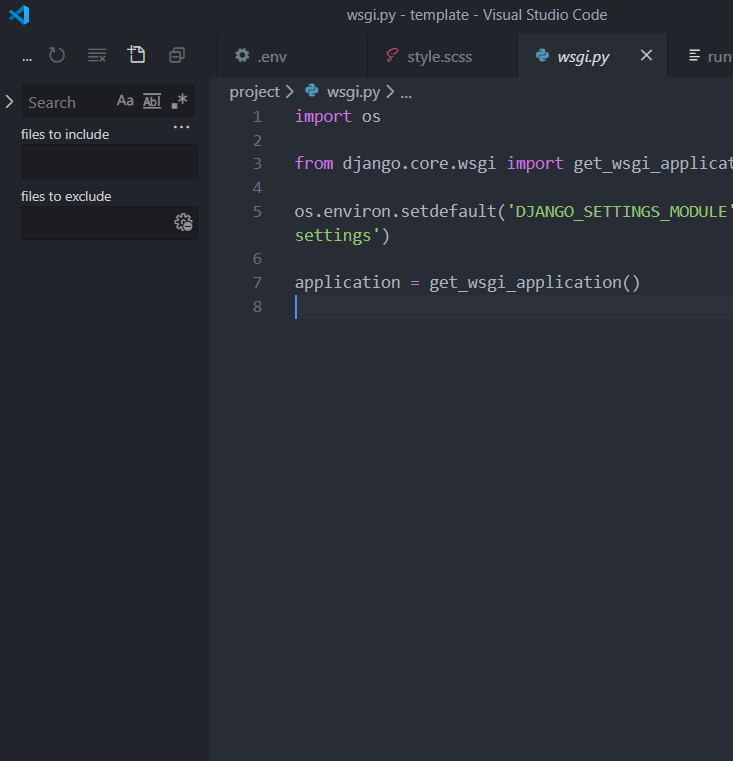
VS Code version: Code 1.44.2 (ff91584, 2020-04-16T16:36:23.138Z)
OS version: Windows_NT x64 10.0.17763
System Info
| Item |
Value |
| CPUs |
Intel(R) Core(TM) i7-7500U CPU @ 2.70GHz (4 x 2904) |
| GPU Status |
2d_canvas: enabled
flash_3d: enabled
flash_stage3d: enabled
flash_stage3d_baseline: enabled
gpu_compositing: enabled
multiple_raster_threads: enabled_on
oop_rasterization: disabled_off
protected_video_decode: enabled
rasterization: enabled
skia_renderer: disabled_off_ok
video_decode: enabled
viz_display_compositor: enabled_on
viz_hit_test_surface_layer: disabled_off_ok
webgl: enabled
webgl2: enabled |
| Load (avg) |
undefined |
| Memory (System) |
7.88GB (2.29GB free) |
| Process Argv |
C:\Users\zackp\Desktop\template |
| Screen Reader |
no |
| VM |
0% |
Extensions (8)
| Extension |
Author (truncated) |
Version |
| vscode-django |
bat |
0.20.0 |
| python-extension-pack |
don |
1.6.0 |
| auto-rename-tag |
for |
0.1.2 |
| day-night-theme-switcher |
fre |
0.1.2 |
| MagicPython |
mag |
1.1.0 |
| python |
ms- |
2020.4.76186 |
| LiveServer |
rit |
5.6.1 |
| vscodeintellicode |
Vis |
1.2.6 |
(1 theme extensions excluded)


Issue Type: Bug
VS Code version: Code 1.44.2 (ff91584, 2020-04-16T16:36:23.138Z)
OS version: Windows_NT x64 10.0.17763
System Info
flash_3d: enabled
flash_stage3d: enabled
flash_stage3d_baseline: enabled
gpu_compositing: enabled
multiple_raster_threads: enabled_on
oop_rasterization: disabled_off
protected_video_decode: enabled
rasterization: enabled
skia_renderer: disabled_off_ok
video_decode: enabled
viz_display_compositor: enabled_on
viz_hit_test_surface_layer: disabled_off_ok
webgl: enabled
webgl2: enabled
Extensions (8)
(1 theme extensions excluded)