Issue Type: Bug
- In source control (git) click on a python changed file
- It will display the side by side view with the previous revision on the left and the latest on the right but its not the view in which you can stage/unstage and in which the 2 sides are in sync when you scroll. On the right you can edit the file and work as if you were on a normal view.
Some test I just did: use the settings sync extension and load it on vs code insiders that I just installed, and the issue appeared there too.
I also tried to disable all extensions but that did not fix it.
Working diff view:

And for python file:
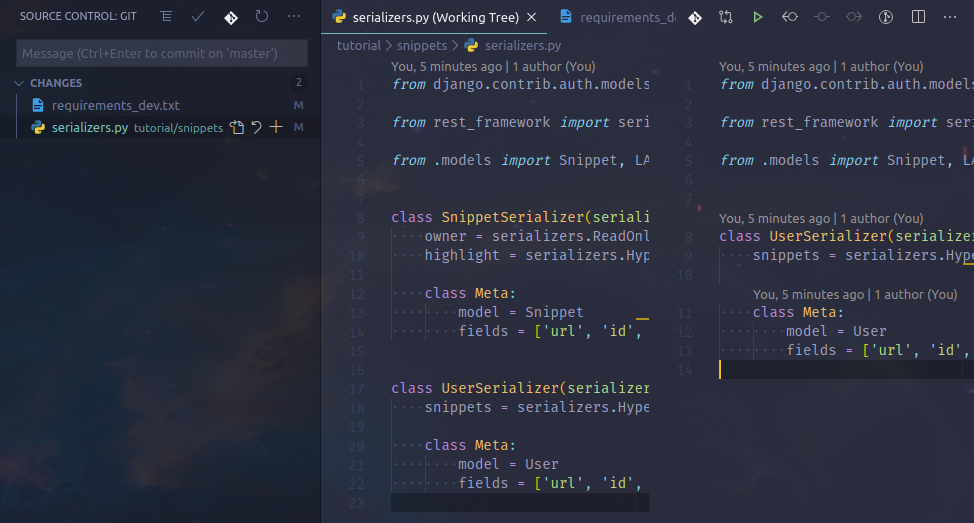
VS Code version: Code 1.45.1 (5763d90, 2020-05-14T08:27:22.494Z)
OS version: Linux x64 5.3.0-53-generic
Edit:
It was due to these settings:
    "workbench.editorAssociations": [
        {
            "viewType": "default",
            "filenamePattern": "*.py"
        }
    ],
Issue can be closed


Issue Type: Bug
Some test I just did: use the settings sync extension and load it on vs code insiders that I just installed, and the issue appeared there too.
I also tried to disable all extensions but that did not fix it.
Working diff view:

And for python file:

VS Code version: Code 1.45.1 (5763d90, 2020-05-14T08:27:22.494Z)
OS version: Linux x64 5.3.0-53-generic
Edit:
It was due to these settings:
Issue can be closed