DebugConfiguration.noDebug is sticky #99576


Description

Version: 1.46.0-insider
Commit: b1ef2bf
Date: 2020-06-05T12:27:56.662Z (2 days ago)
Electron: 7.3.1
Chrome: 78.0.3904.130
Node.js: 12.8.1
V8: 7.8.279.23-electron.0
OS: Darwin x64 18.7.0
Running "Run > Start Debugging" after running "Run > Start Without Debugging" does not start debugging. Close inspection revealed that noDebug of the DebugConfiguration passed to DebugConfigurationProvider's resolveDebugConfiguration remains true.
Steps to Reproduce:
-
Clone the vscode debug adapter sample
git clone https://github.com/microsoft/vscode-mock-debug -
Build the mock extension
npm install. -
Create a breakpoint at
extension.ts:105 -
Launch the extension (F5)
-
Open a
readme.mdin the extension development host. -
"Run > Start Without Debugging" (Ctrl+F5) from the extension development host, and select
Mock Debug. -
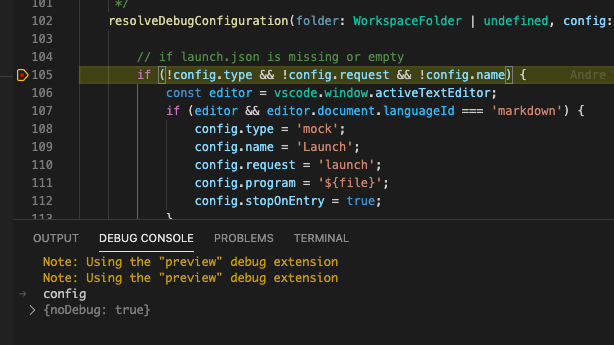
See the breakpoint hit, and evaluate
config.
-
Go back to the extension development host, and stop the task.
-
"Run > Start Debugging" (F5) from the extension development host this time, and select
Mock Debug. -
See the breakpoint hit, and evaluate 'config'.
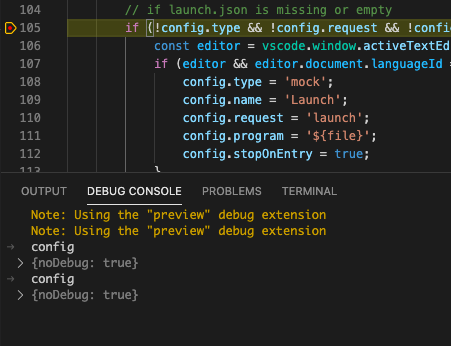
You can see noDebug (the second row) is set true even though it's requested to debug.
Actually, I see that if I start with F5 first, and try Ctrl+F5 later, the second run receives DebugConfiguration without noDebug property. So, it seems like the value chosen in the very first run remains unchanged in the subsequent task runs.