- VSCode Version: 1.35.1
- OS Version: macOS latest
Steps to Reproduce:
- Use the high contrast theme
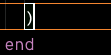
- Wish yourself luck trying to figure out where the cursor actually is
- Cry a little
When using the high-contrast theme, one cannot easily determine where the cursor actually is because the box around certain stuff obscures it, and a bolded left, or right side hardly points to where the cursor actually is because the old portions weight is not enough to easily determine in a sub-second like outside of high contrast themes (actually if we were highly technical the same applies to non-high contrast as well because the cursor is often too thin)


Steps to Reproduce:
When using the high-contrast theme, one cannot easily determine where the cursor actually is because the box around certain stuff obscures it, and a bolded left, or right side hardly points to where the cursor actually is because the old portions weight is not enough to easily determine in a sub-second like outside of high contrast themes (actually if we were highly technical the same applies to non-high contrast as well because the cursor is often too thin)