UI for new gps_graphic filter + small updates to gps_text#1306
UI for new gps_graphic filter + small updates to gps_text#1306bmatherly merged 6 commits intomltframework:masterfrom
Conversation


|
I was not able to get any text to appear with my test gpx file. Do you have an example file that I can use (and maybe some instructions of how to use it)? |

 bmatherly
left a comment
bmatherly
left a comment
bmatherly
left a comment
There was a problem hiding this comment.
I might be able to provide more feedback if I can get the filter to draw something on my video. Please provide an example file if you have one.
| text: '0' | ||
| horizontalAlignment: TextInput.AlignRight | ||
| validator: IntValidator {bottom: 0; top: 59;} | ||
| implicitWidth: 20 |
There was a problem hiding this comment.
These TextFields are not wide enough for double digits on my screen and the number get cut off.

In general, I find it cumbersome to edit these fields. I think we had this discussion in the last review. No need to rehash it unless you have some new ideas.
There was a problem hiding this comment.
I think it's a scaling thing, on my screen I can fit easily 2 digits (this was my intention):

I just use the mouse wheel to edit them.
I don't know what other design choice to make for better usage, the clasic ddd:hh:mm:ss would be a step down in my opinion.
It's already pretty long, but should I increase the width by 50% for each one?
There was a problem hiding this comment.
I think removing the text allows me to increase width by 50% to 30px and still look decent:

There was a problem hiding this comment.
I think you could use fontMetrics.advanceWidth("XX") + 5 to have a solution that responds to font size changes.
https://doc.qt.io/qt-6/qml-qtquick-fontmetrics.html#advanceWidth-method
There was a problem hiding this comment.
I''m not sure why but fontmetrics returns less than I expected, 6px per char. This image is how it looks for me with 2x what it returns. I'd rather go with a fixed 30, what do you think? 2.5x could also get 30 but I don't know what it returns on other PCs, might look ridiculous.

Maybe I'm using it wrong? I added a :
    FontMetrics {
        id: fontMetrics
        font.family: "Arial"
    }
Into the root UI element then used it directly as:
implicitWidth: fontMetrics.advanceWidth("99")*2
There was a problem hiding this comment.
I do have validators for all the fields but for some reason they don't revert back invalid values. I can see the invalid value doesn't go through (mouse up/down reverts to the previously valid value). I wonder if there's some text(string) vs int interaction I'm not aware of.
validator: IntValidator {bottom: 0; top: 59;}
For the days I'm not sure what to do, I expect this field to be 0 for most "real" use cases but I can see 2 sort of common exceptions:
-date of the device gets reset to something "default" like 1st of january which would add some hundreds of years, or even 1xxx
-video (or image) has no date so it's read as epoch 0 which adds... 19.000+ days
I would personally consider both of these cases exceptions and not fully support them (visually I mean) because 5 digits wastes a lot of space for a corner case. I say a decent middle ground is 40px for days to make it slightly different from the others and induce the idea of "this field is different". I really don't want to add months/years, functionally they would serve no real purpose.
There was a problem hiding this comment.
I wonder if there's some text(string) vs int interaction I'm not aware of.
I found this helpful idea: https://stackoverflow.com/a/59113560/4355458
This worked for me:
                onTextChanged:
                {
                    if(!acceptableInput)
                        offset_hours.undo()
                }
But your hours validator is actually wrong. The top should be 23, not 59.
I would personally consider both of these cases exceptions and not fully support them
I think you are underestimating our users creativity. Users will add the filters to tracks, color/transparent clips, pictures that they have downloaded off the internet, etc. Putting the filter on another track is particularly helpful because it allow them to apply other affects to the text or graph without applying the effect to the video. They are going to expect all these scenarios to work. Let's just do 4 digits for the days. That should get us pretty far and hopefully avoid bug reports.
I would also encourage you to test some other use cases that are not the specific use case that you have in mind. I notice that when I apply the filter to a track, the filter starts from the beginning with each clip that it encounters on the track. This will be unexpected by users. But I do not know if we have to fix that as part of this PR. But, minimally, the filter should work well on a transparent clip on another track.
Another idea I have to help with the time calculation (not required for this PR):
We could add a status section that shows the detected start time of the clip and the gps file. That would allow the user to see what the expected offset is between the items. Something to think about.
There was a problem hiding this comment.
I found this helpful idea: https://stackoverflow.com/a/59113560/4355458
But your hours validator is actually wrong. The top should be 23, not 59.
Good catch & find.
Let's just do 4 digits for the days
Ok, works for me.
Putting the filter on another track is particularly helpful because it allow them to apply other affects to the text or graph without applying the effect to the video.
This will require tweaks from their part as it's not how the filter can work: it needs to "sync" to something that will provide a time back to it (which is normally the "current" clip underneath) so this is not directly supported simply because of how the entire filter works. I did encounter a case myself when I wanted to do this and I had to visually re-sync the gps (as it was now starting at epoch 0). I don't see another way around this except maybe making a dummy copy of the real clip and making the clip copy transparent somehow.
I notice that when I apply the filter to a track, the filter starts from the beginning with each clip that it encounters on the track.
This is actually intentional (unless I misunderstood your case) and I think the correct way to it. In your case the filter starts from the begining because you're reusing the same image/clip which means it will re-sync to that previous "location".
But think of this scenario: you do a travel vlog in Paris and you add a map showing the current location. Every time you show this one clip near the eiffel tower you definitely want the map to show the same real location near the eiffel tower.
The previous gps_text filter actually messed this up when applied to the timeline by adding the current timeline time to the actual clip time ( mlt_frame_original_position() vs mlt_frame_get_position() ) so the same clip shown at minute 0 and then again at minute 10 would show different values (and I actually thought I had a major bug because locally it was perfectly synced but it somehow drifted when showing another clip, so for a short <1min export this was almost invisible, but for a 30min video it was quite absurd - but only if applied to the timeline, directly on clip was fine).
I'm going to wait for user feedback on variations for this one as I assume people will have specific use cases that I can't even imagine right now and will decide what to support on a case by case/popularity basis.
We could add a status section that shows the detected start time of the clip and the gps file
Hmm, I actually removed this even from the original gps_text (I left it as a hidden feature when hovering over the chosen .gpx file (see attached img)), I found out in practice that I never ever used it and even when I had a sync issue it was more confusing than just trying to find a "stop" in the video and sync it to a 0km/h speed in gps. It's actually more confusing than it looks because of timezones and the fact that most clocks drift if not connected to the internet.
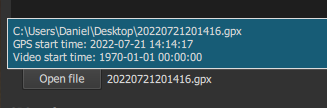
vs
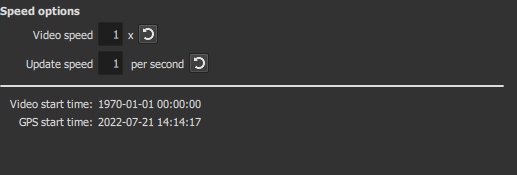
If you think it's useful enough I can add it back from diff. I kind of think the even longer UI might scare people and it looks better without.
There was a problem hiding this comment.
I'm going to wait for user feedback on variations for this one as I assume people will have specific use cases that I can't even imagine right now and will decide what to support on a case by case/popularity basis.
I think that is a good approach
If you think it's useful enough I can add it back from diff. I kind of think the even longer UI might scare people and it looks better without.
I think it is probably useful because it will help the user to understand why their offset is 150 days or whatever might look strange to them. But let's tackle that in another PR.
Thanks for your continued discussion and consideration in this PR. Let's fix the validation, clean up the nitpicks and get this one merged. I hope you will continue to make improvements in future PRs.
There was a problem hiding this comment.
I think it is probably useful because it will help the user to understand why their offset is 150 days or whatever might look strange to them. But let's tackle that in another PR.
All the data is already there so this is just a matter of restoring the old lines. I've added them back quickly.
Thanks for your continued discussion and consideration in this PR. Let's fix the validation, clean up the nitpicks and get this one merged. I hope you will continue to make improvements in future PRs.
No problem, and sure, I'll hopefully have at least one update with the planned stuff and maybe other user suggestions.
Here is a very short random GPS track. I don't think there's any instructions to give, if I load the file in the filter I can already see the map drawn (but it's 1px thick and white, because of the default style, the "future" is thin). Go with the "2D map: full map progress line" preset and then change color style to "One color" and increase thickness to 10 to make sure you see the map over the video. I have a black color as a background and can see it immediately. Oh this was for the graphics one, I missed that you meant text, same instructions but make sure you click on the first button near the sync textfields: |

|
bmatherly
left a comment
bmatherly
left a comment
There was a problem hiding this comment.
I think we are very close. We are down to nitpicks now. Thanks for tolerating my comments. Regarding the unused code (commented out), maybe you have intentions to add more features later. Can you stash those in another branch somewhere? The reason I prefer to remove unused code is because I end up being the one to maintain all these filters as bugs are found or the underlying framework needs to change. Unused code makes the maintenance more time consuming for me.
+add the gps+file date area

2 participants


For gps_text (v2):
-removed the timezone parameter (now it's calculated via javascript directly)
-combined more stuff in getControls (renamed from gps_setControls)
-fixed dark/light icons
-moved video_speed location to the top, I think it makes sense to group it there
-added support for tracks passing the 180 meridian (but still not 100% if it passes both 0 and 180)
For gps_graphic:
-New filter, quite complex, the ui got quite big (again lol, I'm a big fan of having all the options) but I'm open to suggestions.
-there are a lot of preset params so I did a weird thing with them (sorry Brian, I know I said I'd follow other filter patterns) - I do think it improves readability a lot and it's not unnecessarily complex