Adapters
Adapters enable you to use the MobFox SDK inside other ad networks SDK's that you are using. This way you can display MobFox ads in addition to ads from other host networks.
- Install the MobFox Android SDK Core.
- Install the MoPub Android SDK.
- Download the MobFox-Android-MoPub-Adapter.jar and Place it in your application's libs folder (next to your src folder).
- Add MobFox-Android-MoPub-Adapter.jar as a dependency in your gradle.build file.
- See the docs in MoPub for creating and integrating Banner / Interstitial ads.
- Create a MobFox publication.
- See the docs in MoPub for implementing custom networks on the MoPub ads previously created.
- For banner ads use this CUSTOM EVENT CLASS
com.mobfox.sdk.adapters.MoPubBannerAdapterand in CUSTOM EVENT CLASS DATA input:{"invh":"<your-publication-hash>"}Use your required MobFox's publication hash. - For interstitial (fullscreen) ads use this CUSTOM EVENT CLASS
com.mobfox.sdk.adapters.MoPubInterstitialAdapterand in CUSTOM EVENT CLASS DATA input:{"invh":"<your-publication-hash>"}Use your required MobFox's publication hash.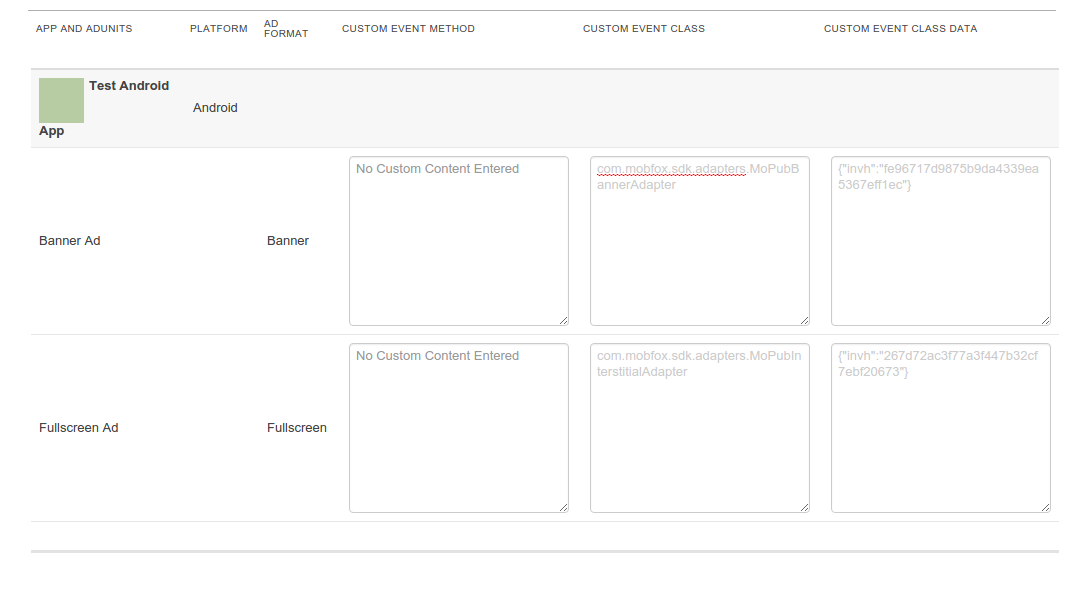
- Now, when calling your MoPub ads, you should get the respective MobFox ads.
#AdMob
- Install the MobFox Android SDK Core.
- Install the AdMob Android SDK.
- Place the MobFox-Android-AdMob-Adapter.jar in your application's libs folder (next to your src folder) and add it as a dependency in your gradle.build file.
- Declare AdMobInterstitialActivity in your application AndroidManifest.xml file. AndroidManifest.xml:
...

<activity android:name="com.mobfox.sdk.adapters.AdMobInterstitialActivity"
    android:label="@string/app_name">
</activity>

...- In your AdMob control panel:
- Click the
Monetizetab. - Under
All Appsselect your app. - On the relevant
Ad Unit, click thead sourceslink. - Click the
+ New ad networkbutton. -
Do not select the MobFox network from the list but rather click the
+ Custom eventbutton. - In the form fill:
-
Class Name-GADMAdapterMobFoxorGADInterstitialAdapterMobFoxfor interstitial -
Label-MobFox -
Parameter- your MobFox publication hash
-
More AdMob custom event documentation can be found here: (https://developers.google.com/admob/android/custom-events).
- Integrate the AdMob Banner or Interstitial you created previously and load it - you should get an ad from the referred MobFox publication.