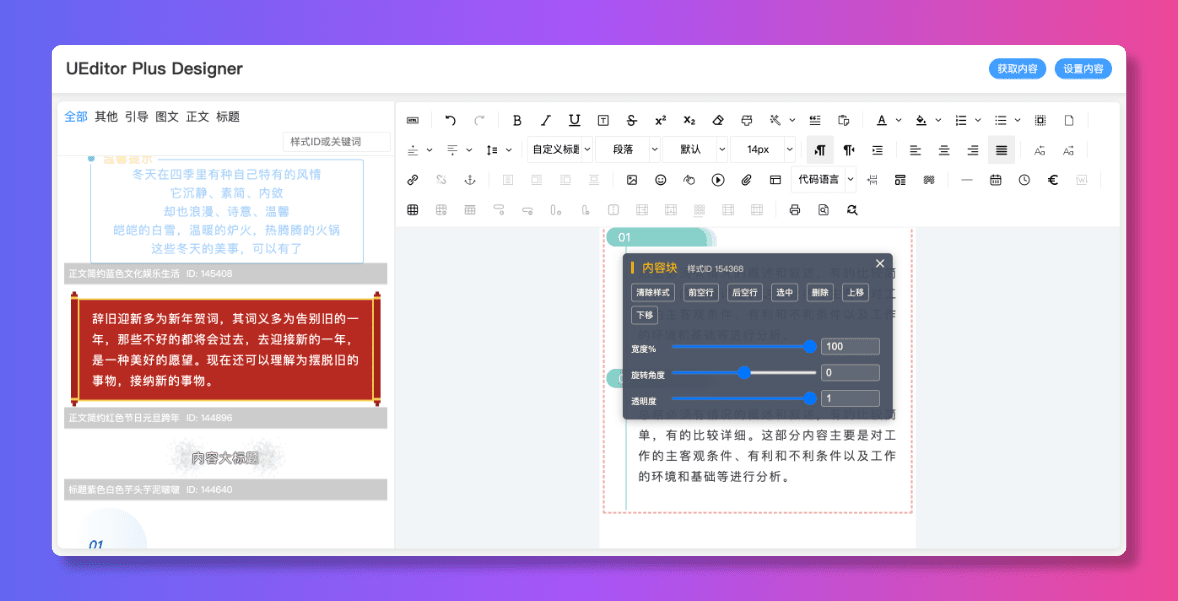
🎨 可视化排版编辑器 - 基于 UEditor Plus 的可视化内容设计工具





压缩版免费使用 | 源码访问需授权 | 商业使用需授权
- ✅ 压缩版(编译后版本):免费用于个人学习和非商业项目
- ❌ 源码访问:查看、修改或分发源代码需要授权
- ❌ 商业使用:生产环境部署、商业产品或盈利性项目需要授权
📮 授权联系: 授权
详细条款请查看 LICENSE 文件。
- 🎨 可视化设计 - 所见即所得的拖拽式编辑体验,轻松创建精美内容布局
- 🧩 模块化设计 - 基于 Section(区块)的内容组织方式,支持自由插入和编辑
- 🔧 高度可定制 - 支持自定义样式加载器和分类加载器,适配各种业务场景
- 📱 响应式布局 - 自动适配不同屏幕尺寸,完美支持移动端和桌面端
- ⚡ 高性能 - 基于 Vue 3 和 TypeScript 构建,提供出色的开发体验和运行性能
- 🔌 多框架支持 - 原生支持 Vue 3,同时提供 React 版本和纯 HTML/JS 使用方式
- 🎯 TypeScript - 完整的类型定义支持,提升开发效率和代码质量
- 📦 灵活集成 - 支持 ES Module、UMD、Standalone 等多种构建方式
注意:以下安装方式获取的是压缩版(编译后版本),可免费用于个人学习和非商业项目。如需商业使用或源码访问,请联系 授权 获取授权。
# 使用 npm
npm install ueditor-plus-designer

# 使用 yarn
yarn add ueditor-plus-designer

# 使用 pnpm
pnpm add ueditor-plus-designer<!-- 引入 Vue 3 -->
<script src="https://unpkg.com/vue@3"></script>
<!-- 引入 UEditor Plus Designer -->
<link rel="stylesheet" href="https://unpkg.com/ueditor-plus-designer/dist/vue/vue-style.css">
<script src="https://unpkg.com/ueditor-plus-designer/dist/vue/vue.umd.js"></script><template>
<div class="designer-container">
<UEditorPlusDesigner
ref="designerRef"
:config="config"
@ready="onReady"
@change="onChange"
/>
</div>
</template>
<script setup lang="ts">
import { ref } from 'vue'
import { UEditorPlusDesigner } from 'ueditor-plus-designer'
import type { DesignerConfig } from 'ueditor-plus-designer'
import 'ueditor-plus-designer/style'
const designerRef = ref()
const config: DesignerConfig = {
ueditorPath: '/ueditor-plus', // UEditor Plus 资源路径
ueditorConfig: {}
}
const onReady = () => {
console.log('Designer is ready!')
}
const onChange = (content: string) => {
console.log('Content changed:', content)
}
// 获取内容
const getContent = () => {
return designerRef.value?.getContent()
}
// 设置内容
const setContent = (html: string) => {
designerRef.value?.setContent(html)
}
</script>
<style scoped>
.designer-container {
width: 100%;
height: 100vh;
}
</style>import React, { useRef } from 'react'
import { UEditorPlusDesigner } from 'ueditor-plus-designer/react'
import type { DesignerConfig, DesignerInstance } from 'ueditor-plus-designer'
import 'ueditor-plus-designer/style'
function App() {
const designerRef = useRef<DesignerInstance>(null)
const config: DesignerConfig = {
ueditorPath: '/ueditor-plus',
ueditorConfig: {}
}
const handleReady = () => {
console.log('Designer is ready!')
}
const handleChange = (content: string) => {
console.log('Content changed:', content)
}
const getContent = () => {
return designerRef.current?.getContent()
}
const setContent = (html: string) => {
designerRef.current?.setContent(html)
}
return (
<div style={{ width: '100%', height: '100vh' }}>
<UEditorPlusDesigner
ref={designerRef}
config={config}
onReady={handleReady}
onChange={handleChange}
/>
</div>
)
}
export default App<!DOCTYPE html>
<html lang="zh-CN">
<head>
<meta charset="UTF-8">
<meta name="viewport" content="width=device-width, initial-scale=1.0">
<title>UEditor Plus Designer</title>
<link rel="stylesheet" href="dist/standalone/ueditor-plus-designer.standalone.css">
</head>
<body>
<div id="designer-container"></div>
<script src="dist/standalone/ueditor-plus-designer.standalone.js"></script>
<script>
const designer = new UEditorPlusDesigner({
container: '#designer-container',
ueditorPath: '/ueditor-plus',
ueditorConfig: {},
onReady: () => {
console.log('Designer is ready!')
},
onChange: (content) => {
console.log('Content changed:', content)
}
})
// 获取内容
const content = designer.getContent()
// 设置内容
designer.setContent('<p>Hello World!</p>')
</script>
</body>
</html>interface DesignerConfig {
/** 容器元素或选择器 */
container?: HTMLElement | string
/** UEditor Plus 资源路径 */
ueditorPath?: string
/** UEditor Plus 配置(透传给 UEditor Plus 实例) */
ueditorConfig?: UEditorPlusConfig
/** 分类加载器 - 自定义素材分类数据源 */
categoryLoader?: () => Promise<MaterialCategory[]>
/** 样式加载器 - 自定义素材列表数据源 */
styleLoader?: (params?: MaterialQueryParams) => Promise<StyleListData>
/** 就绪回调 */
onReady?: () => void
/** 内容变化回调 */
onChange?: (content: string) => void
}参考 UEditor Plus 编辑器的配置文件。
const config: DesignerConfig = {
  styleLoader: async (params) => {
    const { categoryId, keywords, page = 1, pageSize = 20 } = params || {}

    // 从你的 API 获取素材数据
    const response = await fetch(`/api/materials?categoryId=${categoryId}&page=${page}`)
    const data = await response.json()

    return {
      records: data.items,     // 素材列表
      total: data.total,       // 总数
      page: data.page,         // 当前页
      pageSize: data.pageSize  // 每页数量
    }
  }
}const config: DesignerConfig = {
categoryLoader: async () => {
// 从你的 API 获取分类数据
const response = await fetch('/api/categories')
const categories = await response.json()
return categories.map(cat => ({
id: cat.id,
title: cat.name,
pid: cat.parentId,
sort: cat.order,
_child: cat.children || []
}))
}
}注意:本项目源码访问需要授权。以下开发说明仅供已获得授权的开发者参考。如需获取源码访问权限,请联系 授权。
- Node.js: >= 20.x(参见
.nvmrc) - npm: >= 9.x
npm install# 启动开发服务器(默认端口 5173)
npm run dev
# 预览生产构建
npm run preview
# 预览 demo 应用
npm run preview:demo# 完整构建(包含所有版本)
npm run build
# 仅构建 Vue 版本
npm run build:vue
# 仅构建 React 版本
npm run build:react
# 仅构建 Demo 应用
npm run build:demo
# 仅构建 Standalone 版本
npm run build:standalonenpm run type-check# 启动文档开发服务器
npm run docs:dev
# 构建文档
npm run docs:build
# 预览文档
npm run docs:preview查看完整的使用示例:
本项目基于 Apache License 2.0 开源,但商业使用和源码访问受以下限制:
压缩版(编译后版本) 可免费用于以下场景:
- ✅ 个人学习和非商业项目
- ✅ 开发环境测试使用
- ✅ 评估和试用
以下使用场景需要获得商业授权:
- ❌ 在生产环境中部署使用
- ❌ 用于商业产品或服务
- ❌ 用于盈利性项目
- ❌ 查看、修改或分发源代码
- ❌ 基于源码的二次开发
- ❌ 创建衍生作品
如需商业授权或源码访问权限,请联系:
- Email: 授权
- GitHub: https://github.com/modstart-lib/ueditor-plus-designer
未经授权的商业使用或源码访问将被视为侵权行为。
如果遇到问题或有任何疑问,欢迎: