Treats your AI conversations and workspace artifacts as thinking — not disposable logs.
You have hundreds (or thousands) of conversations with Cursor — reasoning through architecture decisions, debugging trade-offs, exploring patterns. You also have markdown docs, TODOs, and code comments scattered across projects. Then they disappear into the noise. Inspiration mines all of it.



For builders who use AI as a thinking partner (not just autocomplete). If you've thought "I solved this before... where is that conversation?", this is for you.
git clone https://github.com/mostly-coherent/Inspiration.git
cd Inspiration
npm run bootstrap
npm run dev
→ Open http://localhost:3000/onboarding-fast
| Step | What Happens | Time |
|---|---|---|
| 1. Auto-detect | Finds your Cursor DB + Claude sessions | ~3s |
| 2. API Key | Paste Anthropic key | ~10s |
| 3. Generate | Maps local chat history | ~60s |
Cost: $0 for local history (<500MB). Optional vector indexing costs ~$0.50–$5 one-time.
Full Power: Add an OpenAI key to connect your thinking with 300+ Lenny's Podcast episodes — Dylan Field (Figma), Elena Verna (Lovable), Claire Vo (ChatPRD), and other product leaders.
Inspiration reads from 3 chat sources + workspace documents, converts everything to embeddings (OpenAI text-embedding-3-small), and stores them in Supabase pgvector for semantic search.
| Source | What it reads | Storage format |
|---|---|---|
| Cursor | All Composer/Chat conversations | SQLite (state.vscdb) |
| Claude Code | Code mode sessions (CLI or Desktop app) | JSONL (~/.claude/projects/) |
| Claude Cowork | Cowork mode sessions (Desktop app) | JSONL (local-agent-mode-sessions/) |
| Workspace Docs | Markdown files (.md), TODO/FIXME/HACK/NOTE code comments | Direct filesystem scan |
Everything flows through the same pipeline: detect → extract → embed → store in Supabase pgvector. The Sync button on the home page runs all four sources incrementally (only new/changed content gets re-indexed).
A true thinking partner does three things:
(a) Remembers what you've said before Reads from Cursor's SQLite database, Claude's JSONL sessions, and your workspace documents. Converts everything to embeddings, runs semantic similarity across your entire history.
(b) Connects dots you haven't connected Knowledge graph extraction maps how concepts link across projects. Reveals that a pattern you rejected in Project A fits Project B.
(c) Challenges your assumptions Theme Explorer's Reflect tab generates probing Socratic questions from your patterns, gaps, and expert knowledge. Pushes back where it matters.
The gap: Tools respond to what you ask. Thinking partners surface what you didn't know to ask about. Inspiration does the latter.
1. Pattern Recognition You Can't Do Yourself
Surfaces: "You've been circling this same caching problem across three projects for four months." Each conversation felt isolated—a colleague would've noticed.
2. Cross-Project Connections
Knowledge graphs synthesize across boundaries you've mentally siloed. A debugging pattern from March connects to work you're doing now.
3. Blind Spot Detection
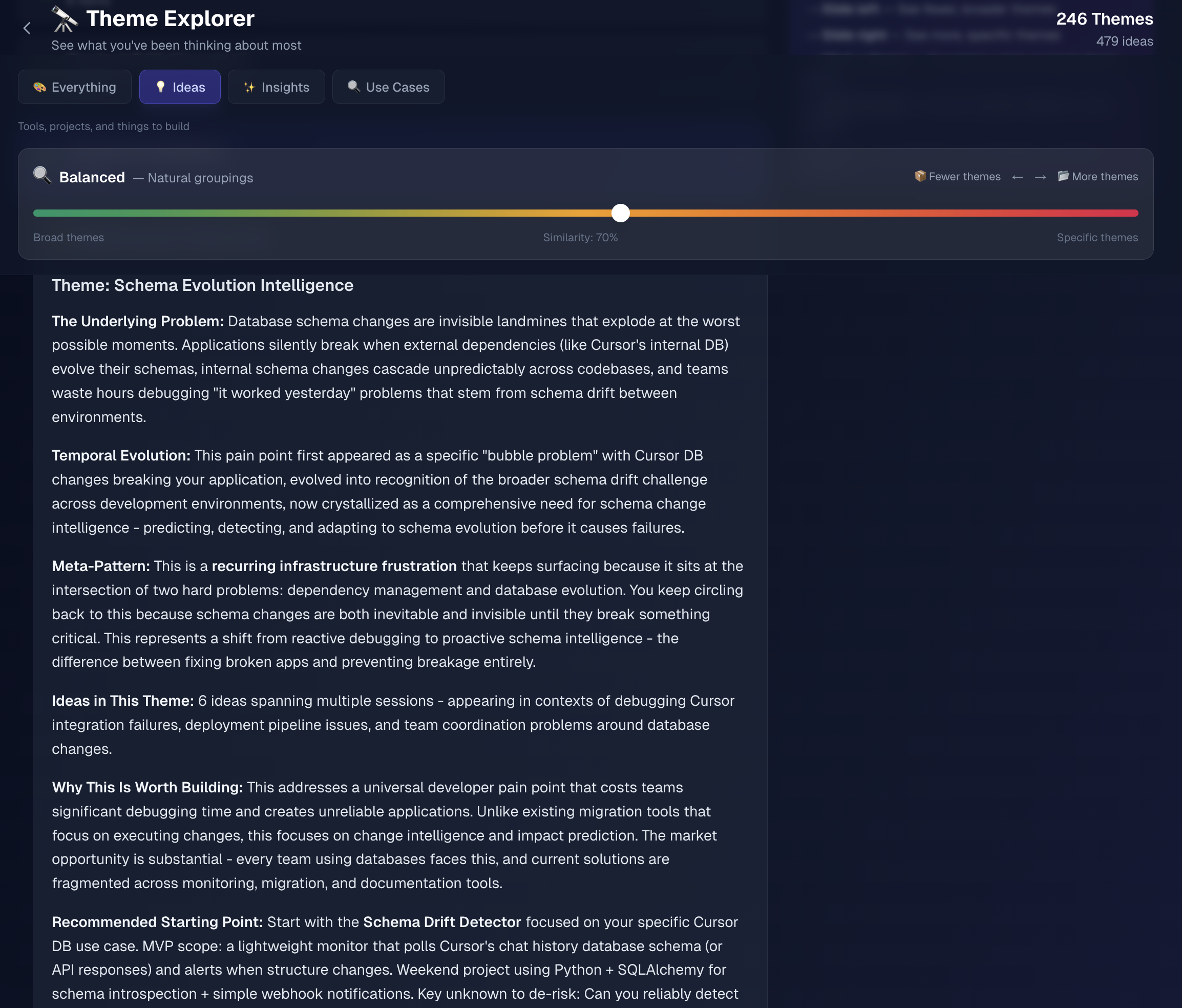
Theme Explorer tabs:
- Patterns — Semantic clustering (forest-level → tree-level zoom)
- Reflect — Socratic questions generated from your patterns, gaps, and expert knowledge
- Unexplored — Topics discussed but not formalized (gaps in your Library)
4. Expert Knowledge Bridging
300+ Lenny's Podcast episodes pre-indexed and matched against your knowledge graph. Working through growth strategy? See what Elena Verna said about similar patterns. Connects your private thinking with public expertise.
5. Longitudinal Intelligence
Compounding factor. Tracks evolution: "Your focus shifted from UI to systems design without you noticing." No single-session tool can do this.
- Reads data directly from local storage (Cursor SQLite, Claude JSONL, workspace files) — no plugins, no extensions, no modifications
- <500MB histories: works entirely locally with 90s Fast Start — no database needed
- Larger histories: choose quick scan (recent 500MB) or full Vector DB indexing
- Privacy-first: data stays on your machine. Optional Supabase sync uses your own instance.
🧠 How It Works
Conversations with AI capture reasoning in the moment — not polished docs. Your workspace markdown and code comments capture decisions and intentions. Inspiration analyzes all of it:
Pattern recognition: Semantic search finds recurring themes across Cursor chats, Claude sessions, and your workspace docs. You keep hitting the same edge case. Your focus shifted from frontend to systems without noticing.
Relationship forming: Semantic connections link conversations and documents. A discussion from March connects to a TODO you wrote last week. Three projects share a common problem you didn't notice.
What this reveals: Git history shows what you shipped. Patterns show how you thought about it — trade-offs, dead-ends, constraints. Sometimes that context is more valuable than the code.
Why it compounds: More conversations and documents = more patterns and connections. The value isn't additive — it's discovering recurring themes you didn't know existed.
⚙️ Environment Variables
Required environment variables:
ANTHROPIC_API_KEY– Required: For Claude (generation, synthesis)OPENAI_API_KEY– Optional: Enables expert perspectives (embeddings, semantic search)SUPABASE_URL– Optional: For Vector DB (required for 500MB+ histories)SUPABASE_ANON_KEY– Optional: Supabase anonymous key
Notes:
- Cursor chat history auto-detected on macOS and Windows
- Claude Code + Cowork JSONL history auto-detected on macOS, Windows, and Linux
- Workspace documents (markdown, code comments) scanned from configured workspace paths
- Cloud deployment (Vercel): Read-only mode
🚢 Deployment
Recommended: Deploy to Vercel
- Build locally and verify:
npm run build - Connect GitHub repo to Vercel
- Configure environment variables in Vercel dashboard
- Deploy
Note: Cloud deployments run in read-only mode (cannot sync local Cursor DB). For full functionality, run locally.
⚙️ System Requirements
| Requirement | Version/Details |
|---|---|
| OS | macOS or Windows |
| Node.js | 18.18.0+ |
| Python | 3.10+ (3.11+ recommended) |
| Disk Space | 100MB–2GB (scales with chat history) |
| API Keys | Anthropic (required), OpenAI (optional), Supabase (optional) |
| Chat History | Cursor and/or Claude (Code/Cowork) with existing conversations |
🔧 Technical Implementation
Stack: Next.js 15, Python, Anthropic Claude, OpenAI embeddings, pgvector
Key Engineering:
- Reverse-engineered Cursor's "Bubble" format (SQLite) + Claude's JSONL (Code + Cowork modes)
- Workspace scanning: markdown docs, TODO/FIXME/HACK/NOTE code comments across all configured workspaces
- RAG over your own chat history + documents for conceptual relationships
- Dedup via embedding similarity (generate N×1.5, present N)
- Hybrid local/cloud: SQLite → optional Supabase Vector DB sync
- pgvector for server-side similarity (275x fewer API calls)
Architecture: Standard RAG pipeline (embed → analyze → retrieve → synthesize) + semantic search + cosine similarity. Novelty is longitudinal intelligence over your own thinking.
📖 Development Notes
- See
CLAUDE.mdfor detailed development commands, project structure, and environment setup - See
PLAN.mdfor product requirements and milestones - See
ARCHITECTURE.mdfor system design and technical details
💬 Community & Support
Bugs/Features: GitHub Issues | Discussion: GitHub Discussions | Docs: ARCHITECTURE.md, CLAUDE.md
PRs welcome. See issues tagged good first issue. Share discoveries: #InspirationDiscoveries on Twitter.
🙏 Acknowledgments
Thanks to:
- Lenny Rachitsky for making the podcast transcripts available for educational use. The Expert Perspectives feature exists because of this generosity.
- Claire Vo for curating lennys-podcast-transcripts on GitHub—clean structure made integration straightforward.
Status: Active | License: MIT | Author: @mostly-coherent