
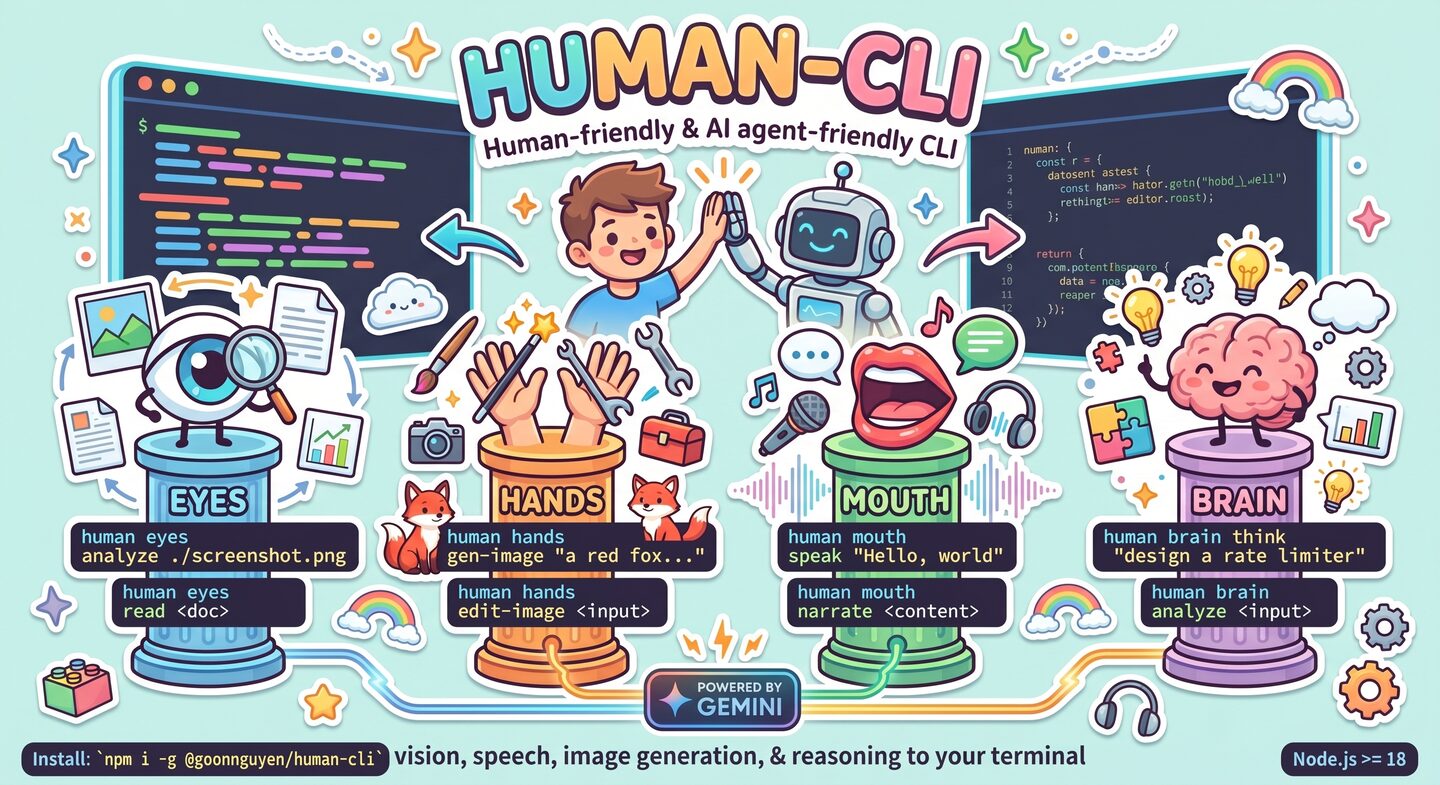
Human-friendly & AI agent-friendly CLI bringing vision, speech, image generation, and reasoning to your terminal — powered by Gemini.
human-cli is a native CLI (v2.0 rewrite): every command runs as a direct in-process function call, no MCP subprocess, no JSON-RPC round-trips. Use it standalone — or mount it as an MCP server for Claude Desktop when you want to.
- 👁️ Eyes — analyze images, read & summarize documents (PDF, txt, md, csv, json, xml, html)
- ✋ Hands — generate images, edit/inpaint/outpaint/style-transfer/compose (Gemini), crop/resize/rotate/mask locally (Jimp)
- 👄 Mouth — text-to-speech + long-form narration via Gemini TTS
- 🧠 Brain — sequential thinking, AI reflection, pattern-based analysis, reasoning-framework catalog
Works great for:
- 💻 Humans — colored output, progress spinners, sensible file names
- 🤖 AI agents —
--jsonenvelopes, stdin piping, stable exit codes, non-TTY auto-detection
npm i -g @goonnguyen/human-cliRequires Node.js ≥ 18. Heavy/optional deps (playwright, sharp, rmbg, mammoth, xlsx, MCP SDK, etc.) are declared as optionalDependencies — npm installs them if it can, skips silently if your platform doesn't support them.
# 1. Set your Gemini API key (free tier available)
human config init
human config set GOOGLE_GEMINI_API_KEY <your-key>

# 2. Verify everything works
human doctor

# 3. Try it
human eyes analyze ./screenshot.png --focus "UI bugs"
human hands gen-image "a red fox in snow" --aspect 16:9
human mouth speak "Hello, world" --voice Zephyr
human brain think "design a rate limiter"CLI command Gemini REST API
│ ▲
▼ │
commander.action() → processor fn(config, args)
│ │
▼ │
run-processor.ts @google/generative-ai
(env resolve → config → execute → render) │
▼
(same process, no subprocess)
v1 used to spawn @goonnguyen/human-mcp as a stdio subprocess and proxy every call via JSON-RPC. v2 removes that entire layer. Result:
- ~30× faster cold start (no subprocess handshake)
- Single-process error handling
- No MCP dep unless you use
human mcp start
human <group> <action> [args] [flags]

Groups:
  eyes     vision & document analysis
  hands    generation, editing, local image ops
  mouth    text-to-speech & narration
  brain    reasoning & reflection
  mcp      run as an MCP server (for Claude Desktop)
  config   manage user config
  doctor   run diagnostics
  tools    list the native tool registry
  call     invoke any tool by name with raw JSON args (escape hatch)
Every source-accepting command understands:
| Form | Example |
|---|---|
| Local path | ./photo.png |
| URL | https://example.com/img.jpg |
| Data URI | data:image/png;base64,… |
| stdin | - |
| File literal (text commands) | @path/to/content.md |
Media outputs save to ./outputs/<timestamp>-<tool>.<ext> by default; path is printed.
-o <dir>— custom directory-o -— keep base64 inline in JSON envelope (agent mode)--json— force structured output (auto when stdout is not a TTY)
Agent envelope:
{
  "ok": true,
  "tool": "eyes.analyze",
  "data": { "text": "…", "media": [{ "kind": "image", "path": "/abs/path.png" }] },
  "metadata": { "duration_ms": 1234 },
  "error": null
}
Exit codes: 0 ok · 1 tool error · 2 usage error · 3 config error · 4 missing dep / MCP server not found.
Env vars resolve from five layered sources (higher wins):
| Priority | Source |
|---|---|
| 1 (highest) | OS env vars — system/shell/deployment |
| 2 | User config JSON — ~/.config/human-cli/config.json / %APPDATA%/human-cli/config.json |
| 3 | process.env — runtime |
| 4 | .env.* — .env, .env.<NODE_ENV>, .env.local in CWD |
| 5 (lowest) | Inline flags — --env KEY=VAL, --api-key, … |
Unusual: OS env wins by default (for deterministic agent environments). Pass
--inline-firstor setHUMAN_CLI_INLINE_FIRST=1to invert.
User config supports both nested and flat shapes:
{
  "gemini":     { "apiKey": "…", "model": "gemini-2.5-flash" },
  "minimax":    { "apiKey": "…" },
  "providers":  { "speech": "gemini" }
}
{ "GOOGLE_GEMINI_API_KEY": "…", "SPEECH_PROVIDER": "elevenlabs" }Run human config list to see which value comes from which source. Keys containing KEY/SECRET/TOKEN/PASSWORD are masked by default; pass --show-values to reveal.
human eyes analyze <source> [--focus <text>] [--detail quick|detailed]
human eyes compare <img1> <img2> [--focus differences|similarities|layout|content]
human eyes read <document> [--pages <range>] [--extract text|tables|both]
human eyes summarize <document> [--length brief|medium|detailed] [--focus <text>]
PDFs are sent to Gemini directly (multimodal). Text-based formats (md, txt, csv, json, xml, html) are read locally. DOCX/XLSX/PPTX parsing deferred to v2.1.
# Native (Gemini)
human hands gen-image <prompt>  [--style --aspect --negative --seed --model]
human hands edit-image <input>  --prompt <text>
human hands inpaint <input>     --prompt <text> [--mask-prompt <text>]
human hands outpaint <input>    --prompt <text> [--direction up|down|left|right|all] [--ratio <n>]
human hands style-transfer <input> --prompt <text> --style-image <src>
human hands compose <input>     --prompt <text> [--secondary <paths…>] [--layout <mode>]

# Native (Jimp, local — no API)
human hands crop <input>   [--mode --x --y --width --height]
human hands resize <input> [--width --height --scale] [--no-aspect]
human hands rotate <input> --angle <deg>
human hands mask <input>   --mask <src>

# Deferred to v2.1 (graceful error)
human hands gen-video | img-to-video | gen-music | gen-sfx | gen-music-el | remove-bg | screenshothuman mouth speak <text> [--voice --language --style] [--output <dir>]
human mouth narrate <content> [--voice --style --max-chunk --language]
# Deferred to v2.1
human mouth explain | customizehuman brain think <problem> [--max-thoughts <n>] # Gemini CoT
human brain analyze <input> [--type general|logical|root-cause|tradeoff] # local
human brain reflect <analysis> [--focus <areas>] [--goal <text>] [--detail] # Gemini
human brain patterns [--query <kw>] # local cataloghuman tools --json # list all tools
human call <tool_name> --args '<json>' --json # invoke by name
human call brain_patterns_info --args '{"query":"bayesian"}' --json
cat payload.json | human call mouth_speak --args - --json -o -{
"mcpServers": {
"human": {
"command": "human",
"args": ["mcp", "start"]
}
}
}human-cli ships its own native MCP server (human mcp start). Requires the @modelcontextprotocol/sdk optional dep (auto-installed).
This repo ships a reusable Agent Skill at plugins/human/skills/human/ that teaches any skill-aware agent how to drive human-cli correctly: when to pick which command, how to parse the JSON envelope, how to isolate outputs per session, and how to recover from the 4 classes of exit errors.
The skill is packaged as a Claude Code plugin marketplace (see .claude-plugin/marketplace.json) so it can be installed with a single command.
# Add this repo as a marketplace, then install the "human" plugin
/plugin marketplace add mrgoonie/human-cli
/plugin install human@human-cli
From then on, every Claude Code session has the skill loaded globally, independent of CWD.
Alternative — project-local auto-discovery: Claude Code also auto-loads skills from <project>/.claude/skills/ when running inside this repo (the directory symlinks into plugins/human/skills/human). No install step needed, but only active while CWD is inside the repo.
Then just talk to the agent in natural language — "look at ./mock.png and tell me what's off", "generate a 16:9 hero image of …", "narrate ./post.md to mp3" — the human skill auto-activates via its description triggers.
Cowork teammates have shell access. Either:
- Plugin route — have every teammate run
/plugin marketplace add mrgoonie/human-cli && /plugin install human@human-cli. - MCP route — register
human mcp startas an MCP server in the Cowork config so tools appear natively without shelling out.
Set GOOGLE_GEMINI_API_KEY in the team config (or via human config set) so every teammate resolves the same key.
Antigravity agents can execute shell commands. Install the CLI (npm i -g @goonnguyen/human-cli) and point the agent at AGENT.md + plugins/human/skills/human/SKILL.md as reference docs. The --json envelope, stable exit codes, and human tools --json discovery endpoint make it straightforward for an Antigravity agent to plan → invoke → verify each step.
If your agent can run shell commands and parse JSON, it can use human-cli. Point it at:
human tools --json— discover the 26 tool names + schemas at runtimehuman call <tool> --args '<json>' --json— generic invoke pathAGENT.md— integration contract (envelope, exit codes, piping patterns)plugins/human/skills/human/— full skill pack (workflows, recipes, troubleshooting)
Heavy-media processors land natively (previously stubbed with exit 4):
- ✅
hands gen-video/img-to-video— Minimax Hailuo 2.3 (submit → poll → download) - ✅
hands gen-music— Minimax Music 2.5 - ✅
hands gen-sfx— ElevenLabs Sound Effects - ✅
hands gen-music-el— ElevenLabs Music - ✅
hands remove-bg— rmbg local AI (fast/balanced/high quality) - ✅
hands screenshot— Playwright (fullpage, viewport, element) - ✅
mouth explain— code → speech via Gemini - ✅
mouth customize— voice + style comparison matrix - 📦 Tool registry grew 16 → 26
- ⏳ Deferred to v2.2: real Gemini Veo, ZhipuAI provider routes, DOCX/XLSX/PPTX parsers, Minimax/ElevenLabs TTS in
mouth speak
Breaking rewrite — everything native:
- ❌ Removed: MCP subprocess spawn via
@goonnguyen/human-mcp - ✅ Added: native processors (
src/processors/*) with direct Gemini SDK calls - ✅ Added: internal tool registry (
src/mcp/tool-registry.ts) exposed viacall/tools/mcp start - ✅ Added: native MCP stdio server (
src/mcp/server.ts) for Claude Desktop compatibility
git clone https://github.com/mrgoonie/human-cli
cd human-cli
npm install
npm run dev       # tsup watch mode
npm run typecheck
npm test
npm run build
node dist/cli.js --help
See AGENT.md for the agent integration guide.
MIT © Duy Nguyen