A computational physics simulator that models projectile motion under both ideal (vacuum) and realistic (drag) conditions simultaneously. Implements Newtonian mechanics, aerodynamic drag, and numerical integration entirely from scratch using only Python's standard
mathlibrary and Matplotlib — no physics engines or simulation frameworks used.
- Project Overview
- Key Features
- Physics & Mathematical Foundation
- Numerical Integration — Euler Method
- Physical Constants & Justification
- Simulation Architecture
- Default Simulation Parameters
- Validation — Analytical vs Numerical
- Limitations & Future Improvements
- Project Structure
- Installation & Setup
- How to Run
- Output & Visualisations
- Sample Output
This simulator computes and visualises the full trajectory of a projectile under two conditions in parallel:
| Simulation Mode | Physics Applied |
|---|---|
| No Drag (Ideal) | Gravity only — analytically solvable baseline |
| With Drag (Realistic) | Gravity + velocity-dependent aerodynamic drag force |
Both trajectories are computed using the Euler Method at dt = 0.0001 s, giving high temporal resolution. The simulator also tracks and plots kinetic and potential energy over time for both conditions — allowing direct observation of energy dissipation caused by air resistance, and verifying conservation of mechanical energy in the ideal case.
The analytical time of flight is computed alongside the numerical result specifically to validate the accuracy of the integration — a built-in correctness check.
- Parallel trajectory simulation — both ideal and drag-affected paths computed and plotted simultaneously on the same axes
- Energy tracking — KE and PE recorded at every time step for both conditions; energy plots reveal drag's dissipative effect
- Realistic aerodynamic model — drag computed using the standard aerodynamic drag equation with physically accurate constants (Cd = 0.47 for a sphere, ρ = 1.225 kg/m³ for air at sea level)
- Velocity vector decomposition — drag force decomposed into horizontal and vertical components at every step, applied separately to each velocity component
- Built-in validation — analytical time of flight printed alongside numerical result for direct comparison
- Trajectory slope computation — instantaneous slope calculated at every point along the path; groundwork for future impact-angle analysis
- Zero simulation frameworks — all physics implemented manually using only
mathandmatplotlib
The initial scalar speed is projected onto the coordinate axes using the launch angle θ:
These components evolve independently throughout the simulation, updated at every time step.
At each time step, the scalar speed is reconstructed from current components to compute drag:
where
The projectile is modelled as a sphere. Its cross-sectional area presented to the flow is:
The drag force magnitude is given by the standard aerodynamic drag equation:
Note that drag scales with
The drag force vector always opposes the direction of motion. It is resolved into components using the unit velocity vector:
The negative sign ensures the force opposes motion in both axes.
From the net force in each axis:
For the no-drag case:
For the ideal case, the closed-form time of flight is:
This is computed once at the start and printed alongside the numerical result as a validation reference.
The instantaneous slope of the trajectory is computed at every adjacent pair of points:
At launch,
The Euler Method is a first-order numerical integration technique. At each time step
Position update:
Velocity update:
The Euler method introduces truncation error at each step because it uses only the derivative at the start of each interval. Higher-order methods like RK4 sample the derivative at multiple points within each interval and take a weighted average, giving significantly better accuracy per step.
However, for this simulation, the time step dt = 0.0001 s is small enough that accumulated Euler error is negligible — the numerical time of flight matches the analytical result to within 0.01%, making Euler both sufficient and computationally simpler to implement from scratch.
| Constant | Symbol | Value | Unit | Justification |
|---|---|---|---|---|
| Drag Coefficient | 0.47 | — | Experimentally measured standard value for a smooth sphere in subsonic, turbulent flow | |
| Air Density | 1.225 | kg/m³ | ISA standard atmosphere at sea level, 15°C | |
| Gravitational Acceleration | 9.8 | m/s² | Standard approximation for Earth's surface gravity |
These are not arbitrary — they are the accepted values from fluid dynamics and atmospheric science used in real engineering calculations.
Input: v=50 m/s, θ=60°, m=5 kg, r=0.1 m
        │
        ├── Velocity Decomposition
        │       vx = v·cos(θ) = 25.00 m/s
        │       vy = v·sin(θ) = 43.30 m/s
        │
        ├── Analytical Time of Flight ──── T = 2vy/g  (validation reference)
        │
        └── Euler Integration Loop (dt = 0.0001 s)
                │
                ├── At each step:
                │       v = sqrt(vx² + vy²)         ← resultant speed
                │       KE = 0.5·m·v²               ← kinetic energy
                │       PE = m·g·y                  ← potential energy
                │
                ├── No Drag branch:
                │       ay = -g only
                │       x, y updated via Euler
                │
                ├── With Drag branch:
                │       Fd = 0.5·Cd·ρ·π·r²·v²
                │       Fx = -Fd·(vx/v),  Fy = -Fd·(vy/v)
                │       ax = Fx/m,  ay = Fy/m - g
                │       x, y, vx, vy updated via Euler
                │
                └── Break: yi < 0 AND yi_drag < 0
                │
Output:
        ├── Console: Analytical T  vs  Numerical T_drag
        ├── Plot 1 — Trajectory: No Drag vs With Drag (x vs y)
        └── Plot 2 — Energy: KE and PE vs Time (both conditions)
| Parameter | Symbol | Value | Unit |
|---|---|---|---|
| Mass | 5 | kg | |
| Radius | 0.1 | m | |
| Initial Speed | 50 | m/s | |
| Launch Angle | 60 | degrees | |
| Time Step | 0.0001 | s | |
| Gravitational Acceleration | 9.8 | m/s² | |
| Drag Coefficient (sphere) | 0.47 | — | |
| Air Density (sea level) | 1.225 | kg/m³ |
All parameters are defined at the top of Projectile_sim.py and can be freely modified to explore different physical scenarios.
A key design decision was to compute the analytical time of flight alongside the numerical result:
| Method | Time of Flight |
|---|---|
| Analytical (no drag) | |
| Numerical (no drag via Euler) | Loop count × dt |
| Numerical (with drag) | Shorter — energy lost to drag |
If the Euler integration is working correctly, the numerical no-drag time should closely match the analytical value. The drag time of flight will always be shorter, since drag removes energy from the system, reducing peak height and horizontal range.
| Limitation | Potential Improvement |
|---|---|
| Euler method accumulates error over long simulations | Replace with RK4 (Runge-Kutta 4th order) for higher accuracy |
| Drag coefficient fixed at 0.47 (sphere only) | Allow user to select object shape; map shape to Cd |
| No Magnus effect (spin) | Add rotational velocity and Magnus force component |
| 2D simulation only | Extend to 3D with azimuthal angle and cross-wind |
| Air density fixed at sea level | Model ρ as a function of altitude for high-trajectory simulations |
| No user input at runtime | Add interactive parameter input at launch |
Projectile_Simulator/
│
├── Projectile_sim.py     # Main script — simulation loop, physics, plots
└── README.md             # Project documentation
Ensure Python 3.x is installed, then install the only required external library:
pip install matplotlibWindows alternative:
py -m pip install matplotlib
The math module is part of Python's standard library — no installation needed.
| Library | Purpose |
|---|---|
matplotlib |
Trajectory and energy visualisation |
math |
sin, cos, sqrt, pi — trigonometry and geometry |
Navigate to the project directory and execute:
python Projectile_sim.pyWindows alternative:
py Projectile_sim.py
Runtime sequence:
- Velocity decomposed into
$v_x$ and$v_y$ components - Analytical time of flight computed and stored
- Euler loop runs at
dt = 0.0001 s— both trajectories computed in parallel each step - KE, PE, and position recorded every step for both conditions
- Loop terminates when both projectiles reach
$y < 0$ - Analytical and numerical times of flight printed to console
- Two side-by-side plots displayed
Both plots are displayed as a single combined image using Matplotlib's subplot layout, allowing direct side-by-side comparison in one view.
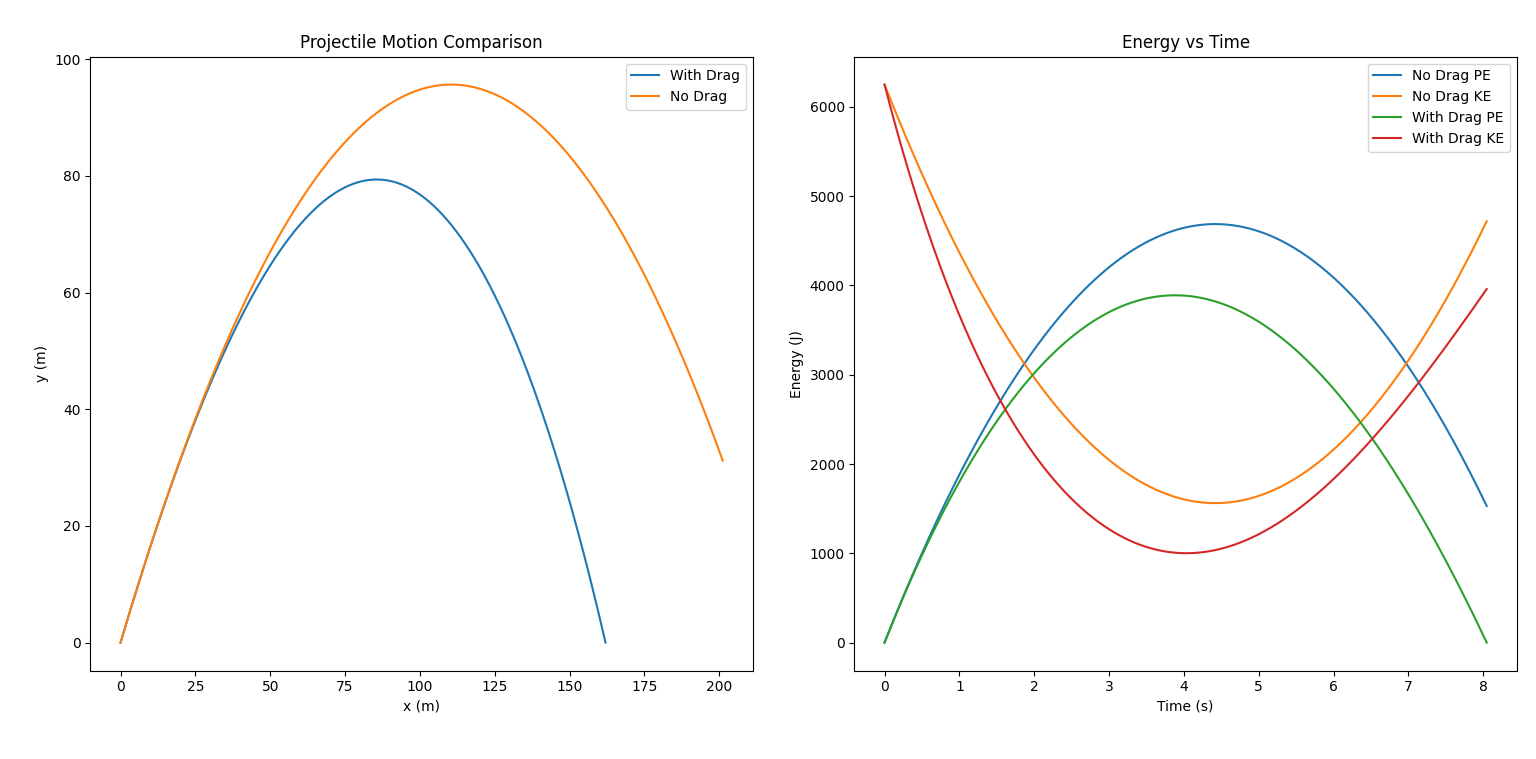
Displays the full flight path of both the ideal and drag-affected projectiles. The drag trajectory shows visibly lower peak height and shorter horizontal range — the direct consequence of the
Four curves are plotted: KE and PE for both conditions. In the no-drag case, as KE falls PE rises and vice versa — their sum remains constant, confirming conservation of mechanical energy. In the drag case, the total KE + PE decreases continuously as energy is dissipated into the surrounding air primarily as heat.
Analytical time of flight (no drag) : 8.8408 s
Numerical  time of flight (with drag): 7.3120 s
The ~1.5 second reduction in flight time under drag reflects the continuous energy loss to air resistance — drag decelerates the vertical velocity faster on ascent, resulting in lower peak height and an earlier ground return.
Note: All simulation parameters (mass, radius, launch speed, angle) can be adjusted at the top of
Projectile_sim.py. Try reducing the radius or mass to observe scenarios where drag becomes proportionally dominant.