
Replies: 1 comment 4 replies

|
Starting with v2, we've switched to on-demand connections to the camera instead of a persistent connection so that the bridge will disconnect from the camera if there aren't any clients connected. Does it still disconnect if you try to view the WebRTC stream? |

|
Indeed, that's what I guess I'm seeing. I get the "Disconnected" pop-ups but it seems to be only a behavior in the GUI. Thank you for you reply and thanks again for this great project! |
|
I can confirm than when using the container on my Docker host with WebRTC streams running in In Snapshot mode, I get the Disconnected pop ups about 5 to 10 seconds after the Connected pop-ups. I only get them on my Docker host with the following error messages: Nothing like this in the HA Addon. |
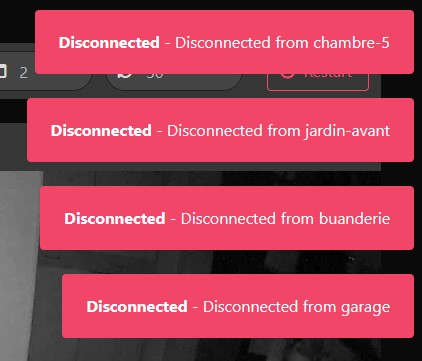
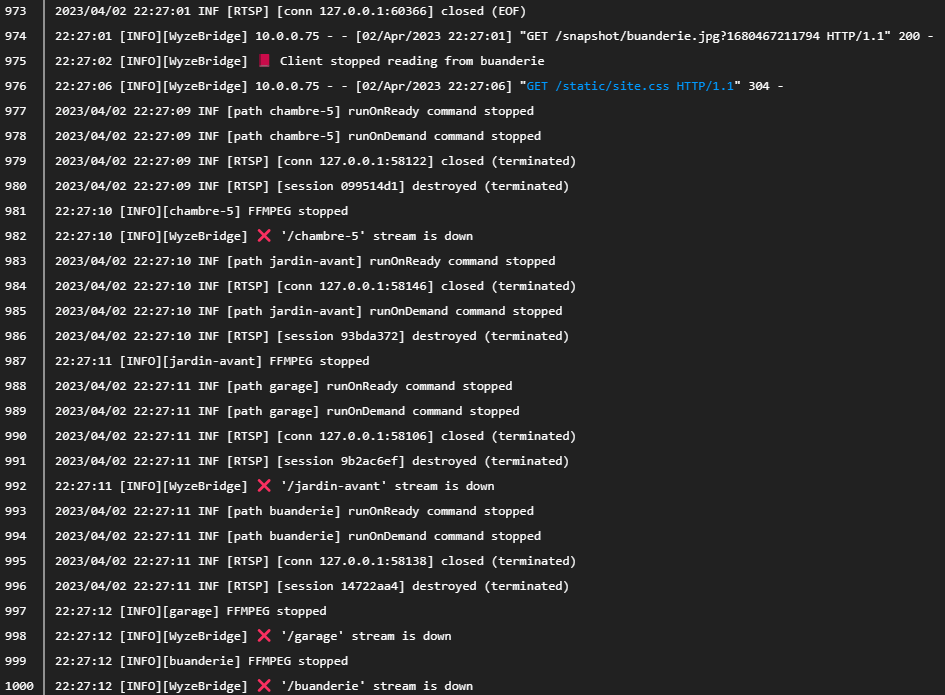

|
This is probably related to the fix for #750 where the bridge will now connect to all enabled cameras to update the snapshot/preview in the WebUI. Do you still get that message if you close the WebUI or set the refresh time to 0? You could also disable any cameras you're not using to prevent the snapshots from updating. |
|
I am unable to reproduce today. Yesterday, I had issues to set my NVR to the new wyze_bridge feeds. |


Uh oh!
There was an error while loading. Please reload this page.
Uh oh!
There was an error while loading. Please reload this page.
Hi,
I am using this container as HA addon for a while and it works quite great. I have HA OS on HA Blue and a few addons.
I have disconnections from time to time but that's very rare.
I'm in the process of moving out HA addons that are not tightly coupled to HA on a different setup in my network.
It's a NUC that's running few LXC containers and VMs. It's way more powerful (Celeron N5105 with 8 GB or ram) that the ODroidN2+ of HA Blue.
One of the LXC is a Docker host where I run Frigate for a few Hikvision cameras just fine.
So I tried to move
wyze-bridgefrom HA to this Docker host with the same configuration.Frigate and
wyze-bridgethen are "sibling" containers on the same host and Frigate is the main client ofwyze-bridge.But the connections are very unstable, I see lots of disconnections. Almost immediately after the first connection.
I thought this could be related to a bandwidth issue since I also host Frigate on the same docker host / NUC, but that's not the case since I stopped this addon and the issues are the same.
I checked for other bottlenecks at network, CPU or memory levels, but I did not see anything interesting.
The only thing that changes from one setup to another is that the cameras are not in the same subnet than before.
My docker host is on 192.168.0.0/24, but HA and the cameras are on 10.0.0.0/24.
Not sure if that's relevant since my Frigate container on the Docker host works just fine the Hikvision NVR that's also 10.0.0.0/24.
HA Host Config
Docker Compose on Docker Host
Log up/down for a single camera (others were filtered out):
All reactions