Option to customize the TOC title#19
Conversation


|
Thank you for this great idea and implementation. First thing I noticed: is there a reason why the default text does not use the localized string but a constant? That would be something for that would help many people who do not want to customize the title and start with the heading in their language. Just use the existing localized string. I understand that you use the translated text later at the component but not as the default string. And maybe it is a good idea to use the fragment of the localized “table of contents” that is already translated in the help text. Don’t get me wrong: I will merge this! But I need to understand if this is on purpose. :) thank you so much! |

 mtoensing
left a comment
mtoensing
left a comment
mtoensing
left a comment
There was a problem hiding this comment.
I gave it a quick test in my German local installation and the string in the new input "Table of contents" does not get translated to the German string. Please verify that the existing localizations for the heading still work. =)
|
Thanks for your thorough review, Marc! I might be stuck at that part (I did not release a GB block before), so I'm not certain, how to update the translation file. wp-content/languages/plugins/simpletoc-de_DE-dfbff627e6c248bcb3b61d7d06da9ca9.json When I manually add I do not know how to update that file, but since it's inside the wp-contents/languages folder, I assume that the .json file automatically generated by wordpress.org once a new plugin version is committed. You might have more insights into that process... Also, the .json file contains the remark "generator: GlotPress..." which means, it was generated by the public WordPress repo, and not committed via GitHub/SVN → I believe that the translation will become available automatically once you bump the plugin version number and commit it to the wp.org repository.
|

|
Hi, The translations are being pulled online from the repository. There are no local translations in the plugins' code. There is an existing translation for "Table of Contents" that should be used:
Just make sure to use exactly that with lower and uppercase. If you use it with the help text I would do it like this: That way it will at least show the correct one in the help text. But I think you should look the default definition of the attribute "title_text" in block.json I don't know how translate that with the standard existing translation. And sadly this is very important because it is the headline of all existing installations. So maybe you don't define a default value there. You can try:
in block.json but I don't think that will work... |
|
Translating the default value
This change adds the correct translation of the default value to the block: // Old:
register_block_type( __DIR__ . '/build' , [
'render_callback' => __NAMESPACE__ . '\\render_callback',
]);
// New:
register_block_type( __DIR__ . '/build' , [
'render_callback' => __NAMESPACE__ . '\\render_callback',
'attributes' => [
'title_text' => [
'default' => __( 'Table of Contents', 'simpletoc' ),
],
]
]);Translating the string in edit.js However, using
i.e. the plugin repo will parse the JS file upon commit, detect the usage of the new After committing the update to the plugin repo, two updates will be generated:
|
|
Yes but someone has to translate that string for the existing 13 languages. I can’t do that Strom those have to be approved - even if It is the same content. Therefore we need to make sure that the existing string is used. I can not approve a French translation. Even as the plug-in author. And people rely on that because the headline would be “table of contents” on many websites if they use another language. And I can’t approve strings. I know that sounds weird but please let us somehow use the important existing translations for the 13 languages for the headline string. |
|
I am really sorry. The translation seems to work. But now the min_level is not saved anymore. It works in the master branch but in your current state of the pr/19 with no changes on my side I always get "no headings found"
Language does not matter. Do you see that on your end, too? |
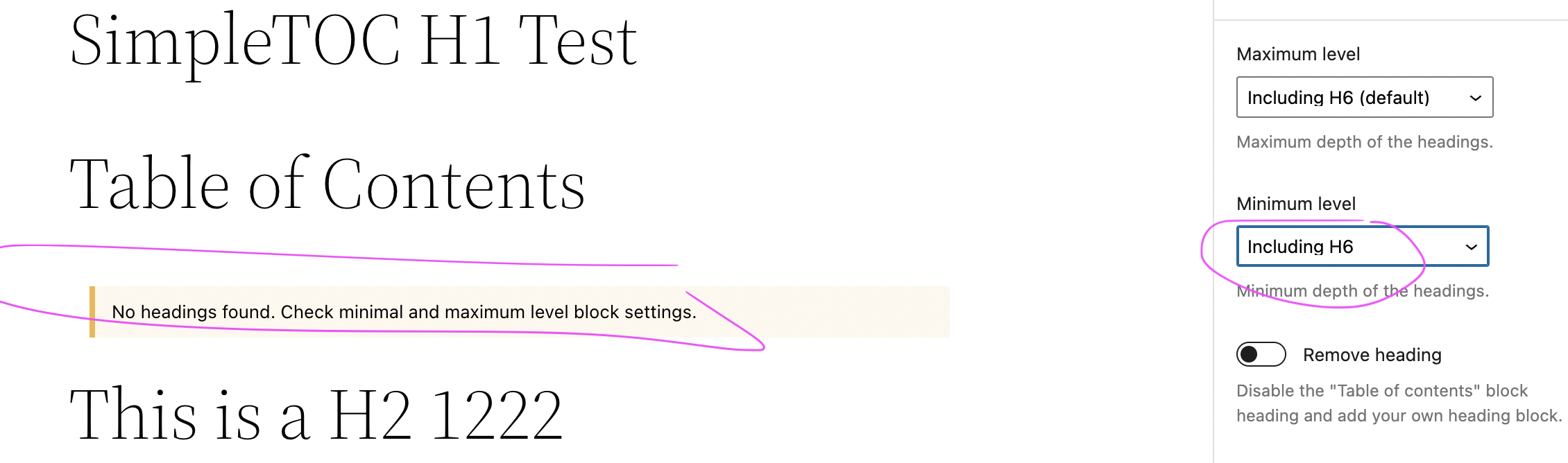
|
|
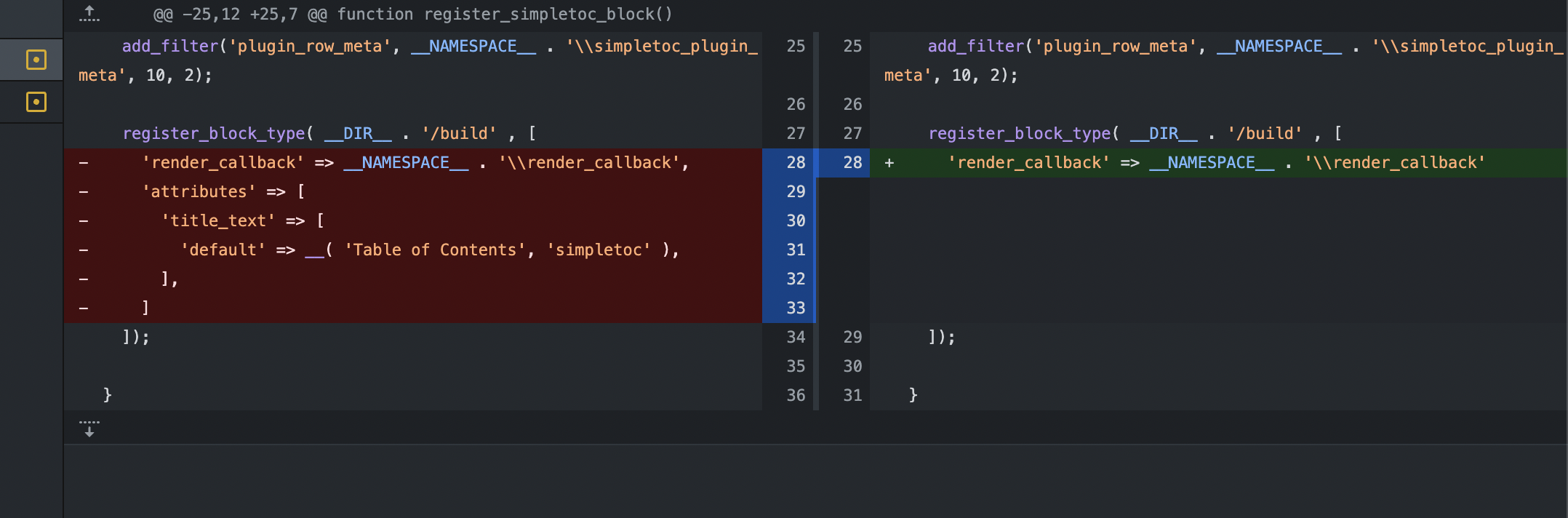
|
Do you need help? I really would like to see this option in the code! It is a great addition. But I hope you understand that we need to find a way to keep the existing translation for the string "Table of Contents" working for this. The reason is that everyone would lose their translated headline. You could argue: "That is not a problem! they can change it or we wait until the translated strings on https://translate.wordpress.org/projects/wp-plugins/simpletoc/ appear" But then everyone who has used SimpleTOC before and relied on the translated headline, will see the fallback to the englush version. So we have to make sure that the headline gets translated but can be overwritten by the user. |
Undo part of b5a6405

Reason: When providing attributes via `register_block_type`, the attributes provided will overwrite the attributes from block.json (instead of extending those).

I.e. We need to provide ALL attributes via the register_block_type() function, or none.
Add 2 new filters to localize the block:

- Filter „load_script_translations“: Adds the translation for `{__(‚Table of Contents‘, ‚simpletoc‘ )}`
- Filter „block_type_metadata_settings“: Translates the default value of the TOC
|
Hi @mtoensing - I've updated the PR with a few changes:
This worked in my tests on a German and English WP site. Do you see any problems with this logic? Btw, thanks for your thorough tests and feedback above! |

|
Thank you for not giving up. Great work. I will have a more profound look and wrap it up in a release as swiftly as I can. |
2 participants


This PR adds a new Text Control that allows authors to change the TOC title without the workaround of hiding the title and adding another title block.
Reason:
Using hide-title + creating a new block with the CSS class
simpletoc-hiddenis a complex task for our blog writers and therefore error-prone → they might set wrong header-level, forget to add thesimpletoc-hiddenclass, or simply be too lazy and leave the default header.Solution:
A new TextControl is displayed in the Block properties, where the block title can be overwritten. To stay consistent with existing pages, the default title is "Table of Contents", which is always used when an empty title is entered.
Preview:
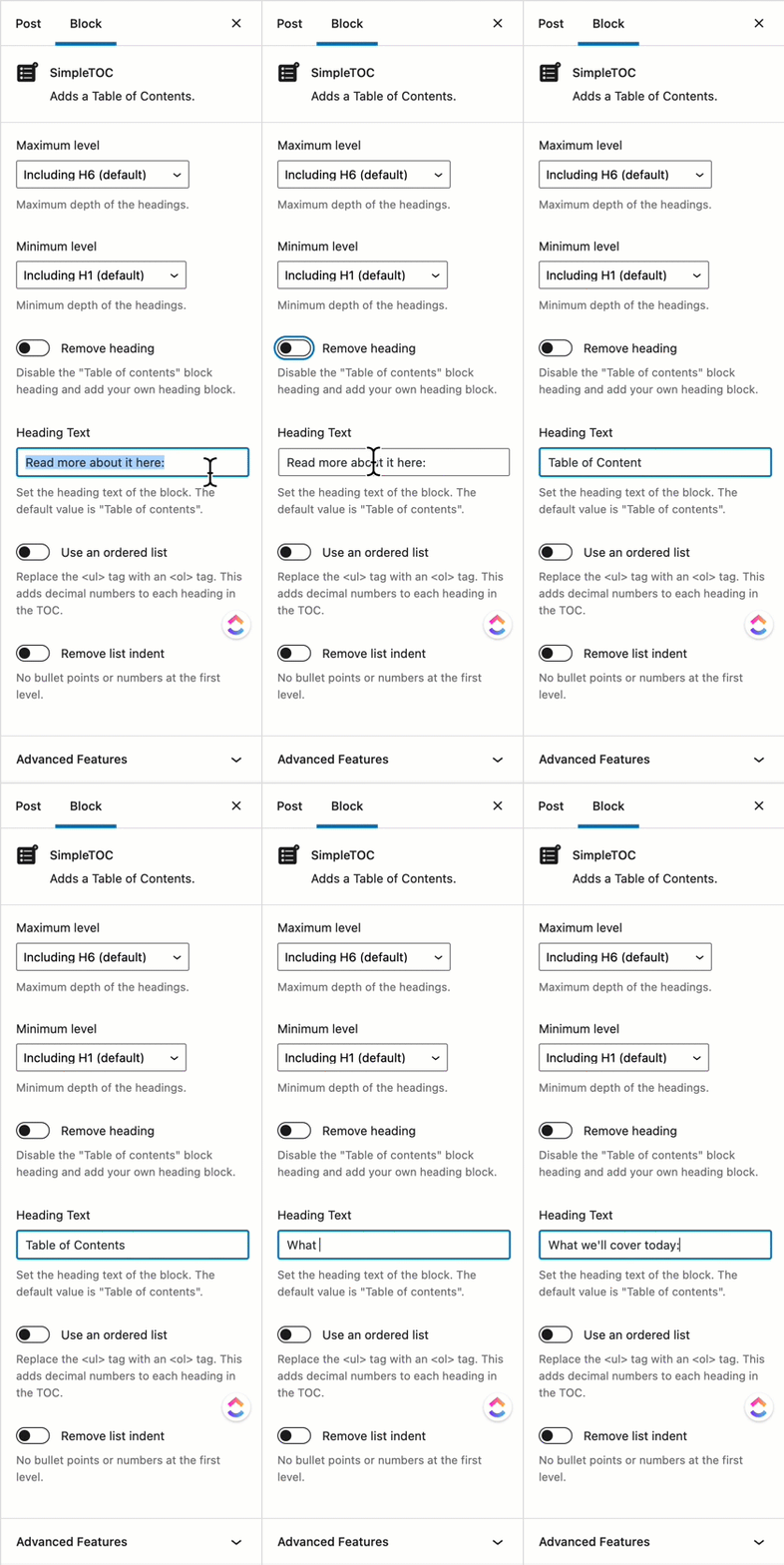
Note how "Table of Contents" is inserted when the text field is cleared