Duration: November 2025 - January 2026
- Matt (Jiwoong) Park [mtp0326@seas.upenn.edu],
- Hassan Rizwan [hrizwan3@seas.upenn.edu],
- Stanley Liu [stanleey@seas.upenn.edu],
- Spencer Ware [wares@seas.upenn.edu]
- Overview
- Link to our Research Paper
- Video Demo
- Key Features
- Tech Stack
- How It Works
- Installation
- Resources


SynthToSoul is a full-stack audio analysis application designed to distinguish between Human-Made and AI-Generated music. By combining a custom Deep Learning classifier with audio fingerprinting technology, the system not only detects the origin of a track but also identifies real-world songs that sound similar to AI-generated uploads.
Our core backend uses a binary classification CNN trained on Mel spectrograms and Similarity Search algorithm through FAISS and KNN to find the top
The code was previously moved from a private repository.
[PLEASE READ] Details to our core backend and ML models as well as performance results are provided in our paper here.
- AI vs. Human Detection: Uses a custom Convolutional Neural Network (CNN) trained on Mel spectrograms from GTZAN (human-made tracks) and SONICS (AI-generated tracks) datasets to classify audio files with high accuracy.
-
Similarity Search: If a song is flagged as AI-generated, the system uses TorchOpenL3 embeddings and FAISS (Facebook AI Similarity Search) to find the top
$k$ most similar human-made tracks from the GTZAN dataset. - Interactive UI: A polished, retro-vinyl themed interface built with React, featuring drag-and-drop file uploads, real-time status updates, and audio visualizations.
- Privacy-First: Human-made tracks are deleted immediately after analysis to respect copyright and privacy; only AI tracks are temporarily processed for similarity matching.
- Python & Flask: RESTful API to handle file uploads and serve predictions.
- PyTorch: Powers the custom CNN model (
AudioCNN) for binary classification. - Audio Processing:
torchaudioandlibrosafor spectrogram conversion. - Similarity Engine:
torchopenl3for deep audio embeddings andfaissfor efficient vector similarity search. - Data Handling:
pandasandnumpyfor managing the SONICS and GTZAN dataset metadata and embeddings.
- React (Vite): Fast, modern frontend framework.
- TypeScript: Ensures type safety and code maintainability.
- Tailwind CSS: For responsive, modern styling.
- shadcn/ui: High-quality, accessible UI components.
- Visualizations: Custom vinyl and waveform animations.
- Upload: User drags and drops an audio file (
.wav,.mp3,.flac,.ogg) into the DropZone. - Preprocessing: The backend converts the audio into a Mel spectrogram tensor.
- Classification: The CNN model analyzes the spectrogram features to predict the probability of the track being AI-generated.
- Action:
- Human-Made: The user is notified, and the file is securely deleted.
- AI-Generated: The system generates an audio embedding and queries the FAISS index to find the nearest "real song" neighbors, displaying them as similar tracks.

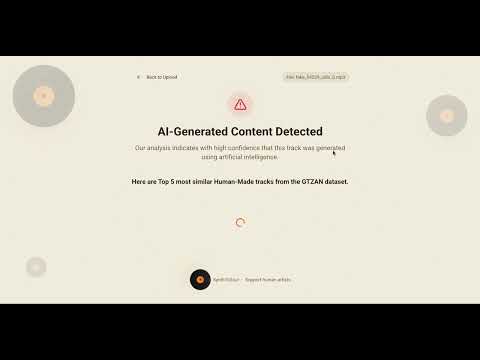
- Used an AI-Generated song "fake_54229_udio_0.mp3" from the SONICS dataset. The system runs the file through the CNN model and finds that it is AI-Generated through binary classification.

- After finding that the song is AI-Generated, the system generates an audio embedding using TorchOpenL3 and queries the FAISS index to find the Top-K nearest "real song" neighbors from the GTZAN dataset, displaying them as similar tracks.

- Used a human-made song "metal.00022.wav" ("Crazy Train" by Ozzy Osbourne) from the GTZAN dataset. The system runs the file through the CNN model and finds that it is Human-Made through binary classification.
- We then map the song to the helper dataframe containing the names of the songs and their artists can be assembled using the data provided by B.L. Sturm.
├── backend/
│   ├── app.py              # Flask entry point & configuration
│   ├── routes.py           # API endpoints
│   ├── cnn_model.py        # PyTorch CNN architecture
│   ├── audio_search.py     # Similarity search engine (FAISS + TorchOpenL3)
│   ├── utils.py            # Audio processing utilities
│   ├── globals.py          # Shared state management
│   ├── models/             # Trained .pth models
│   └── csv/                # Dataset metadata
├── src/
│   ├── components/         # React components (DropZone, ResultsList, etc.)
│   ├── pages/              # Main views (Index, AIResults, HumanResults)
│   ├── hooks/              # Custom React hooks
│   └── lib/                # Utilities
└── public/                 # Static assets
- Node.js & npm
- Python 3.11.14 (3.11.x)
- (Optional) CUDA-enabled GPU for faster inference
git clone https://github.com/yourusername/sound-matcher.git
cd sound-matcherCreate a virtual environment and install Python dependencies.
# Create virtual environment
python -m venv venv

# Activate virtual environment
# On macOS/Linux:
source venv/bin/activate
# On Windows:
# venv\Scripts\activate

# Install dependencies
pip install -r requirements.txtNote: For similarity search features, ensure you have the necessary model weights and index files in
backend/models/andbackend/embeddings/.
Install the Node.js dependencies.
npm installYou can run both the frontend and backend concurrently (recommended) or separately.
yarn devThis command (configured in package.json) starts both the Vite dev server and the Flask backend.
Backend (Flask):
source venv/bin/activate
python backend/app.py
The server will start at http://localhost:8000.
Frontend (Vite):
npm run dev:frontendThe app will be available at http://localhost:5174/.
- SONICS dataset on Kaggle:
https://www.kaggle.com/datasets/awsaf49/sonics-dataset - SONICS dataset on Hugging Face:
https://huggingface.co/datasets/awsaf49/sonics - Article on AI music and streaming platforms (e.g., The Guardian):
https://www.theguardian.com/technology/2025/nov/13/ai-music-spotify-billboard-charts - OpenL3 GitHub repository:
https://github.com/marl/openl3