Important Notice:
This repository is the original work created by Mohd Umar.
All code, documentation, and media are protected under copyright law.
Copying, redistributing, or using this project without permission may result in legal action.
Using or cloning this repository for GKE, hackathons, competitions, or any other public submissions without authorization may lead to copyright violations and strict legal consequences.
This project extends the Online Boutique demo with a new AI Shopping Agent microservice that enables natural language interactions for shopping.
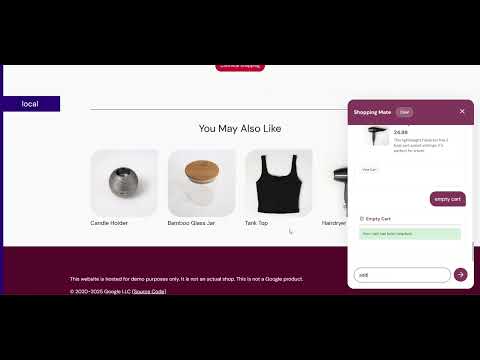
Users can simply chat with the AI to manage their shopping experience end-to-end.
- 🛒 Cart Management – Add products, empty the cart, and view cart items through prompts.
- 🔍 Smart Search – Search for products using natural language queries.
- ⚖️ Product Comparison – Compare multiple items side by side.
- 🎁 Gift Recommendations – Get product suggestions based on user-provided details (age, gender, interests).
- 🤖 Automated Checkout – AI can complete checkout after user confirmation.
- 🧠 Personalized Suggestions – Tailored recommendations during the shopping journey.
Unlike typical shopping assistants that rely on simple keyword matching, this project introduces an original gift recommendation flow.
The AI first analyzes the entire user conversation to understand intent, then extracts details like age, gender, and interests of the person user like to buy gift for. Using this context, it recommends the most relevant and personalized gifts, making the experience smarter and more human-like.
- Google Kubernetes Engine (GKE Autopilot) – scalable microservice deployment.
- Google Generative AI APIs – natural language understanding and recommendations.
- Online Boutique Microservices – integrates with Cart, Catalog, and Checkout.
- AlloyDB – stores and serves product catalog data.
- MCP (Multi-Cluster Pods) – scales services across multiple clusters.
- A2A (App-to-App Communication) – secure internal service connectivity.
- CI/CD – Cloud Build and GitHub Actions for deployments.
- User sends a prompt (e.g., “Add red shoes to my cart”).
- AI Shopping Agent interprets the request and converts it into service calls.
- The agent communicates with Cart, Catalog, and Checkout services inside GKE.
- AlloyDB provides product catalog data for search, compare, and recommendations.
- GKE Autopilot ensures scalability, with MCP and A2A supporting multi-cluster and secure communication.
- Response is returned to the User through the AI agent.
This section explains the custom components and structure added to extend the Online Boutique demo with the AI Shopping Assistant.
- Contains the HTML, CSS, and JavaScript code for the core of the new microservice.
- Handles interaction with Gemini, either through API calls via the Python backend or via a demo mode with a mock database and direct Gemini calls (depending on the version).
- Includes functions to process user queries: prompts sent to Gemini are handled to return the required actions for execution.
- The mock database is recommended only for rapid testing. For complete, production-like behavior, use the Python backend integrated with AlloyDB.
- Contains the Dockerfile and Python backend code for the AI-powered shopping assistant.
- Implements core functionalities such as natural language processing, cart management, product search, recommendations, and auto-checkout.
- Custom handlers that enable the AI bot to interact with Online Boutique microservices.
- Processes user prompts and converts them into the appropriate service API calls.
- Adds routes to connect the custom handlers.
- Allows the AI agent to fetch responses from the backend and interact with the microservices.
- Adds the shoppingmate component to the Kustomize configuration.
- Integrates the AI microservice into the deployment manifests for GKE.
- The frontend is made to work independently for testing purposes. This allows you to test and interact with the UI without needing the backend running.
- The Python backend can also run alongside the frontend in the same deployment if needed, providing a more integrated experience for full functionality.
Please note that for certain actions like Add to Cart, Empty Cart, Checkout, and similar operations, the page will reload upon success. This behavior is necessary for the following reasons:
- The pre-built demo does not automatically update values without a page reload.
- These operations will not visually update in the demo without a reload, as it's designed for a more static view.
In a full implementation, you would typically use dynamic updates (like AJAX or state management) to reflect these changes without a full reload.
I have used session storage to keep track of:
- Cart details (such as added products).
- Messages from the Shopping Mate AI bot.
This allows data to persist across page refreshes or when navigating to new pages, preventing any loss of user information. The session storage ensures that the cart and bot messages remain intact, providing a smoother and more persistent user experience.



Online Boutique is a cloud-first microservices demo application. The application is a web-based e-commerce app where users can browse items, add them to the cart, and purchase them.
Google uses this application to demonstrate how developers can modernize enterprise applications using Google Cloud products, including: Google Kubernetes Engine (GKE), Cloud Service Mesh (CSM), gRPC, Cloud Operations, Spanner, Memorystore, AlloyDB, and Gemini. This application works on any Kubernetes cluster.
If you’re using this demo, please ★Star this repository to show your interest!
Note to Googlers: Please fill out the form at go/microservices-demo.
Online Boutique is composed of 11 microservices written in different languages that talk to each other over gRPC.

Find Protocol Buffers Descriptions at the ./protos directory.
| Service | Language | Description |
|---|---|---|
| frontend | Go | Exposes an HTTP server to serve the website. Does not require signup/login and generates session IDs for all users automatically. |
| cartservice | C# | Stores the items in the user's shopping cart in Redis and retrieves it. |
| productcatalogservice | Go | Provides the list of products from a JSON file and ability to search products and get individual products. |
| currencyservice | Node.js | Converts one money amount to another currency. Uses real values fetched from European Central Bank. It's the highest QPS service. |
| paymentservice | Node.js | Charges the given credit card info (mock) with the given amount and returns a transaction ID. |
| shippingservice | Go | Gives shipping cost estimates based on the shopping cart. Ships items to the given address (mock) |
| emailservice | Python | Sends users an order confirmation email (mock). |
| checkoutservice | Go | Retrieves user cart, prepares order and orchestrates the payment, shipping and the email notification. |
| recommendationservice | Python | Recommends other products based on what's given in the cart. |
| adservice | Java | Provides text ads based on given context words. |
| loadgenerator | Python/Locust | Continuously sends requests imitating realistic user shopping flows to the frontend. |
| Home Page | Checkout Screen |
|---|---|
 |
 |
-
Ensure you have the following requirements:
- Google Cloud project.
- Shell environment with
gcloud,git, andkubectl.
-
Clone the latest major version.
git clone --depth 1 --branch v0 https://github.com/GoogleCloudPlatform/microservices-demo.git
cd microservices-demo/
The
--depth 1argument skips downloading git history. -
Set the Google Cloud project and region and ensure the Google Kubernetes Engine API is enabled.
export PROJECT_ID=<PROJECT_ID>
export REGION=us-central1
gcloud services enable container.googleapis.com \
  --project=${PROJECT_ID}
Substitute
<PROJECT_ID>with the ID of your Google Cloud project. -
Create a GKE cluster and get the credentials for it.
gcloud container clusters create-auto online-boutique \
  --project=${PROJECT_ID} --region=${REGION}
Creating the cluster may take a few minutes.
-
Deploy Online Boutique to the cluster.
kubectl apply -f ./release/kubernetes-manifests.yaml
-
Wait for the pods to be ready.
kubectl get pods
After a few minutes, you should see the Pods in a
Runningstate:NAME READY STATUS RESTARTS AGE adservice-76bdd69666-ckc5j 1/1 Running 0 2m58s cartservice-66d497c6b7-dp5jr 1/1 Running 0 2m59s checkoutservice-666c784bd6-4jd22 1/1 Running 0 3m1s currencyservice-5d5d496984-4jmd7 1/1 Running 0 2m59s emailservice-667457d9d6-75jcq 1/1 Running 0 3m2s frontend-6b8d69b9fb-wjqdg 1/1 Running 0 3m1s loadgenerator-665b5cd444-gwqdq 1/1 Running 0 3m paymentservice-68596d6dd6-bf6bv 1/1 Running 0 3m productcatalogservice-557d474574-888kr 1/1 Running 0 3m recommendationservice-69c56b74d4-7z8r5 1/1 Running 0 3m1s redis-cart-5f59546cdd-5jnqf 1/1 Running 0 2m58s shippingservice-6ccc89f8fd-v686r 1/1 Running 0 2m58s -
Access the web frontend in a browser using the frontend's external IP.
kubectl get service frontend-external | awk '{print $4}'
Visit
http://EXTERNAL_IPin a web browser to access your instance of Online Boutique. -
Congrats! You've deployed the default Online Boutique. To deploy a different variation of Online Boutique (e.g., with Google Cloud Operations tracing, Istio, etc.), see Deploy Online Boutique variations with Kustomize.
-
Once you are done with it, delete the GKE cluster.
gcloud container clusters delete online-boutique \
  --project=${PROJECT_ID} --region=${REGION}
Deleting the cluster may take a few minutes.
- Terraform: See these instructions to learn how to deploy Online Boutique using Terraform.
- Istio / Cloud Service Mesh: See these instructions to deploy Online Boutique alongside an Istio-backed service mesh.
- Non-GKE clusters (Minikube, Kind, etc): See the Development guide to learn how you can deploy Online Boutique on non-GKE clusters.
- AI assistant using Gemini: See these instructions to deploy a Gemini-powered AI assistant that suggests products to purchase based on an image.
- And more: The
/kustomizedirectory contains instructions for customizing the deployment of Online Boutique with other variations.
- Development to learn how to run and develop this app locally.
- Platform Engineering in action: Deploy the Online Boutique sample apps with Score and Humanitec
- The new Kubernetes Gateway API with Istio and Anthos Service Mesh (ASM)
- Use Azure Redis Cache with the Online Boutique sample on AKS
- Sail Sharp, 8 tips to optimize and secure your .NET containers for Kubernetes
- Deploy multi-region application with Anthos and Google cloud Spanner
- Use Google Cloud Memorystore (Redis) with the Online Boutique sample on GKE
- Use Helm to simplify the deployment of Online Boutique, with a Service Mesh, GitOps, and more!
- How to reduce microservices complexity with Apigee and Anthos Service Mesh
- gRPC health probes with Kubernetes 1.24+
- Use Google Cloud Spanner with the Online Boutique sample
- Seamlessly encrypt traffic from any apps in your Mesh to Memorystore (redis)
- Strengthen your app's security with Cloud Service Mesh and Anthos Config Management
- From edge to mesh: Exposing service mesh applications through GKE Ingress
- Take the first step toward SRE with Cloud Operations Sandbox
- Deploying the Online Boutique sample application on Cloud Service Mesh
- Anthos Service Mesh Workshop: Lab Guide
- KubeCon EU 2019 - Reinventing Networking: A Deep Dive into Istio's Multicluster Gateways - Steve Dake, Independent
- Google Cloud Next'18 SF
- Day 1 Keynote showing GKE On-Prem
- Day 3 Keynote showing Stackdriver APM (Tracing, Code Search, Profiler, Google Cloud Build)
- Introduction to Service Management with Istio
- Google Cloud Next'18 London – Keynote showing Stackdriver Incident Response Management
- Microservices demo showcasing Go Micro