here i will explain how to install ros on ubuntu
-
first we will need to install vmware workstation https://www.vmware.com/products/workstation-pro/workstation-pro-evaluation.html
-
then we install ubuntu iso https://ubuntu.com/download/desktop/thank-you?version=22.04&architecture=amd64
-
then we open Vmware , and go to
File > New Virtual Machine Wizard

- select Typical
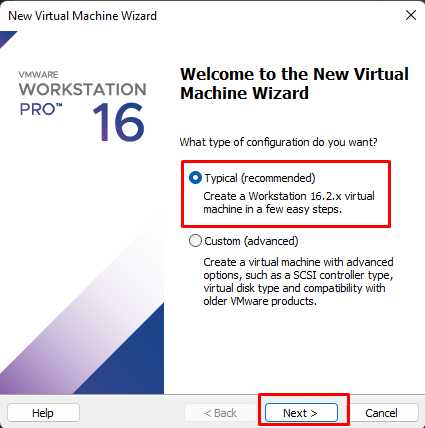
- select
installer disc image file (iso)and upload the ubunto iso file

- then write Name and passowrd

- and write the virtual name and change the file Location if you want

- then you can change the disk size by defult it will be 20.0 .

-
after setup Ubuntu we open terminal , and for we setup ros we need to write this command on terminal
-
sudo sh -c 'echo "deb http://packages.ros.org/ros/ubuntu $(lsb_release -sc) main" > /etc/apt/sources.list.d/ros-latest.list' -
sudo apt install curl # if you haven't already installed curl curl -s https://raw.githubusercontent.com/ros/rosdistro/master/ros.asc | sudo apt-key add - -
sudo apt-get update -
sudo apt-get install ros-kinetic-desktop-full -
echo "source /opt/ros/kinetic/setup.bash" >> ~/.bashrc source ~/.bashrc -
then we write
roscore, to make sure that the installation process was successful