The aim of this project is the colorization of the black and white image given as input and giving the colorized image as an output.
Colorization is the process of adding color information to monochrome photographs or videos. The colorization of grayscale images is an ill-posed problem, with multiple correct solutions. Online tools can be used for image colorization but the problem with these tools is a lack of inductive bias like in the image of an apple above which results in inappropriate colors and doesn’t even work for a few image domains. Deep learning algorithms that better understand image data like the colors that are generally observed for human faces should ideally perform better in this task.
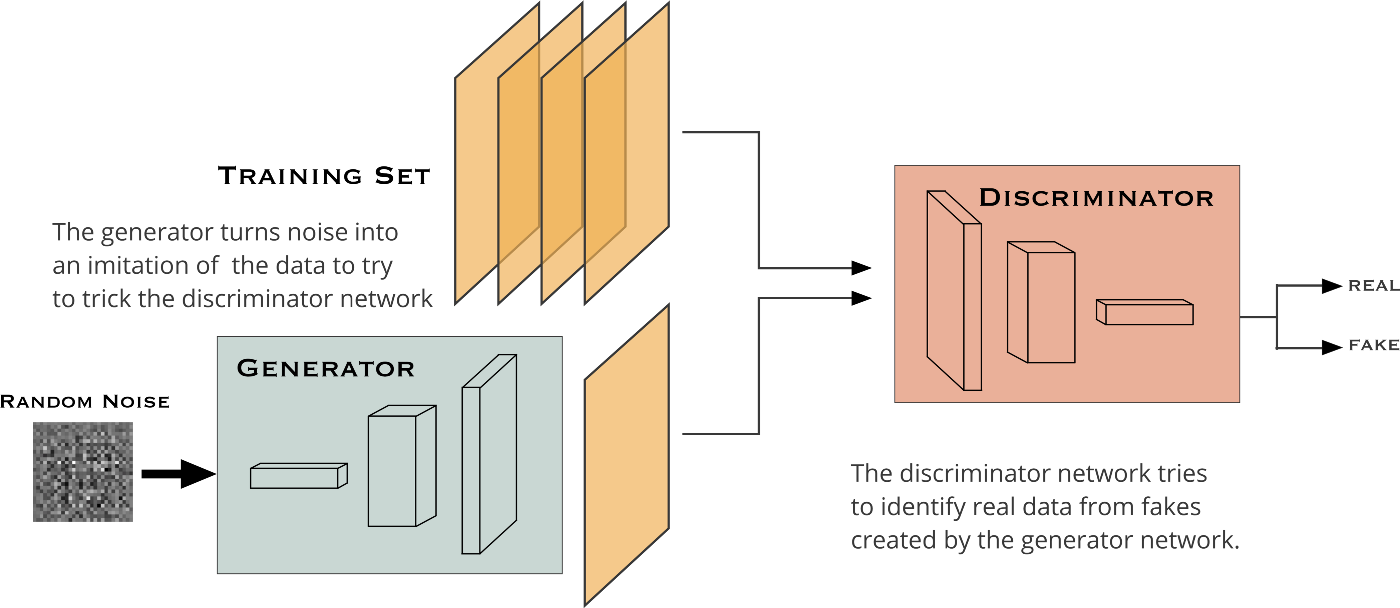
A GAN is composed of two smaller networks called the generator and discriminator. As the name suggests, the generator’s task is to produce results that are indistinguishable from real data. The discriminator’s task is to classify whether a sample originated from the generator’s model distribution or the original data distribution. Both of these subnetworks are trained simultaneously until the generator is able to consistently produce results that the discriminator cannot classify.
In our setting, the generator model takes a grayscale image (1-channel image) and produces a 2-channel image, a channel for *a and another for *b. The discriminator, takes these two produced channels and concatenates them with the input grayscale image, and decides whether this new 3-channel image is fake or real. Of course, the discriminator also needs to see some real images (3-channel images again in Lab color space) that are not produced by the generator and should learn that they are real.
- Python
- Pytorch
- Matplotlib
- Numpy
- Tqdm
- PIL
- fastai
- Knowledge of GAN, U-Net architecture and deep learning algorithms
- Some insight into frameworks such as Pytorch ,etc. and python libraries like numpy,matplotlib, PIL, etc.
COCO 2017 dataset
Google colab
PyTorch as backend and python libraries like numpy,PIL, matplotlib and python modules like pathlib
Consider x as the grayscale image, z as the input noise for the generator, and y as the 2-channel output we want from the generator (it can also represent the 2 color channels of a real image). Also, G is the generator model and D is the discriminator. Then the loss for our conditional GAN will be:

Notice that x is given to both models which is the condition we introduce two both players of this game.
In our approach two losses are used: L1 loss, which makes it a regression task, and an adversarial (GAN) loss, which helps to solve the problem in an unsupervised manner The earlier loss function helps to produce good-looking colorful images that seem real, but to further help the models and introduce some supervision in our task, we combine this loss function with L1 Loss (you might know L1 loss as mean absolute error) of the predicted colors compared with the actual colors:

If we use L1 loss alone, the model still learns to colorize the images but it will be conservative and most of the time uses colors like "gray" or "brown" because when it doubts which color is the best, it takes the average and uses these colors to reduce the L1 loss as much as possible (it is similar to the blurring effect of L1 or L2 loss in super resolution task). Also, the L1 Loss is preferred over L2 loss (or mean squared error) because it reduces that effect of producing gray-ish images. So, our combined loss function will be:

where λ is a coefficient to balance the contribution of the two losses to the final loss (of course the discriminator loss does not involve the L1 loss).
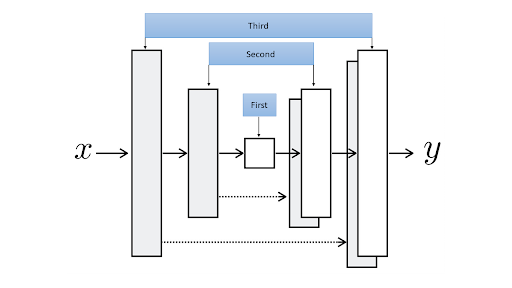
We use U-Net as the generator of our GAN. It makes the U-Net from the middle part of it (down in the U shape) and adds down-sampling and up-sampling modules to the left and right of that middle module (respectively) at every iteration until it reaches the input module and output module.
The architecture of our discriminator is rather straight forward. This code implements a model by stacking blocks of Conv-BatchNorm-LeackyReLU to decide whether the input image is fake or real. We are using a “Patch” Discriminator here. . In a patch discriminator, the model outputs one number for every patch of say 70 by 70 pixels of the input image and for each of them decides whether it is fake or not separately.
- Importing the required python and PyTorch libraries
- Downloading the COCO dataset(We wil download about 20,000 images from the COCO dataset but we are going to use only 8000 of them for training by sampling 10000 images from the complete dataset.)
- Making Datasets and DataLoader-Resizing the images and flipping horizontally (flipping only if it is training set) and then we read an RGB image, convert it to Lab color space and separate the first (grayscale) channel and the color channels as our inputs and targets for the models respectively. Then we are making the data loaders.
- Creating our U-Net Generator
- Creating our Patch Discriminator
- Calculating the the GAN losses
- Initializing and training our model
- Trying another model by pretraining our generator
- Comparing the results of both models
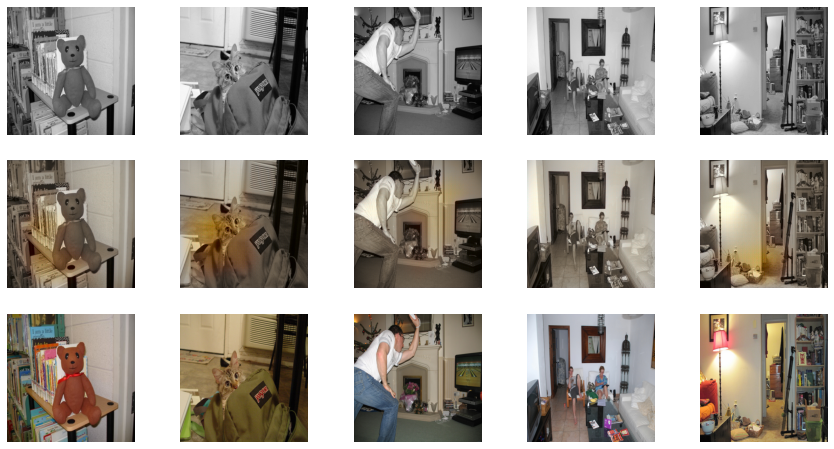
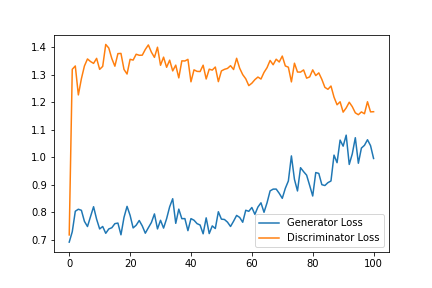
We pretrain the generator separately in a supervised and deterministic manner to avoid the problem of “the blind leading the blind” in the GAN game where neither generator nor discriminator knows anything about the task at the beginning of training. The backbone of the generator (the down sampling path) is a pretrained model for classification (on COCO dataset)
The whole generator will be pretrained on the task of colorization with L1 loss.
We are going to use a pretrained ResNet18 as the backbone of my U-Net and to accomplish the second stage of pretraining, we are going to train the U-Net on our training set with only L1 Loss. Then we will move to the combined adversarial and L1 loss, as we did in the previous section.
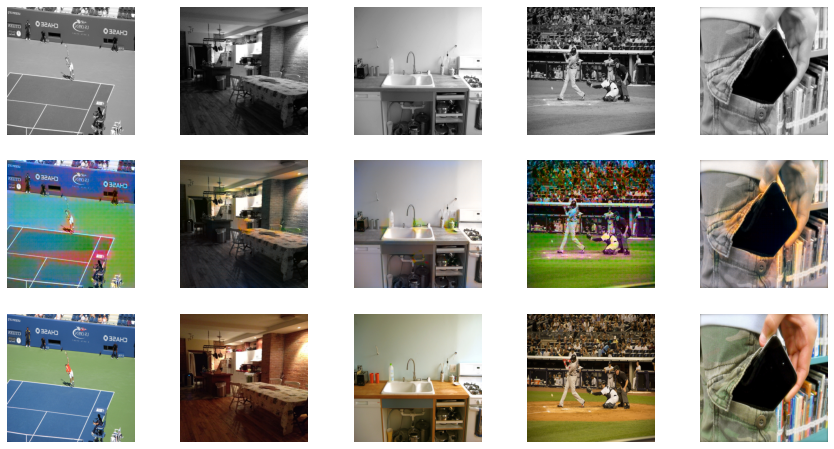
The U-Net we built with the ResNet18 backbone is already awesome in colorizing images after pretraining with L1 Loss only (a step before the final adversarial training). But, the model is still conservative and encourages using gray-ish colors when it is not sure about what the object is or what color it should be. However, it performs really awesome for common scenes in the images like sky, tree, grass, etc. Here I show you the outputs of the U-Net without adversarial training and U-Net with adversarial training to better depict the significant difference that the adversarial training is making in our case even using less number of epochs (20 as compared to without pretraining that is 100):
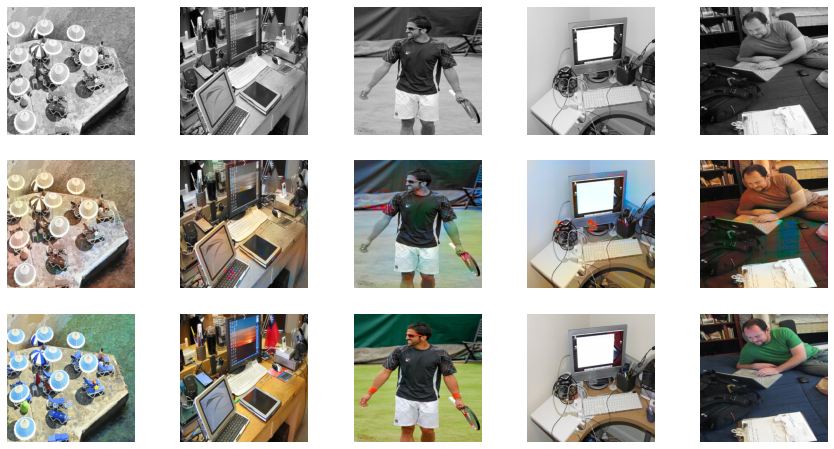
Using Pretrained generator
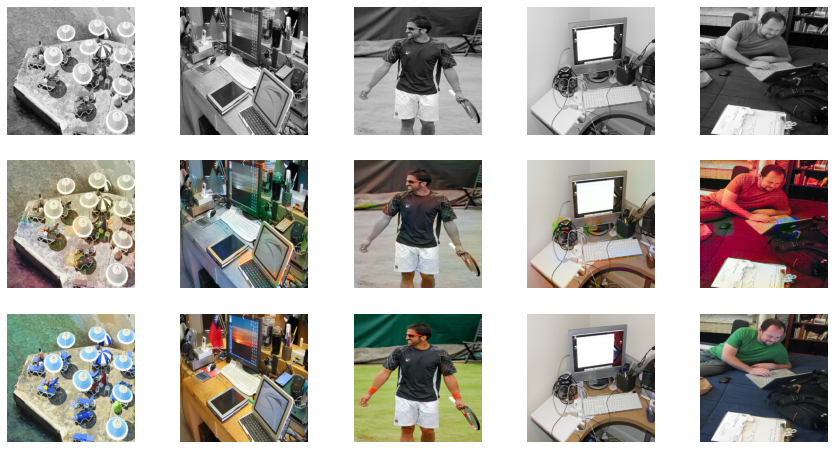
Without Pretraining