Among the two pre-eminent supervised and unsupervised machine learning techniques, classification is a popular method of the supervised algorithms -- where labeled examples of prior instances by humans can guide the training of a machine. Below, we introduce classfication with a few hands-on examples.
- Public Datasets for ML Exploration
- Public Jupyter Notebook Zoo
- Python Data Science Handbook
- BQML, AutoML, Colab, AI Notebooks
- Simple Challenge -- Garfield
- Pandas for Data Exploration
- Seaborn, Matplotlib, Plotly for Interaction Visualization
- Training, Testing, and Scoring Datasets
- Factor Plots
- Data Shaping/Curation
- Data Visualization with COVID Data
- Data Encoding
- Leading Indicators
- Model Selection
- Algorithmic Selection
- Measuring Performance
- Accuracy
- Confusion Matrix
- Logloss, Precision, Recall, F1-Score
- MNIST Example
There are numerous ML datasets for explorations in the public domain: contributed by many commercial and academic organizations. A few examples below.
- Kaggle
- Google Public Datasets
- Google Dataset Search
- Open Data Gov
- Awesome Public Datasets
- UCI ML Datasets
- FiveThirtyEight Datasets
- Google Open Images
- Coco Dataset
- Google Research Datasets
- AI Data Labeling
There are even more contributions of prebuilt/open-source models (some represented as notebooks) in the open domain. Here, a few examples --
- AI Hub
- Colab Examples
- Analytics Zoo
- Kaggle
- Google Experiments
- Jupyter Notebook Gallery
- KDNuggets
- Azure ML Learning
- Github Central
 |  |  |
Previously, in BQML model, we developed in-database classification model directly in the big query data warehouse, so continuous training, continuous scoring methods are totally opaque, managed, and seamless to consumers.
-- Jump to https://console.cloud.google.com/bigquery?project=project-dynamic-modeling&p=project-dynamic-modeling
-- and key the model as following
CREATE OR REPLACE MODEL
 `bqml_tutorial.cardio logistic_model` OPTIONS
   (model type='LOGISTIC REG',
    auto_class_weights=TRUE,
    input_label_cols=['cardio']) AS
  SELECT age, gender, height, weight, ap_hi,
    ap_lo, cholesterol, gluc, smoke,
    alco, active, cardio
  FROM `project-dynamic-modeling.cardio_disease.cardio_disease`
There is also a managed service in Google Cloud Platform (GCP) -- called AutoML tables -- which provides a total seamless experience for citizen data science.
Today, we focus on the middle: building the classification model from the start. Specifically, we will be using the Google Colab (a freemium JuPyteR notebook service for Julia, Python and R) to ingest, shape, explore, visualize, and model data.
There is also a managed JupyterHub environment offered by Google (called AI Notebooks) that we will utilize later.
Garfield lays down in the evening to watch TV. I think his biometrics and activity choices during the day are indicative of his TV propensity at night. Do you see a pattern in this data?
import pandas as pd

garfield_biometrics = pd.read_csv('https://drive.google.com/uc?export=download&id=1_pOxAYnUWZ0FNdVnPMdkBo0WEgfMZLy0').\
 applymap(lambda x: x if x is not None and str(x).lower() != 'nan' else None)
garfield_biometrics.head(25)| Day | 8AM | 9AM | 10AM | 11AM | Noon | Lunch Bill | 1PM | 2PM | 3PM | 4PM | 5PM | Commute | DayOfWeek | WatchTV | |
|---|---|---|---|---|---|---|---|---|---|---|---|---|---|---|---|
| 0 | 1-Jan-21 | Coffee | 6 | 6 | 0 | Sandwich | 7.35 | 9 | 8 | 5 | Tea | 2 | Long | Mon | Yes |
| 1 | 2-Jan-21 | Doughnut | 2 | 5 | 5 | Lenthils | 3.02 | 3 | 4 | 3 | PingPong | 0 | Short | Tue | No |
| 2 | 3-Jan-21 | Coffee | 7 | 10 | 9 | Taco | 4.50 | 0 | 4 | 3 | PingPong | 7 | Short | Wed | No |
| 3 | 4-Jan-21 | Coffee | 9 | 7 | 8 | Sandwich | 7.35 | 2 | 6 | 2 | PingPong | 5 | Short | Thu | Yes |
| 4 | 5-Jan-21 | Doughnut | 3 | 10 | 3 | Sandwich | 7.35 | 0 | 7 | 6 | Tea | 7 | Long | Fri | Yes |
| 5 | 6-Jan-21 | Sandwich | 9 | 9 | 1 | Lenthils | 2.98 | 5 | 7 | 10 | Coffee | 10 | Short | Sat | No |
| 6 | 7-Jan-21 | Doughnut | 3 | 10 | 7 | Lenthils | 2.80 | 10 | 6 | 1 | Coffee | 6 | Short | Mon | No |
| 7 | 8-Jan-21 | Coffee | 3 | 0 | 6 | Taco | 4.40 | 8 | 5 | 3 | Tea | 6 | Short | Tue | No |
| 8 | 9-Jan-21 | Sandwich | 5 | 4 | 7 | Lenthils | 2.98 | 2 | 1 | 3 | PingPong | 5 | Short | Wed | No |
| 9 | 10-Jan-21 | Coffee | 6 | 10 | 1 | Taco | 5.00 | 4 | 3 | 5 | Workout | 0 | Short | Thu | Yes |
| 10 | 11-Jan-21 | Doughnut | 7 | 9 | 8 | Sandwich | 7.35 | 1 | 4 | 4 | Workout | 3 | Long | Fri | Yes |
| 11 | 12-Jan-21 | Sandwich | 9 | 6 | 7 | Sandwich | 7.39 | 10 | 7 | 3 | Workout | 5 | Long | Sat | Yes |
| 12 | 13-Jan-21 | Sandwich | 8 | 10 | 7 | Taco | 4.50 | 9 | 0 | 3 | PingPong | 1 | Short | Mon | No |
| 13 | 14-Jan-21 | Doughnut | 2 | 2 | 2 | Sandwich | 7.25 | 9 | 4 | 4 | Tea | 9 | Short | Tue | Yes |
| 14 | 15-Jan-21 | Coffee | 5 | 9 | 5 | Taco | 4.60 | 8 | 0 | 3 | Coffee | 10 | Short | Wed | Yes |
| 15 | 16-Jan-21 | Coffee | 6 | 0 | 1 | Lenthils | 3.20 | 4 | 10 | 3 | PingPong | 6 | Short | Thu | No |
| 16 | 17-Jan-21 | Sandwich | 0 | 9 | 5 | Sandwich | 7.45 | 0 | 6 | 3 | PingPong | 3 | Short | Fri | Yes |
| 17 | 18-Jan-21 | Doughnut | 2 | 0 | 4 | Taco | 4.80 | 8 | 5 | 5 | Coffee | 2 | Long | Sat | Yes |
| 18 | 19-Jan-21 | Coffee | 5 | 7 | 6 | Taco | 4.75 | 9 | 6 | 10 | Workout | 5 | Short | Mon | No |
| 19 | 20-Jan-21 | Coffee | 6 | 0 | 2 | Sandwich | 7.35 | 6 | 7 | 4 | Workout | 6 | Short | Tue | None |
| 20 | 21-Jan-21 | Coffee | 9 | 9 | 3 | Lenthils | 2.79 | 6 | 9 | 4 | PingPong | 9 | Long | Wed | None |
pandas is an open source, BSD-licensed library providing high-performance, easy-to-use data structures and data analysis tools for the Python programming language. It was developed by Wes McKinney in 2008.
import pandas as pd

# Fetch data from URL
# Of course, pandas can fetch data from many other sources like SQL databases, Files, Cloud etc
garfield_biometrics = pd.read_csv('https://drive.google.com/uc?export=download&id=1_pOxAYnUWZ0FNdVnPMdkBo0WEgfMZLy0').\
 applymap(lambda x: x if x is not None and str(x).lower() != 'nan' else None)
display(garfield_biometrics)| Day | 8AM | 9AM | 10AM | 11AM | Noon | Lunch Bill | 1PM | 2PM | 3PM | 4PM | 5PM | Commute | DayOfWeek | WatchTV | |
|---|---|---|---|---|---|---|---|---|---|---|---|---|---|---|---|
| 0 | 1-Jan-21 | Coffee | 6 | 6 | 0 | Sandwich | 7.35 | 9 | 8 | 5 | Tea | 2 | Long | Mon | Yes |
| 1 | 2-Jan-21 | Doughnut | 2 | 5 | 5 | Lenthils | 3.02 | 3 | 4 | 3 | PingPong | 0 | Short | Tue | No |
| 2 | 3-Jan-21 | Coffee | 7 | 10 | 9 | Taco | 4.50 | 0 | 4 | 3 | PingPong | 7 | Short | Wed | No |
| 3 | 4-Jan-21 | Coffee | 9 | 7 | 8 | Sandwich | 7.35 | 2 | 6 | 2 | PingPong | 5 | Short | Thu | Yes |
| 4 | 5-Jan-21 | Doughnut | 3 | 10 | 3 | Sandwich | 7.35 | 0 | 7 | 6 | Tea | 7 | Long | Fri | Yes |
| 5 | 6-Jan-21 | Sandwich | 9 | 9 | 1 | Lenthils | 2.98 | 5 | 7 | 10 | Coffee | 10 | Short | Sat | No |
| 6 | 7-Jan-21 | Doughnut | 3 | 10 | 7 | Lenthils | 2.80 | 10 | 6 | 1 | Coffee | 6 | Short | Mon | No |
| 7 | 8-Jan-21 | Coffee | 3 | 0 | 6 | Taco | 4.40 | 8 | 5 | 3 | Tea | 6 | Short | Tue | No |
| 8 | 9-Jan-21 | Sandwich | 5 | 4 | 7 | Lenthils | 2.98 | 2 | 1 | 3 | PingPong | 5 | Short | Wed | No |
| 9 | 10-Jan-21 | Coffee | 6 | 10 | 1 | Taco | 5.00 | 4 | 3 | 5 | Workout | 0 | Short | Thu | Yes |
| 10 | 11-Jan-21 | Doughnut | 7 | 9 | 8 | Sandwich | 7.35 | 1 | 4 | 4 | Workout | 3 | Long | Fri | Yes |
| 11 | 12-Jan-21 | Sandwich | 9 | 6 | 7 | Sandwich | 7.39 | 10 | 7 | 3 | Workout | 5 | Long | Sat | Yes |
| 12 | 13-Jan-21 | Sandwich | 8 | 10 | 7 | Taco | 4.50 | 9 | 0 | 3 | PingPong | 1 | Short | Mon | No |
| 13 | 14-Jan-21 | Doughnut | 2 | 2 | 2 | Sandwich | 7.25 | 9 | 4 | 4 | Tea | 9 | Short | Tue | Yes |
| 14 | 15-Jan-21 | Coffee | 5 | 9 | 5 | Taco | 4.60 | 8 | 0 | 3 | Coffee | 10 | Short | Wed | Yes |
| 15 | 16-Jan-21 | Coffee | 6 | 0 | 1 | Lenthils | 3.20 | 4 | 10 | 3 | PingPong | 6 | Short | Thu | No |
| 16 | 17-Jan-21 | Sandwich | 0 | 9 | 5 | Sandwich | 7.45 | 0 | 6 | 3 | PingPong | 3 | Short | Fri | Yes |
| 17 | 18-Jan-21 | Doughnut | 2 | 0 | 4 | Taco | 4.80 | 8 | 5 | 5 | Coffee | 2 | Long | Sat | Yes |
| 18 | 19-Jan-21 | Coffee | 5 | 7 | 6 | Taco | 4.75 | 9 | 6 | 10 | Workout | 5 | Short | Mon | No |
| 19 | 20-Jan-21 | Coffee | 6 | 0 | 2 | Sandwich | 7.35 | 6 | 7 | 4 | Workout | 6 | Short | Tue | None |
| 20 | 21-Jan-21 | Coffee | 9 | 9 | 3 | Lenthils | 2.79 | 6 | 9 | 4 | PingPong | 9 | Long | Wed | None |
garfield_biometrics.dtypesDay object
8AM object
9AM int64
10AM int64
11AM int64
Noon object
Lunch Bill float64
1PM int64
2PM int64
3PM int64
4PM object
5PM int64
Commute object
DayOfWeek object
WatchTV object
dtype: object
Pandas can be used to slice, dice, and describe data of course. And traditional sorting, filtering, grouping, transforms work too.
# Columnar Definition of the data
from IPython.display import *
display(HTML("The columns of the dataframe are"))
display(pd.DataFrame(garfield_biometrics.columns, columns=['Column Name']).set_index('Column Name').T)

display(HTML("The rows of the dataframe are"))
display(pd.DataFrame(garfield_biometrics.index, columns=['Row Name']).set_index('Row Name').T)
The columns of the dataframe are
| Column Name | Day | 8AM | 9AM | 10AM | 11AM | Noon | Lunch Bill | 1PM | 2PM | 3PM | 4PM | 5PM | Commute | DayOfWeek | WatchTV |
|---|
The rows of the dataframe are
| Row Name | 0 | 1 | 2 | 3 | 4 | 5 | 6 | 7 | 8 | 9 | ... | 11 | 12 | 13 | 14 | 15 | 16 | 17 | 18 | 19 | 20 |
|---|
0 rows × 21 columns
# Shape of the data
HTML(f'The shape of the dataset is {garfield_biometrics.shape[0]} rows and {garfield_biometrics.shape[1]} columns')
The shape of the dataset is 21 rows and 15 columns
# Slice of the data, row wise alternates
display(garfield_biometrics[4:12:2].head(100))| Day | 8AM | 9AM | 10AM | 11AM | Noon | Lunch Bill | 1PM | 2PM | 3PM | 4PM | 5PM | Commute | DayOfWeek | WatchTV | |
|---|---|---|---|---|---|---|---|---|---|---|---|---|---|---|---|
| 4 | 5-Jan-21 | Doughnut | 3 | 10 | 3 | Sandwich | 7.35 | 0 | 7 | 6 | Tea | 7 | Long | Fri | Yes |
| 6 | 7-Jan-21 | Doughnut | 3 | 10 | 7 | Lenthils | 2.80 | 10 | 6 | 1 | Coffee | 6 | Short | Mon | No |
| 8 | 9-Jan-21 | Sandwich | 5 | 4 | 7 | Lenthils | 2.98 | 2 | 1 | 3 | PingPong | 5 | Short | Wed | No |
| 10 | 11-Jan-21 | Doughnut | 7 | 9 | 8 | Sandwich | 7.35 | 1 | 4 | 4 | Workout | 3 | Long | Fri | Yes |
# Slice of the data, column wise, first five columns
display(garfield_biometrics.iloc[:,:5].head(5))| Day | 8AM | 9AM | 10AM | 11AM | |
|---|---|---|---|---|---|
| 0 | 1-Jan-21 | Coffee | 6 | 6 | 0 |
| 1 | 2-Jan-21 | Doughnut | 2 | 5 | 5 |
| 2 | 3-Jan-21 | Coffee | 7 | 10 | 9 |
| 3 | 4-Jan-21 | Coffee | 9 | 7 | 8 |
| 4 | 5-Jan-21 | Doughnut | 3 | 10 | 3 |
# Sorted by breakfast at 8AM
display(garfield_biometrics.sort_values('8AM').head(5))| Day | 8AM | 9AM | 10AM | 11AM | Noon | Lunch Bill | 1PM | 2PM | 3PM | 4PM | 5PM | Commute | DayOfWeek | WatchTV | |
|---|---|---|---|---|---|---|---|---|---|---|---|---|---|---|---|
| 0 | 1-Jan-21 | Coffee | 6 | 6 | 0 | Sandwich | 7.35 | 9 | 8 | 5 | Tea | 2 | Long | Mon | Yes |
| 18 | 19-Jan-21 | Coffee | 5 | 7 | 6 | Taco | 4.75 | 9 | 6 | 10 | Workout | 5 | Short | Mon | No |
| 15 | 16-Jan-21 | Coffee | 6 | 0 | 1 | Lenthils | 3.20 | 4 | 10 | 3 | PingPong | 6 | Short | Thu | No |
| 14 | 15-Jan-21 | Coffee | 5 | 9 | 5 | Taco | 4.60 | 8 | 0 | 3 | Coffee | 10 | Short | Wed | Yes |
| 19 | 20-Jan-21 | Coffee | 6 | 0 | 2 | Sandwich | 7.35 | 6 | 7 | 4 | Workout | 6 | Short | Tue | None |
# Specific Columns
display(garfield_biometrics[['8AM', 'Noon', 'Commute', 'WatchTV']].head(5))| 8AM | Noon | Commute | WatchTV | |
|---|---|---|---|---|
| 0 | Coffee | Sandwich | Long | Yes |
| 1 | Doughnut | Lenthils | Short | No |
| 2 | Coffee | Taco | Short | No |
| 3 | Coffee | Sandwich | Short | Yes |
| 4 | Doughnut | Sandwich | Long | Yes |
# Group count Lunches
garfield_biometrics.groupby('Noon')['Noon'].agg('count').to_frame()| Noon | |
|---|---|
| Noon | |
| Lenthils | 6 |
| Sandwich | 8 |
| Taco | 7 |
# Filter: what is the WatchTV when Lunch is Taco
garfield_biometrics[garfield_biometrics.Noon == 'Taco'][['Noon', 'WatchTV']]| Noon | WatchTV | |
|---|---|---|
| 2 | Taco | No |
| 7 | Taco | No |
| 9 | Taco | Yes |
| 12 | Taco | No |
| 14 | Taco | Yes |
| 17 | Taco | Yes |
| 18 | Taco | No |
# Data Types of the field
display(garfield_biometrics.dtypes)
display(garfield_biometrics.astype(str).dtypes)
Day object
8AM object
9AM int64
10AM int64
11AM int64
Noon object
Lunch Bill float64
1PM int64
2PM int64
3PM int64
4PM object
5PM int64
Commute object
DayOfWeek object
WatchTV object
dtype: object
Day object
8AM object
9AM object
10AM object
11AM object
Noon object
Lunch Bill object
1PM object
2PM object
3PM object
4PM object
5PM object
Commute object
DayOfWeek object
WatchTV object
dtype: object
# String Type Selection Only
garfield_biometrics.select_dtypes('object').head()| Day | 8AM | Noon | 4PM | Commute | DayOfWeek | WatchTV | |
|---|---|---|---|---|---|---|---|
| 0 | 1-Jan-21 | Coffee | Sandwich | Tea | Long | Mon | Yes |
| 1 | 2-Jan-21 | Doughnut | Lenthils | PingPong | Short | Tue | No |
| 2 | 3-Jan-21 | Coffee | Taco | PingPong | Short | Wed | No |
| 3 | 4-Jan-21 | Coffee | Sandwich | PingPong | Short | Thu | Yes |
| 4 | 5-Jan-21 | Doughnut | Sandwich | Tea | Long | Fri | Yes |
# Capture categorical variables
string_types = garfield_biometrics.select_dtypes('object').columns.tolist()
# Make a in-mem copy of the table
garfield_biometrics_copy = garfield_biometrics.copy()
# For each column that is string, xform to titlecase and remove any trailing space
garfield_biometrics_copy[string_types] = garfield_biometrics_copy[string_types].applymap(lambda x: str(x).strip().title() if x is not None and str(x).lower() != 'none' else None)
# Preview
display(garfield_biometrics_copy.head(200))| Day | 8AM | 9AM | 10AM | 11AM | Noon | Lunch Bill | 1PM | 2PM | 3PM | 4PM | 5PM | Commute | DayOfWeek | WatchTV | |
|---|---|---|---|---|---|---|---|---|---|---|---|---|---|---|---|
| 0 | 1-Jan-21 | Coffee | 6 | 6 | 0 | Sandwich | 7.35 | 9 | 8 | 5 | Tea | 2 | Long | Mon | Yes |
| 1 | 2-Jan-21 | Doughnut | 2 | 5 | 5 | Lenthils | 3.02 | 3 | 4 | 3 | Pingpong | 0 | Short | Tue | No |
| 2 | 3-Jan-21 | Coffee | 7 | 10 | 9 | Taco | 4.50 | 0 | 4 | 3 | Pingpong | 7 | Short | Wed | No |
| 3 | 4-Jan-21 | Coffee | 9 | 7 | 8 | Sandwich | 7.35 | 2 | 6 | 2 | Pingpong | 5 | Short | Thu | Yes |
| 4 | 5-Jan-21 | Doughnut | 3 | 10 | 3 | Sandwich | 7.35 | 0 | 7 | 6 | Tea | 7 | Long | Fri | Yes |
| 5 | 6-Jan-21 | Sandwich | 9 | 9 | 1 | Lenthils | 2.98 | 5 | 7 | 10 | Coffee | 10 | Short | Sat | No |
| 6 | 7-Jan-21 | Doughnut | 3 | 10 | 7 | Lenthils | 2.80 | 10 | 6 | 1 | Coffee | 6 | Short | Mon | No |
| 7 | 8-Jan-21 | Coffee | 3 | 0 | 6 | Taco | 4.40 | 8 | 5 | 3 | Tea | 6 | Short | Tue | No |
| 8 | 9-Jan-21 | Sandwich | 5 | 4 | 7 | Lenthils | 2.98 | 2 | 1 | 3 | Pingpong | 5 | Short | Wed | No |
| 9 | 10-Jan-21 | Coffee | 6 | 10 | 1 | Taco | 5.00 | 4 | 3 | 5 | Workout | 0 | Short | Thu | Yes |
| 10 | 11-Jan-21 | Doughnut | 7 | 9 | 8 | Sandwich | 7.35 | 1 | 4 | 4 | Workout | 3 | Long | Fri | Yes |
| 11 | 12-Jan-21 | Sandwich | 9 | 6 | 7 | Sandwich | 7.39 | 10 | 7 | 3 | Workout | 5 | Long | Sat | Yes |
| 12 | 13-Jan-21 | Sandwich | 8 | 10 | 7 | Taco | 4.50 | 9 | 0 | 3 | Pingpong | 1 | Short | Mon | No |
| 13 | 14-Jan-21 | Doughnut | 2 | 2 | 2 | Sandwich | 7.25 | 9 | 4 | 4 | Tea | 9 | Short | Tue | Yes |
| 14 | 15-Jan-21 | Coffee | 5 | 9 | 5 | Taco | 4.60 | 8 | 0 | 3 | Coffee | 10 | Short | Wed | Yes |
| 15 | 16-Jan-21 | Coffee | 6 | 0 | 1 | Lenthils | 3.20 | 4 | 10 | 3 | Pingpong | 6 | Short | Thu | No |
| 16 | 17-Jan-21 | Sandwich | 0 | 9 | 5 | Sandwich | 7.45 | 0 | 6 | 3 | Pingpong | 3 | Short | Fri | Yes |
| 17 | 18-Jan-21 | Doughnut | 2 | 0 | 4 | Taco | 4.80 | 8 | 5 | 5 | Coffee | 2 | Long | Sat | Yes |
| 18 | 19-Jan-21 | Coffee | 5 | 7 | 6 | Taco | 4.75 | 9 | 6 | 10 | Workout | 5 | Short | Mon | No |
| 19 | 20-Jan-21 | Coffee | 6 | 0 | 2 | Sandwich | 7.35 | 6 | 7 | 4 | Workout | 6 | Short | Tue | None |
| 20 | 21-Jan-21 | Coffee | 9 | 9 | 3 | Lenthils | 2.79 | 6 | 9 | 4 | Pingpong | 9 | Long | Wed | None |
# Rename '8AM' to 'Breakfast', 'Noon' to 'Lunch', '4PM' to 'Post Siesta'
display(garfield_biometrics_copy.rename({
    '8AM':'Breakfast',
    'Noon':'Lunch',
    '4PM':'Post Siesta'
    }, axis=1).head(5))

# Notice pandas dataframe is immutable: aka it creates a copy when you change something
display(pd.DataFrame(garfield_biometrics_copy.columns, columns=['Column Name']).set_index('Column Name').T)| Day | Breakfast | 9AM | 10AM | 11AM | Lunch | Lunch Bill | 1PM | 2PM | 3PM | Post Siesta | 5PM | Commute | DayOfWeek | WatchTV | |
|---|---|---|---|---|---|---|---|---|---|---|---|---|---|---|---|
| 0 | 1-Jan-21 | Coffee | 6 | 6 | 0 | Sandwich | 7.35 | 9 | 8 | 5 | Tea | 2 | Long | Mon | Yes |
| 1 | 2-Jan-21 | Doughnut | 2 | 5 | 5 | Lenthils | 3.02 | 3 | 4 | 3 | Pingpong | 0 | Short | Tue | No |
| 2 | 3-Jan-21 | Coffee | 7 | 10 | 9 | Taco | 4.50 | 0 | 4 | 3 | Pingpong | 7 | Short | Wed | No |
| 3 | 4-Jan-21 | Coffee | 9 | 7 | 8 | Sandwich | 7.35 | 2 | 6 | 2 | Pingpong | 5 | Short | Thu | Yes |
| 4 | 5-Jan-21 | Doughnut | 3 | 10 | 3 | Sandwich | 7.35 | 0 | 7 | 6 | Tea | 7 | Long | Fri | Yes |
| Column Name | Day | 8AM | 9AM | 10AM | 11AM | Noon | Lunch Bill | 1PM | 2PM | 3PM | 4PM | 5PM | Commute | DayOfWeek | WatchTV |
|---|
# Make changes inplace
garfield_biometrics_copy.rename({
    '8AM':'Breakfast',
    'Noon':'Lunch',
    '4PM':'Post Siesta'
    }, axis=1, inplace=True)

display(garfield_biometrics_copy.head(5))| Day | Breakfast | 9AM | 10AM | 11AM | Lunch | Lunch Bill | 1PM | 2PM | 3PM | Post Siesta | 5PM | Commute | DayOfWeek | WatchTV | |
|---|---|---|---|---|---|---|---|---|---|---|---|---|---|---|---|
| 0 | 1-Jan-21 | Coffee | 6 | 6 | 0 | Sandwich | 7.35 | 9 | 8 | 5 | Tea | 2 | Long | Mon | Yes |
| 1 | 2-Jan-21 | Doughnut | 2 | 5 | 5 | Lenthils | 3.02 | 3 | 4 | 3 | Pingpong | 0 | Short | Tue | No |
| 2 | 3-Jan-21 | Coffee | 7 | 10 | 9 | Taco | 4.50 | 0 | 4 | 3 | Pingpong | 7 | Short | Wed | No |
| 3 | 4-Jan-21 | Coffee | 9 | 7 | 8 | Sandwich | 7.35 | 2 | 6 | 2 | Pingpong | 5 | Short | Thu | Yes |
| 4 | 5-Jan-21 | Doughnut | 3 | 10 | 3 | Sandwich | 7.35 | 0 | 7 | 6 | Tea | 7 | Long | Fri | Yes |
Let us describe (aka skew, mean, mode, min, max) distributions of the data
# Descriptive Stats of the numerical Attributes
display(garfield_biometrics_copy.describe())| 9AM | 10AM | 11AM | Lunch Bill | 1PM | 2PM | 3PM | 5PM | |
|---|---|---|---|---|---|---|---|---|
| count | 21.000000 | 21.000000 | 21.000000 | 21.000000 | 21.000000 | 21.000000 | 21.000000 | 21.000000 |
| mean | 5.333333 | 6.285714 | 4.619048 | 5.198095 | 5.380952 | 5.190476 | 4.142857 | 5.095238 |
| std | 2.708013 | 3.809762 | 2.729033 | 1.867262 | 3.570381 | 2.676174 | 2.242448 | 3.048028 |
| min | 0.000000 | 0.000000 | 0.000000 | 2.790000 | 0.000000 | 0.000000 | 1.000000 | 0.000000 |
| 25% | 3.000000 | 4.000000 | 2.000000 | 3.200000 | 2.000000 | 4.000000 | 3.000000 | 3.000000 |
| 50% | 6.000000 | 7.000000 | 5.000000 | 4.750000 | 6.000000 | 6.000000 | 3.000000 | 5.000000 |
| 75% | 7.000000 | 9.000000 | 7.000000 | 7.350000 | 9.000000 | 7.000000 | 5.000000 | 7.000000 |
| max | 9.000000 | 10.000000 | 9.000000 | 7.450000 | 10.000000 | 10.000000 | 10.000000 | 10.000000 |
%matplotlib inline
import seaborn as sns
import numpy as np
# Set figure size
sns.set(rc={'figure.figsize':(9.0, 5.0)}, style="darkgrid")
# Show distribution plots
sns.kdeplot(data=garfield_biometrics_copy.select_dtypes(include=np.number))
<AxesSubplot:ylabel='Density'>

# Describe categorical types of data as well
garfield_biometrics_copy.select_dtypes(exclude=np.number).describe(include='all')

#garfield_biometrics_copy.Lunch.value_counts().plot(kind='bar')| Day | Breakfast | Lunch | Post Siesta | Commute | DayOfWeek | WatchTV | |
|---|---|---|---|---|---|---|---|
| count | 21 | 21 | 21 | 21 | 21 | 21 | 19 |
| unique | 21 | 3 | 3 | 4 | 2 | 6 | 2 |
| top | 6-Jan-21 | Coffee | Sandwich | Pingpong | Short | Mon | Yes |
| freq | 1 | 10 | 8 | 8 | 15 | 4 | 10 |


Unknown Unknown Dog Unknown Unknown Cat

- Training Dataset: The sample of labeled data used to fit the model. The actual dataset that we use to train the model. The model sees and learns from this data.
- Testing Dataset: The sample of labeled data used to provide an unbiased evaluation of a final model fit on the training dataset. A test dataset is independent of the training dataset, but it follows the same probability distribution as the training dataset.
- If a model learned from the training dataset also fits the test dataset well, the model is NOT overfit.
- If a model learned from the training dataset does not predict test dataset well, the model is overfit.
- Scoring Dataset: The unlabeled data -- from real world -- that is used to predict outcomes from the trained model.
Only consider the "labeled" data: data that has been "supervised" by human intelligence. Notice that our toy data has missing labels in the last two rows. We will use this data as "scoring" data.
labeled_garfield_data = garfield_biometrics_copy[~garfield_biometrics_copy.WatchTV.isna()]
labeled_garfield_data| Day | Breakfast | 9AM | 10AM | 11AM | Lunch | Lunch Bill | 1PM | 2PM | 3PM | Post Siesta | 5PM | Commute | DayOfWeek | WatchTV | |
|---|---|---|---|---|---|---|---|---|---|---|---|---|---|---|---|
| 0 | 1-Jan-21 | Coffee | 6 | 6 | 0 | Sandwich | 7.35 | 9 | 8 | 5 | Tea | 2 | Long | Mon | Yes |
| 1 | 2-Jan-21 | Doughnut | 2 | 5 | 5 | Lenthils | 3.02 | 3 | 4 | 3 | Pingpong | 0 | Short | Tue | No |
| 2 | 3-Jan-21 | Coffee | 7 | 10 | 9 | Taco | 4.50 | 0 | 4 | 3 | Pingpong | 7 | Short | Wed | No |
| 3 | 4-Jan-21 | Coffee | 9 | 7 | 8 | Sandwich | 7.35 | 2 | 6 | 2 | Pingpong | 5 | Short | Thu | Yes |
| 4 | 5-Jan-21 | Doughnut | 3 | 10 | 3 | Sandwich | 7.35 | 0 | 7 | 6 | Tea | 7 | Long | Fri | Yes |
| 5 | 6-Jan-21 | Sandwich | 9 | 9 | 1 | Lenthils | 2.98 | 5 | 7 | 10 | Coffee | 10 | Short | Sat | No |
| 6 | 7-Jan-21 | Doughnut | 3 | 10 | 7 | Lenthils | 2.80 | 10 | 6 | 1 | Coffee | 6 | Short | Mon | No |
| 7 | 8-Jan-21 | Coffee | 3 | 0 | 6 | Taco | 4.40 | 8 | 5 | 3 | Tea | 6 | Short | Tue | No |
| 8 | 9-Jan-21 | Sandwich | 5 | 4 | 7 | Lenthils | 2.98 | 2 | 1 | 3 | Pingpong | 5 | Short | Wed | No |
| 9 | 10-Jan-21 | Coffee | 6 | 10 | 1 | Taco | 5.00 | 4 | 3 | 5 | Workout | 0 | Short | Thu | Yes |
| 10 | 11-Jan-21 | Doughnut | 7 | 9 | 8 | Sandwich | 7.35 | 1 | 4 | 4 | Workout | 3 | Long | Fri | Yes |
| 11 | 12-Jan-21 | Sandwich | 9 | 6 | 7 | Sandwich | 7.39 | 10 | 7 | 3 | Workout | 5 | Long | Sat | Yes |
| 12 | 13-Jan-21 | Sandwich | 8 | 10 | 7 | Taco | 4.50 | 9 | 0 | 3 | Pingpong | 1 | Short | Mon | No |
| 13 | 14-Jan-21 | Doughnut | 2 | 2 | 2 | Sandwich | 7.25 | 9 | 4 | 4 | Tea | 9 | Short | Tue | Yes |
| 14 | 15-Jan-21 | Coffee | 5 | 9 | 5 | Taco | 4.60 | 8 | 0 | 3 | Coffee | 10 | Short | Wed | Yes |
| 15 | 16-Jan-21 | Coffee | 6 | 0 | 1 | Lenthils | 3.20 | 4 | 10 | 3 | Pingpong | 6 | Short | Thu | No |
| 16 | 17-Jan-21 | Sandwich | 0 | 9 | 5 | Sandwich | 7.45 | 0 | 6 | 3 | Pingpong | 3 | Short | Fri | Yes |
| 17 | 18-Jan-21 | Doughnut | 2 | 0 | 4 | Taco | 4.80 | 8 | 5 | 5 | Coffee | 2 | Long | Sat | Yes |
| 18 | 19-Jan-21 | Coffee | 5 | 7 | 6 | Taco | 4.75 | 9 | 6 | 10 | Workout | 5 | Short | Mon | No |
Quickly see correlations between numerical and output attributes
# See if any numeric columns have relevance
sns.pairplot(data=labeled_garfield_data, hue='WatchTV', diag_kind="kde")
<seaborn.axisgrid.PairGrid at 0x7fdd04da0d60>

- Numerical Attributes -- Independent variables in the study usually represented as a real number.
- Temporal Attributes -- Time variable: for example, date fields. Span/aging factors can be derived.
- Spatial Attributes -- Location variable: for example, latitude and longitude. Distance factors can be derived.
- Ordinal Attributes -- Numerical or Text variables: implies ordering. For example, low, medium, high can be encoded as 1, 2, 3 respectively
- Categorical Attributes -- String variables: usually do not imply any ordinality (ordering) but have small cardinality. For example, Male-Female, Winter-Spring-Summer-Fall
- Text Attributes -- String variables that usually have very hgh cardinality. For example, user reviews with commentary
- ID Attributes -- Identity attributes (usually string/long numbers) that have no significance in predicting outcome. For example, social security number, warehouse id. It is best to avoid these ID attributes in the modeling exercise.
- Leakage attributes -- redundant attributes that usually are deterministically correlated with the outcome label attribute. For example, say we have two temperature attributes -- one in Fahrenheit and another Celsius -- where Fahrenheit temperature is the predicted attribute, having the Celsius accidentally in the modeling will lead to absolute predictions that fail to capture true stochasticity of the model.
- Categorical Labels -- Usually a string or ordinal variable with small cardinality. For example, asymptomatic recovery, symptomatic recovery, intensive care recovery, fatal. This usually indicates a classification problem.
- Numerical Labels -- Usually a numerical output variable. For example, business travel volume. This usually indicates a regression problem.
- When labels do not exist in the dataset, it usually indicates a unsupervised learning problem.
Impute missing values with mean, interpolation, forward-fill, backward-fill, drop altogether.
# Where do we have invalid values
garfield_biometrics_copy.isna()[-4:]| Day | Breakfast | 9AM | 10AM | 11AM | Lunch | Lunch Bill | 1PM | 2PM | 3PM | Post Siesta | 5PM | Commute | DayOfWeek | WatchTV | |
|---|---|---|---|---|---|---|---|---|---|---|---|---|---|---|---|
| 17 | False | False | False | False | False | False | False | False | False | False | False | False | False | False | False |
| 18 | False | False | False | False | False | False | False | False | False | False | False | False | False | False | False |
| 19 | False | False | False | False | False | False | False | False | False | False | False | False | False | False | True |
| 20 | False | False | False | False | False | False | False | False | False | False | False | False | False | False | True |
# Impute with forward fill
display(garfield_biometrics_copy.fillna(method='ffill')[-3:])| Day | Breakfast | 9AM | 10AM | 11AM | Lunch | Lunch Bill | 1PM | 2PM | 3PM | Post Siesta | 5PM | Commute | DayOfWeek | WatchTV | |
|---|---|---|---|---|---|---|---|---|---|---|---|---|---|---|---|
| 18 | 19-Jan-21 | Coffee | 5 | 7 | 6 | Taco | 4.75 | 9 | 6 | 10 | Workout | 5 | Short | Mon | No |
| 19 | 20-Jan-21 | Coffee | 6 | 0 | 2 | Sandwich | 7.35 | 6 | 7 | 4 | Workout | 6 | Short | Tue | No |
| 20 | 21-Jan-21 | Coffee | 9 | 9 | 3 | Lenthils | 2.79 | 6 | 9 | 4 | Pingpong | 9 | Long | Wed | No |
# Impute with backfill
display(garfield_biometrics_copy.fillna(method='bfill')[-3:])| Day | Breakfast | 9AM | 10AM | 11AM | Lunch | Lunch Bill | 1PM | 2PM | 3PM | Post Siesta | 5PM | Commute | DayOfWeek | WatchTV | |
|---|---|---|---|---|---|---|---|---|---|---|---|---|---|---|---|
| 18 | 19-Jan-21 | Coffee | 5 | 7 | 6 | Taco | 4.75 | 9 | 6 | 10 | Workout | 5 | Short | Mon | No |
| 19 | 20-Jan-21 | Coffee | 6 | 0 | 2 | Sandwich | 7.35 | 6 | 7 | 4 | Workout | 6 | Short | Tue | None |
| 20 | 21-Jan-21 | Coffee | 9 | 9 | 3 | Lenthils | 2.79 | 6 | 9 | 4 | Pingpong | 9 | Long | Wed | None |
# Impute with mode
display(garfield_biometrics_copy.fillna(garfield_biometrics_copy.WatchTV.mode()[0])[-3:])| Day | Breakfast | 9AM | 10AM | 11AM | Lunch | Lunch Bill | 1PM | 2PM | 3PM | Post Siesta | 5PM | Commute | DayOfWeek | WatchTV | |
|---|---|---|---|---|---|---|---|---|---|---|---|---|---|---|---|
| 18 | 19-Jan-21 | Coffee | 5 | 7 | 6 | Taco | 4.75 | 9 | 6 | 10 | Workout | 5 | Short | Mon | No |
| 19 | 20-Jan-21 | Coffee | 6 | 0 | 2 | Sandwich | 7.35 | 6 | 7 | 4 | Workout | 6 | Short | Tue | Yes |
| 20 | 21-Jan-21 | Coffee | 9 | 9 | 3 | Lenthils | 2.79 | 6 | 9 | 4 | Pingpong | 9 | Long | Wed | Yes |
# Impute with median
display(garfield_biometrics_copy.fillna(garfield_biometrics_copy.WatchTV.value_counts().idxmax())[-3:])| Day | Breakfast | 9AM | 10AM | 11AM | Lunch | Lunch Bill | 1PM | 2PM | 3PM | Post Siesta | 5PM | Commute | DayOfWeek | WatchTV | |
|---|---|---|---|---|---|---|---|---|---|---|---|---|---|---|---|
| 18 | 19-Jan-21 | Coffee | 5 | 7 | 6 | Taco | 4.75 | 9 | 6 | 10 | Workout | 5 | Short | Mon | No |
| 19 | 20-Jan-21 | Coffee | 6 | 0 | 2 | Sandwich | 7.35 | 6 | 7 | 4 | Workout | 6 | Short | Tue | Yes |
| 20 | 21-Jan-21 | Coffee | 9 | 9 | 3 | Lenthils | 2.79 | 6 | 9 | 4 | Pingpong | 9 | Long | Wed | Yes |
Pivot, transpose, or interpolate data
# Original data preview
display(garfield_biometrics_copy.tail(5))| Day | Breakfast | 9AM | 10AM | 11AM | Lunch | Lunch Bill | 1PM | 2PM | 3PM | Post Siesta | 5PM | Commute | DayOfWeek | WatchTV | |
|---|---|---|---|---|---|---|---|---|---|---|---|---|---|---|---|
| 16 | 17-Jan-21 | Sandwich | 0 | 9 | 5 | Sandwich | 7.45 | 0 | 6 | 3 | Pingpong | 3 | Short | Fri | Yes |
| 17 | 18-Jan-21 | Doughnut | 2 | 0 | 4 | Taco | 4.80 | 8 | 5 | 5 | Coffee | 2 | Long | Sat | Yes |
| 18 | 19-Jan-21 | Coffee | 5 | 7 | 6 | Taco | 4.75 | 9 | 6 | 10 | Workout | 5 | Short | Mon | No |
| 19 | 20-Jan-21 | Coffee | 6 | 0 | 2 | Sandwich | 7.35 | 6 | 7 | 4 | Workout | 6 | Short | Tue | None |
| 20 | 21-Jan-21 | Coffee | 9 | 9 | 3 | Lenthils | 2.79 | 6 | 9 | 4 | Pingpong | 9 | Long | Wed | None |
# Transposed preview
display(garfield_biometrics_copy[:5].T.head(4))| 0 | 1 | 2 | 3 | 4 | |
|---|---|---|---|---|---|
| Day | 1-Jan-21 | 2-Jan-21 | 3-Jan-21 | 4-Jan-21 | 5-Jan-21 |
| Breakfast | Coffee | Doughnut | Coffee | Coffee | Doughnut |
| 9AM | 6 | 2 | 7 | 9 | 3 |
| 10AM | 6 | 5 | 10 | 7 | 10 |
# Set daily "index"
display(garfield_biometrics_copy.set_index('Day').head(5))| Breakfast | 9AM | 10AM | 11AM | Lunch | Lunch Bill | 1PM | 2PM | 3PM | Post Siesta | 5PM | Commute | DayOfWeek | WatchTV | |
|---|---|---|---|---|---|---|---|---|---|---|---|---|---|---|
| Day | ||||||||||||||
| 1-Jan-21 | Coffee | 6 | 6 | 0 | Sandwich | 7.35 | 9 | 8 | 5 | Tea | 2 | Long | Mon | Yes |
| 2-Jan-21 | Doughnut | 2 | 5 | 5 | Lenthils | 3.02 | 3 | 4 | 3 | Pingpong | 0 | Short | Tue | No |
| 3-Jan-21 | Coffee | 7 | 10 | 9 | Taco | 4.50 | 0 | 4 | 3 | Pingpong | 7 | Short | Wed | No |
| 4-Jan-21 | Coffee | 9 | 7 | 8 | Sandwich | 7.35 | 2 | 6 | 2 | Pingpong | 5 | Short | Thu | Yes |
| 5-Jan-21 | Doughnut | 3 | 10 | 3 | Sandwich | 7.35 | 0 | 7 | 6 | Tea | 7 | Long | Fri | Yes |
# Reindex into a proper datetime format
display(garfield_biometrics_copy.set_index(pd.to_datetime(garfield_biometrics_copy.Day)).drop('Day', axis=1).head(5))| Breakfast | 9AM | 10AM | 11AM | Lunch | Lunch Bill | 1PM | 2PM | 3PM | Post Siesta | 5PM | Commute | DayOfWeek | WatchTV | |
|---|---|---|---|---|---|---|---|---|---|---|---|---|---|---|
| Day | ||||||||||||||
| 2021-01-01 | Coffee | 6 | 6 | 0 | Sandwich | 7.35 | 9 | 8 | 5 | Tea | 2 | Long | Mon | Yes |
| 2021-01-02 | Doughnut | 2 | 5 | 5 | Lenthils | 3.02 | 3 | 4 | 3 | Pingpong | 0 | Short | Tue | No |
| 2021-01-03 | Coffee | 7 | 10 | 9 | Taco | 4.50 | 0 | 4 | 3 | Pingpong | 7 | Short | Wed | No |
| 2021-01-04 | Coffee | 9 | 7 | 8 | Sandwich | 7.35 | 2 | 6 | 2 | Pingpong | 5 | Short | Thu | Yes |
| 2021-01-05 | Doughnut | 3 | 10 | 3 | Sandwich | 7.35 | 0 | 7 | 6 | Tea | 7 | Long | Fri | Yes |
# Reindex into two-day intervals
garfield_biometrics_copy.set_index(pd.to_datetime(garfield_biometrics_copy.Day)).drop('Day', axis=1).resample('2d').agg(lambda x: x.value_counts().idxmax()).head(5)| Breakfast | 9AM | 10AM | 11AM | Lunch | Lunch Bill | 1PM | 2PM | 3PM | Post Siesta | 5PM | Commute | DayOfWeek | |
|---|---|---|---|---|---|---|---|---|---|---|---|---|---|
| Day | |||||||||||||
| 2021-01-01 | Coffee | 2 | 6 | 5 | Lenthils | 3.02 | 3 | 4 | 3 | Pingpong | 2 | Long | Mon |
| 2021-01-03 | Coffee | 7 | 7 | 9 | Taco | 7.35 | 2 | 6 | 3 | Pingpong | 7 | Short | Thu |
| 2021-01-05 | Doughnut | 3 | 10 | 3 | Lenthils | 2.98 | 5 | 7 | 10 | Coffee | 7 | Long | Fri |
| 2021-01-07 | Coffee | 3 | 10 | 7 | Lenthils | 4.40 | 10 | 6 | 3 | Coffee | 6 | Short | Mon |
| 2021-01-09 | Coffee | 6 | 10 | 7 | Lenthils | 2.98 | 2 | 3 | 3 | Pingpong | 5 | Short | Thu |
# Pivot data
display(garfield_biometrics_copy.pivot(index='Day', columns='Lunch', values='Lunch Bill').fillna(0).sample(5))

# Display heatmap too
import matplotlib.pyplot as plt
ax = sns.heatmap(labeled_garfield_data.set_index(pd.to_datetime(labeled_garfield_data.Day)).pivot(columns=['Lunch', 'WatchTV'], values='Lunch Bill').\
          fillna(0).round().T, annot=True, linewidth=0.5, cbar=False, square=True, alpha=0.3)
ax.set_xticklabels(pd.to_datetime(labeled_garfield_data.Day).dt.strftime('%m-%d-%Y'))
plt.xticks(rotation=45)
pass| Lunch | Lenthils | Sandwich | Taco |
|---|---|---|---|
| Day | |||
| 8-Jan-21 | 0.00 | 0.00 | 4.4 |
| 13-Jan-21 | 0.00 | 0.00 | 4.5 |
| 12-Jan-21 | 0.00 | 7.39 | 0.0 |
| 1-Jan-21 | 0.00 | 7.35 | 0.0 |
| 2-Jan-21 | 3.02 | 0.00 | 0.0 |

Exclude ID attributes, leakage attributes and include only numerical, temporal, spatial, ordinal, and categorical attributes. Also encode labels accordingly.
# Leave out date attribute
garfield_data = garfield_biometrics_copy.set_index(pd.to_datetime(garfield_biometrics_copy.Day)).drop('Day', axis=1)
# Fix the DayOfWeek too
garfield_data['DayOfWeek'] = list(map(lambda x: x.strftime('%A'), garfield_data.index))
# show preview
display(garfield_data.head(4))| Breakfast | 9AM | 10AM | 11AM | Lunch | Lunch Bill | 1PM | 2PM | 3PM | Post Siesta | 5PM | Commute | DayOfWeek | WatchTV | |
|---|---|---|---|---|---|---|---|---|---|---|---|---|---|---|
| Day | ||||||||||||||
| 2021-01-01 | Coffee | 6 | 6 | 0 | Sandwich | 7.35 | 9 | 8 | 5 | Tea | 2 | Long | Friday | Yes |
| 2021-01-02 | Doughnut | 2 | 5 | 5 | Lenthils | 3.02 | 3 | 4 | 3 | Pingpong | 0 | Short | Saturday | No |
| 2021-01-03 | Coffee | 7 | 10 | 9 | Taco | 4.50 | 0 | 4 | 3 | Pingpong | 7 | Short | Sunday | No |
| 2021-01-04 | Coffee | 9 | 7 | 8 | Sandwich | 7.35 | 2 | 6 | 2 | Pingpong | 5 | Short | Monday | Yes |
# Most handy function
garfield_numerical_data = pd.get_dummies(garfield_data)
display(garfield_numerical_data.head(5))| 9AM | 10AM | 11AM | Lunch Bill | 1PM | 2PM | 3PM | 5PM | Breakfast_Coffee | Breakfast_Doughnut | ... | Commute_Short | DayOfWeek_Friday | DayOfWeek_Monday | DayOfWeek_Saturday | DayOfWeek_Sunday | DayOfWeek_Thursday | DayOfWeek_Tuesday | DayOfWeek_Wednesday | WatchTV_No | WatchTV_Yes | |
|---|---|---|---|---|---|---|---|---|---|---|---|---|---|---|---|---|---|---|---|---|---|
| Day | |||||||||||||||||||||
| 2021-01-01 | 6 | 6 | 0 | 7.35 | 9 | 8 | 5 | 2 | 1 | 0 | ... | 0 | 1 | 0 | 0 | 0 | 0 | 0 | 0 | 0 | 1 |
| 2021-01-02 | 2 | 5 | 5 | 3.02 | 3 | 4 | 3 | 0 | 0 | 1 | ... | 1 | 0 | 0 | 1 | 0 | 0 | 0 | 0 | 1 | 0 |
| 2021-01-03 | 7 | 10 | 9 | 4.50 | 0 | 4 | 3 | 7 | 1 | 0 | ... | 1 | 0 | 0 | 0 | 1 | 0 | 0 | 0 | 1 | 0 |
| 2021-01-04 | 9 | 7 | 8 | 7.35 | 2 | 6 | 2 | 5 | 1 | 0 | ... | 1 | 0 | 1 | 0 | 0 | 0 | 0 | 0 | 0 | 1 |
| 2021-01-05 | 3 | 10 | 3 | 7.35 | 0 | 7 | 6 | 7 | 0 | 1 | ... | 0 | 0 | 0 | 0 | 0 | 0 | 1 | 0 | 0 | 1 |
5 rows × 29 columns
Compute quickly correlation coefficients to determine if moving one has any bearing on the output.
- Correlated Factors
- Uncorrelated Factors
(labeled_data, scoring_data) = (garfield_numerical_data[:19], garfield_numerical_data[19:])

# Develop a handy function to select input attributes
input_data = lambda df: df[[col for col in df.columns if 'WatchTV' not in col]]
label_data = lambda df: df.WatchTV_Yes
# Display preview
display(input_data(labeled_data).head(3))| 9AM | 10AM | 11AM | Lunch Bill | 1PM | 2PM | 3PM | 5PM | Breakfast_Coffee | Breakfast_Doughnut | ... | Post Siesta_Workout | Commute_Long | Commute_Short | DayOfWeek_Friday | DayOfWeek_Monday | DayOfWeek_Saturday | DayOfWeek_Sunday | DayOfWeek_Thursday | DayOfWeek_Tuesday | DayOfWeek_Wednesday | |
|---|---|---|---|---|---|---|---|---|---|---|---|---|---|---|---|---|---|---|---|---|---|
| Day | |||||||||||||||||||||
| 2021-01-01 | 6 | 6 | 0 | 7.35 | 9 | 8 | 5 | 2 | 1 | 0 | ... | 0 | 1 | 0 | 1 | 0 | 0 | 0 | 0 | 0 | 0 |
| 2021-01-02 | 2 | 5 | 5 | 3.02 | 3 | 4 | 3 | 0 | 0 | 1 | ... | 0 | 0 | 1 | 0 | 0 | 1 | 0 | 0 | 0 | 0 |
| 2021-01-03 | 7 | 10 | 9 | 4.50 | 0 | 4 | 3 | 7 | 1 | 0 | ... | 0 | 0 | 1 | 0 | 0 | 0 | 1 | 0 | 0 | 0 |
3 rows × 27 columns
Compute correlation vector between label and input attributes (direction & magnitude of change)
corr_scores = input_data(labeled_data).corrwith(label_data(labeled_data)).to_frame('Correlation')
# Project a score for absolute score -- positive & negative are both indicative
corr_scores['Abs Correlation'] = corr_scores['Correlation'].apply(abs)
corr_scores = corr_scores.sort_values('Abs Correlation', ascending=False)
display(corr_scores.head(100))| Correlation | Abs Correlation | |
|---|---|---|
| Lunch Bill | 0.821853 | 0.821853 |
| Lunch_Sandwich | 0.724569 | 0.724569 |
| Lunch_Lenthils | -0.629941 | 0.629941 |
| Commute_Short | -0.566947 | 0.566947 |
| Commute_Long | 0.566947 | 0.566947 |
| DayOfWeek_Saturday | -0.456435 | 0.456435 |
| DayOfWeek_Monday | 0.410792 | 0.410792 |
| Post Siesta_Pingpong | -0.368035 | 0.368035 |
| DayOfWeek_Wednesday | -0.361551 | 0.361551 |
| Post Siesta_Workout | 0.231341 | 0.231341 |
| Post Siesta_Tea | 0.231341 | 0.231341 |
| 11AM | -0.211628 | 0.211628 |
| Breakfast_Doughnut | 0.190964 | 0.190964 |
| Breakfast_Sandwich | -0.151186 | 0.151186 |
| Lunch_Taco | -0.149514 | 0.149514 |
| DayOfWeek_Tuesday | 0.121716 | 0.121716 |
| DayOfWeek_Friday | 0.121716 | 0.121716 |
| DayOfWeek_Sunday | 0.121716 | 0.121716 |
| 10AM | 0.096233 | 0.096233 |
| 5PM | -0.085689 | 0.085689 |
| 9AM | -0.082154 | 0.082154 |
| 3PM | -0.072357 | 0.072357 |
| 1PM | -0.062198 | 0.062198 |
| Breakfast_Coffee | -0.044947 | 0.044947 |
| 2PM | 0.043470 | 0.043470 |
| Post Siesta_Coffee | -0.027217 | 0.027217 |
| DayOfWeek_Thursday | -0.018078 | 0.018078 |
import plotly.express as px
fig = px.bar(corr_scores, x=corr_scores.index, y='Correlation', template='plotly_dark')
fig.show()Remember we picked the heart disease data for MVM.
import pandas as pd
cardio_data = pd.read_csv('https://drive.google.com/uc?export=download&id=1Sg6_70n13RF1feOykQYg1pepRXVg6FS8', sep=';')
cardio_data| id | age | gender | height | weight | ap_hi | ap_lo | cholesterol | gluc | smoke | alco | active | cardio | |
|---|---|---|---|---|---|---|---|---|---|---|---|---|---|
| 0 | 0 | 18393 | 2 | 168 | 62.0 | 110 | 80 | 1 | 1 | 0 | 0 | 1 | 0 |
| 1 | 1 | 20228 | 1 | 156 | 85.0 | 140 | 90 | 3 | 1 | 0 | 0 | 1 | 1 |
| 2 | 2 | 18857 | 1 | 165 | 64.0 | 130 | 70 | 3 | 1 | 0 | 0 | 0 | 1 |
| 3 | 3 | 17623 | 2 | 169 | 82.0 | 150 | 100 | 1 | 1 | 0 | 0 | 1 | 1 |
| 4 | 4 | 17474 | 1 | 156 | 56.0 | 100 | 60 | 1 | 1 | 0 | 0 | 0 | 0 |
| ... | ... | ... | ... | ... | ... | ... | ... | ... | ... | ... | ... | ... | ... |
| 69995 | 99993 | 19240 | 2 | 168 | 76.0 | 120 | 80 | 1 | 1 | 1 | 0 | 1 | 0 |
| 69996 | 99995 | 22601 | 1 | 158 | 126.0 | 140 | 90 | 2 | 2 | 0 | 0 | 1 | 1 |
| 69997 | 99996 | 19066 | 2 | 183 | 105.0 | 180 | 90 | 3 | 1 | 0 | 1 | 0 | 1 |
| 69998 | 99998 | 22431 | 1 | 163 | 72.0 | 135 | 80 | 1 | 2 | 0 | 0 | 0 | 1 |
| 69999 | 99999 | 20540 | 1 | 170 | 72.0 | 120 | 80 | 2 | 1 | 0 | 0 | 1 | 0 |
70000 rows × 13 columns
What leading indicators can be gleaned to predict the cardio disease?
display(pd.get_dummies(cardio_data).corr())

# Find leading indicators
corr = pd.get_dummies(cardio_data).corr().cardio.to_frame('corr')
corr['attribute'] = corr.index
fig = px.bar(corr[corr.attribute != 'cardio'], x='attribute', y='corr', template='plotly_dark')
fig.show()| id | age | gender | height | weight | ap_hi | ap_lo | cholesterol | gluc | smoke | alco | active | cardio | |
|---|---|---|---|---|---|---|---|---|---|---|---|---|---|
| id | 1.000000 | 0.003457 | 0.003502 | -0.003038 | -0.001830 | 0.003356 | -0.002529 | 0.006106 | 0.002467 | -0.003699 | 0.001210 | 0.003755 | 0.003799 |
| age | 0.003457 | 1.000000 | -0.022811 | -0.081515 | 0.053684 | 0.020764 | 0.017647 | 0.154424 | 0.098703 | -0.047633 | -0.029723 | -0.009927 | 0.238159 |
| gender | 0.003502 | -0.022811 | 1.000000 | 0.499033 | 0.155406 | 0.006005 | 0.015254 | -0.035821 | -0.020491 | 0.338135 | 0.170966 | 0.005866 | 0.008109 |
| height | -0.003038 | -0.081515 | 0.499033 | 1.000000 | 0.290968 | 0.005488 | 0.006150 | -0.050226 | -0.018595 | 0.187989 | 0.094419 | -0.006570 | -0.010821 |
| weight | -0.001830 | 0.053684 | 0.155406 | 0.290968 | 1.000000 | 0.030702 | 0.043710 | 0.141768 | 0.106857 | 0.067780 | 0.067113 | -0.016867 | 0.181660 |
| ap_hi | 0.003356 | 0.020764 | 0.006005 | 0.005488 | 0.030702 | 1.000000 | 0.016086 | 0.023778 | 0.011841 | -0.000922 | 0.001408 | -0.000033 | 0.054475 |
| ap_lo | -0.002529 | 0.017647 | 0.015254 | 0.006150 | 0.043710 | 0.016086 | 1.000000 | 0.024019 | 0.010806 | 0.005186 | 0.010601 | 0.004780 | 0.065719 |
| cholesterol | 0.006106 | 0.154424 | -0.035821 | -0.050226 | 0.141768 | 0.023778 | 0.024019 | 1.000000 | 0.451578 | 0.010354 | 0.035760 | 0.009911 | 0.221147 |
| gluc | 0.002467 | 0.098703 | -0.020491 | -0.018595 | 0.106857 | 0.011841 | 0.010806 | 0.451578 | 1.000000 | -0.004756 | 0.011246 | -0.006770 | 0.089307 |
| smoke | -0.003699 | -0.047633 | 0.338135 | 0.187989 | 0.067780 | -0.000922 | 0.005186 | 0.010354 | -0.004756 | 1.000000 | 0.340094 | 0.025858 | -0.015486 |
| alco | 0.001210 | -0.029723 | 0.170966 | 0.094419 | 0.067113 | 0.001408 | 0.010601 | 0.035760 | 0.011246 | 0.340094 | 1.000000 | 0.025476 | -0.007330 |
| active | 0.003755 | -0.009927 | 0.005866 | -0.006570 | -0.016867 | -0.000033 | 0.004780 | 0.009911 | -0.006770 | 0.025858 | 0.025476 | 1.000000 | -0.035653 |
| cardio | 0.003799 | 0.238159 | 0.008109 | -0.010821 | 0.181660 | 0.054475 | 0.065719 | 0.221147 | 0.089307 | -0.015486 | -0.007330 | -0.035653 | 1.000000 |
John Hopkins makes COVID data available daily. We visualize cluster heatmaps of COVID in the US over last six months.
Use inline bash magic to download daily CSV data.
%%bash
rm -rf covid_data
mkdir covid_data
cd covid_data
git init
git sparse-checkout init
git config core.sparseCheckout true
git remote add origin https://github.com/CSSEGISandData/COVID-19.git
git fetch --depth=1 origin master
echo "csse_covid_19_data/csse_covid_19_daily_reports_us/*" > .git/info/sparse-checkout
git checkout master
Initialized empty Git repository in /home/jovyan/CloudSDK/covid_data/.git/
Branch 'master' set up to track remote branch 'master' from 'origin'.
From https://github.com/CSSEGISandData/COVID-19
* branch master -> FETCH_HEAD
* [new branch] master -> origin/master
Already on 'master'
Collate data together temporally and compute active, tested, confirmed, recovered cases in the US.
import pandas as pd, glob, os

def build_pd(tm, file):
    pdf = pd.read_csv(file)
    pdf['Date_'] = tm
    return pdf

covid_us_data = pd.concat([build_pd(pd.to_datetime(os.path.basename(os.path.splitext(filename)[0])), filename) \
                           for filename in glob.glob('covid_data/*/*/*.csv')]).fillna(0).sort_values(['UID', 'Date_'])
covid_us_data['Active'] = covid_us_data['Confirmed'] - covid_us_data['Recovered']
covid_us_data['Active'] = covid_us_data['Active'].fillna(0).apply(lambda x: x if x > 0 else 0)
covid_us_data = covid_us_data.set_index(pd.to_datetime(covid_us_data.Date_))

display(covid_us_data)| Province_State | Country_Region | Last_Update | Lat | Long_ | Confirmed | Deaths | Recovered | Active | FIPS | ... | People_Tested | People_Hospitalized | Mortality_Rate | UID | ISO3 | Testing_Rate | Hospitalization_Rate | Date_ | Total_Test_Results | Case_Fatality_Ratio | |
|---|---|---|---|---|---|---|---|---|---|---|---|---|---|---|---|---|---|---|---|---|---|
| Date_ | |||||||||||||||||||||
| 2020-04-12 | American Samoa | US | 0 | -14.271 | -170.1322 | 0 | 0 | 0.0 | 0.0 | 60.0 | ... | 3.0 | 0.0 | 0.0 | 16.0 | ASM | 5.391708 | 0.0 | 2020-04-12 | 0.0 | 0.000000 |
| 2020-04-13 | American Samoa | US | 0 | -14.271 | -170.1320 | 0 | 0 | 0.0 | 0.0 | 60.0 | ... | 3.0 | 0.0 | 0.0 | 16.0 | ASM | 5.391708 | 0.0 | 2020-04-13 | 0.0 | 0.000000 |
| 2020-04-14 | American Samoa | US | 0 | -14.271 | -170.1320 | 0 | 0 | 0.0 | 0.0 | 60.0 | ... | 3.0 | 0.0 | 0.0 | 16.0 | ASM | 5.391708 | 0.0 | 2020-04-14 | 0.0 | 0.000000 |
| 2020-04-15 | American Samoa | US | 0 | -14.271 | -170.1320 | 0 | 0 | 0.0 | 0.0 | 60.0 | ... | 3.0 | 0.0 | 0.0 | 16.0 | ASM | 5.391708 | 0.0 | 2020-04-15 | 0.0 | 0.000000 |
| 2020-04-16 | American Samoa | US | 0 | -14.271 | -170.1320 | 0 | 0 | 0.0 | 0.0 | 60.0 | ... | 3.0 | 0.0 | 0.0 | 16.0 | ASM | 5.391708 | 0.0 | 2020-04-16 | 0.0 | 0.000000 |
| ... | ... | ... | ... | ... | ... | ... | ... | ... | ... | ... | ... | ... | ... | ... | ... | ... | ... | ... | ... | ... | ... |
| 2021-02-20 | Grand Princess | US | 2021-02-21 05:30:53 | 0.000 | 0.0000 | 103 | 3 | 0.0 | 103.0 | 99999.0 | ... | 0.0 | 0.0 | 0.0 | 84099999.0 | USA | 0.000000 | 0.0 | 2021-02-20 | 0.0 | 2.912621 |
| 2021-02-21 | Grand Princess | US | 2021-02-22 05:30:43 | 0.000 | 0.0000 | 103 | 3 | 0.0 | 103.0 | 99999.0 | ... | 0.0 | 0.0 | 0.0 | 84099999.0 | USA | 0.000000 | 0.0 | 2021-02-21 | 0.0 | 2.912621 |
| 2021-02-22 | Grand Princess | US | 2021-02-23 05:30:53 | 0.000 | 0.0000 | 103 | 3 | 0.0 | 103.0 | 99999.0 | ... | 0.0 | 0.0 | 0.0 | 84099999.0 | USA | 0.000000 | 0.0 | 2021-02-22 | 0.0 | 2.912621 |
| 2021-02-23 | Grand Princess | US | 2021-02-24 05:31:21 | 0.000 | 0.0000 | 103 | 3 | 0.0 | 103.0 | 99999.0 | ... | 0.0 | 0.0 | 0.0 | 84099999.0 | USA | 0.000000 | 0.0 | 2021-02-23 | 0.0 | 2.912621 |
| 2021-02-24 | Grand Princess | US | 2021-02-25 05:31:00 | 0.000 | 0.0000 | 103 | 3 | 0.0 | 103.0 | 99999.0 | ... | 0.0 | 0.0 | 0.0 | 84099999.0 | USA | 0.000000 | 0.0 | 2021-02-24 | 0.0 | 2.912621 |
18520 rows × 21 columns
Ensure we rollup the weekly data and align to Monday
weekly_covid_data = covid_us_data.groupby(['Province_State', 'Lat', 'Long_']).resample('W-MON').agg({'Confirmed':sum, 'Deaths':sum,	'Recovered':sum, 'Active':sum})
display(weekly_covid_data)

# Flatten to make it weekly data; ready for plotting
plot_data = weekly_covid_data.reset_index()
display(plot_data)| Confirmed | Deaths | Recovered | Active | ||||
|---|---|---|---|---|---|---|---|
| Province_State | Lat | Long_ | Date_ | ||||
| Alabama | 32.3182 | -86.9023 | 2020-04-13 | 7537 | 192 | 0.0 | 7537.0 |
| 2020-04-20 | 32299 | 986 | 0.0 | 32299.0 | |||
| 2020-04-27 | 42457 | 1446 | 0.0 | 42457.0 | |||
| 2020-05-04 | 52306 | 1935 | 0.0 | 52306.0 | |||
| 2020-05-11 | 65805 | 2596 | 0.0 | 65805.0 | |||
| ... | ... | ... | ... | ... | ... | ... | ... |
| Wyoming | 42.7560 | -107.3025 | 2021-02-01 | 361313 | 4172 | 348284.0 | 13029.0 |
| 2021-02-08 | 367489 | 4368 | 355956.0 | 11533.0 | |||
| 2021-02-15 | 371127 | 4529 | 361042.0 | 10085.0 | |||
| 2021-02-22 | 375393 | 4634 | 365704.0 | 9689.0 | |||
| 2021-03-01 | 107932 | 1342 | 105347.0 | 2585.0 |
2784 rows × 4 columns
| Province_State | Lat | Long_ | Date_ | Confirmed | Deaths | Recovered | Active | |
|---|---|---|---|---|---|---|---|---|
| 0 | Alabama | 32.3182 | -86.9023 | 2020-04-13 | 7537 | 192 | 0.0 | 7537.0 |
| 1 | Alabama | 32.3182 | -86.9023 | 2020-04-20 | 32299 | 986 | 0.0 | 32299.0 |
| 2 | Alabama | 32.3182 | -86.9023 | 2020-04-27 | 42457 | 1446 | 0.0 | 42457.0 |
| 3 | Alabama | 32.3182 | -86.9023 | 2020-05-04 | 52306 | 1935 | 0.0 | 52306.0 |
| 4 | Alabama | 32.3182 | -86.9023 | 2020-05-11 | 65805 | 2596 | 0.0 | 65805.0 |
| ... | ... | ... | ... | ... | ... | ... | ... | ... |
| 2779 | Wyoming | 42.7560 | -107.3025 | 2021-02-01 | 361313 | 4172 | 348284.0 | 13029.0 |
| 2780 | Wyoming | 42.7560 | -107.3025 | 2021-02-08 | 367489 | 4368 | 355956.0 | 11533.0 |
| 2781 | Wyoming | 42.7560 | -107.3025 | 2021-02-15 | 371127 | 4529 | 361042.0 | 10085.0 |
| 2782 | Wyoming | 42.7560 | -107.3025 | 2021-02-22 | 375393 | 4634 | 365704.0 | 9689.0 |
| 2783 | Wyoming | 42.7560 | -107.3025 | 2021-03-01 | 107932 | 1342 | 105347.0 | 2585.0 |
2784 rows × 8 columns
import plotly.express as px
px.set_mapbox_access_token("pk.eyJ1IjoibmVkYWxhIiwiYSI6ImNrNzgwenQ5dTBkb3kzbG81dmZsZHk3eGYifQ.nrm4JOJ4OXnJboItkKNp7A")Animate Weekly Progression
plot_data['Week'] = plot_data['Date_'].apply(lambda x: x.strftime('%y/%m/%d'))
fig = px.scatter_mapbox(plot_data.sort_values('Week'), lat="Lat", lon="Long_", animation_frame = 'Week', animation_group = 'Province_State',
                        size="Active", color_continuous_scale=px.colors.cyclical.IceFire,
                        size_max=80, zoom=2.5, hover_name='Province_State', hover_data = ['Active', 'Confirmed', 'Recovered', 'Deaths'],
                        title = 'COVID Raging across US', height=700)
fig.update_layout(mapbox_style="dark")
fig.show()Model Garfield TVitcharoo Bot using simple logistic regression. Logistic regression is similar to linear regression, but instead of predicting a continuous output, it classifies training examples by a set of categories or labels. For example, linear regression on a set of electoral surveys may be used to predict candidate's electoral votes, but logistic regression could be used to predict presidential elect. Logistic regression predicts classes, not numeric magnitude. It can easily be used to predict multiclass problems where there are more than two label categories.
# Training and scoring data
(labeled_data, scoring_data) = (garfield_numerical_data[:19], garfield_numerical_data[19:])
# Collect input
input_data = lambda df: df[[col for col in df.columns if 'WatchTV' not in col]]
# Collect output
label_data = lambda df: df.WatchTV_Yes

X = input_data(labeled_data)
y = label_data(labeled_data)

# Display so we can see label data and input data
display(pd.concat([X.head(3), y.head(3).to_frame('WatchTV_Yes')], axis=1))

# Build a model
from sklearn.linear_model import LogisticRegression
clf = LogisticRegression().fit(X, y)
clf| 9AM | 10AM | 11AM | Lunch Bill | 1PM | 2PM | 3PM | 5PM | Breakfast_Coffee | Breakfast_Doughnut | ... | Commute_Long | Commute_Short | DayOfWeek_Friday | DayOfWeek_Monday | DayOfWeek_Saturday | DayOfWeek_Sunday | DayOfWeek_Thursday | DayOfWeek_Tuesday | DayOfWeek_Wednesday | WatchTV_Yes | |
|---|---|---|---|---|---|---|---|---|---|---|---|---|---|---|---|---|---|---|---|---|---|
| Day | |||||||||||||||||||||
| 2021-01-01 | 6 | 6 | 0 | 7.35 | 9 | 8 | 5 | 2 | 1 | 0 | ... | 1 | 0 | 1 | 0 | 0 | 0 | 0 | 0 | 0 | 1 |
| 2021-01-02 | 2 | 5 | 5 | 3.02 | 3 | 4 | 3 | 0 | 0 | 1 | ... | 0 | 1 | 0 | 0 | 1 | 0 | 0 | 0 | 0 | 0 |
| 2021-01-03 | 7 | 10 | 9 | 4.50 | 0 | 4 | 3 | 7 | 1 | 0 | ... | 0 | 1 | 0 | 0 | 0 | 1 | 0 | 0 | 0 | 0 |
3 rows × 28 columns
LogisticRegression()
# Use model to predict scoring data
display(pd.DataFrame(clf.predict(input_data(scoring_data)), columns=['WatchTV']))
# Also display probabilistic scores
display(pd.DataFrame(clf.predict_proba(input_data(scoring_data)), columns=['WatchTV_Yes_0', 'WatchTV_Yes_1']))| WatchTV | |
|---|---|
| 0 | 1 |
| 1 | 0 |
| WatchTV_Yes_0 | WatchTV_Yes_1 | |
|---|---|---|
| 0 | 0.018344 | 0.981656 |
| 1 | 0.948408 | 0.051592 |
Can we explain the model? Logistic Regression is just a linear regression: where a continuous variable is classed into a category based on a logistic curve.

import itertools
coefficients = list(itertools.chain(clf.intercept_, *clf.coef_))

# Show beta coefficients
beta = pd.DataFrame(coefficients, columns=['β'])
display(beta.head())

# Predict outcome
Xi = lambda i: pd.concat([pd.DataFrame([(1, 'Intercept')], columns=['X', 'Name']).set_index('Name'),
                input_data(scoring_data).iloc[i].to_frame('X')])
WX = lambda i: pd.concat([beta.reset_index(), Xi(i).reset_index()], axis=1)
display(WX(0).head())

class_prediction = lambda i: (WX(i).β * WX(i).X).sum()

display(scoring_data)
# Output
for i in range(len(scoring_data)):
print(f'Scoring the sample {i}: {class_prediction(i)}. Garfield watches TV? {class_prediction(i) > 0}')| β | |
|---|---|
| 0 | -1.524114 |
| 1 | -0.113571 |
| 2 | 0.060186 |
| 3 | -0.529752 |
| 4 | 1.353411 |
| index | β | index | X | |
|---|---|---|---|---|
| 0 | 0 | -1.524114 | Intercept | 1.00 |
| 1 | 1 | -0.113571 | 9AM | 6.00 |
| 2 | 2 | 0.060186 | 10AM | 0.00 |
| 3 | 3 | -0.529752 | 11AM | 2.00 |
| 4 | 4 | 1.353411 | Lunch Bill | 7.35 |
| 9AM | 10AM | 11AM | Lunch Bill | 1PM | 2PM | 3PM | 5PM | Breakfast_Coffee | Breakfast_Doughnut | ... | Commute_Short | DayOfWeek_Friday | DayOfWeek_Monday | DayOfWeek_Saturday | DayOfWeek_Sunday | DayOfWeek_Thursday | DayOfWeek_Tuesday | DayOfWeek_Wednesday | WatchTV_No | WatchTV_Yes | |
|---|---|---|---|---|---|---|---|---|---|---|---|---|---|---|---|---|---|---|---|---|---|
| Day | |||||||||||||||||||||
| 2021-01-20 | 6 | 0 | 2 | 7.35 | 6 | 7 | 4 | 6 | 1 | 0 | ... | 1 | 0 | 0 | 0 | 0 | 0 | 0 | 1 | 0 | 0 |
| 2021-01-21 | 9 | 9 | 3 | 2.79 | 6 | 9 | 4 | 9 | 1 | 0 | ... | 0 | 0 | 0 | 0 | 0 | 1 | 0 | 0 | 0 | 0 |
2 rows × 29 columns
Scoring the sample 0: 3.979943652693081. Garfield watches TV? True
Scoring the sample 1: -2.911408678641244. Garfield watches TV? False
Naive Bayes classifiers are built on Bayesian classification methods.
These rely on Bayes's theorem, which is an equation describing the relationship of conditional probabilities of statistical quantities.
In Bayesian classification, we're interested in finding the probability of a label given some observed features, which we can write as
If we are trying to decide between two labels—let's call them
All we need now is some model by which we can compute
This is where the "naive" in "naive Bayes" comes in: if we make very naive assumptions about the generative model for each label, we can find a rough approximation of the generative model for each class, and then proceed with the Bayesian classification. Different types of naive Bayes classifiers rest on different naive assumptions about the data, and we will examine a few of these in the following sections.
from sklearn.naive_bayes import GaussianNB
nb_clf = GaussianNB()
nb_clf.fit(X, y)
nb_clf
GaussianNB()
nb_clf.predict(input_data(scoring_data))array([1, 1], dtype=uint8)
What went wrong? Remember Bayesian models make assumptions about prior probabilities. In our case, we assumed our data followed "Gaussian" distribution, but remember the one hot encoding uses 0 and 1 (bimodal encoding) of features. NB classifier is a parametric model.
from sklearn.preprocessing import StandardScaler
scaler = StandardScaler()
# Normalize into a Gaussian bell curve
scaler.fit(input_data(labeled_data))
# Pretty print
Xstd = pd.DataFrame(scaler.transform(input_data(labeled_data)), columns=input_data(labeled_data).columns)
display(Xstd.head())| 9AM | 10AM | 11AM | Lunch Bill | 1PM | 2PM | 3PM | 5PM | Breakfast_Coffee | Breakfast_Doughnut | ... | Post Siesta_Workout | Commute_Long | Commute_Short | DayOfWeek_Friday | DayOfWeek_Monday | DayOfWeek_Saturday | DayOfWeek_Sunday | DayOfWeek_Thursday | DayOfWeek_Tuesday | DayOfWeek_Wednesday | |
|---|---|---|---|---|---|---|---|---|---|---|---|---|---|---|---|---|---|---|---|---|---|
| 0 | 0.339728 | -0.132525 | -1.793267 | 1.210436 | 1.007429 | 1.216559 | 0.366103 | -0.954296 | 1.172604 | -0.679366 | ... | -0.516398 | 1.673320 | -1.673320 | 2.309401 | -0.433013 | -0.433013 | -0.433013 | -0.342997 | -0.433013 | -0.342997 |
| 1 | -1.179057 | -0.412300 | 0.058476 | -1.240525 | -0.633241 | -0.350534 | -0.503392 | -1.625838 | -0.852803 | 1.471960 | ... | -0.516398 | -0.597614 | 0.597614 | -0.433013 | -0.433013 | 2.309401 | -0.433013 | -0.342997 | -0.433013 | -0.342997 |
| 2 | 0.719425 | 0.986575 | 1.539870 | -0.402783 | -1.453576 | -0.350534 | -0.503392 | 0.724558 | 1.172604 | -0.679366 | ... | -0.516398 | -0.597614 | 0.597614 | -0.433013 | -0.433013 | -0.433013 | 2.309401 | -0.342997 | -0.433013 | -0.342997 |
| 3 | 1.478817 | 0.147250 | 1.169522 | 1.210436 | -0.906686 | 0.433013 | -0.938139 | 0.053016 | 1.172604 | -0.679366 | ... | -0.516398 | -0.597614 | 0.597614 | -0.433013 | 2.309401 | -0.433013 | -0.433013 | -0.342997 | -0.433013 | -0.342997 |
| 4 | -0.799361 | 0.986575 | -0.682221 | 1.210436 | -1.453576 | 0.824786 | 0.800850 | 0.724558 | -0.852803 | 1.471960 | ... | -0.516398 | 1.673320 | -1.673320 | -0.433013 | -0.433013 | -0.433013 | -0.433013 | -0.342997 | 2.309401 | -0.342997 |
5 rows × 27 columns
# Also display probabilistic scores
display(pd.DataFrame(GaussianNB().fit(Xstd, y).\
                     predict_proba(scaler.transform(input_data(scoring_data))), \
columns=['WatchTV_Yes_0', 'WatchTV_Yes_1']))| WatchTV_Yes_0 | WatchTV_Yes_1 | |
|---|---|---|
| 0 | 1.0 | 0.0 |
| 1 | 0.0 | 1.0 |
The principle behind nearest neighbor methods is to find a predefined number of training samples (K) closest in distance to the new point, and predict the label from these. The number of samples can be a user-defined constant (k-nearest neighbor learning), or vary based on the local density of points (radius-based neighbor learning).
from sklearn.neighbors import KNeighborsClassifier
neigh = KNeighborsClassifier(n_neighbors=5).fit(X,y)
# Use model to predict scoring data
display(pd.DataFrame(neigh.predict(input_data(scoring_data)), columns=['WatchTV']))
# Also display probabilistic scores
display(pd.DataFrame(neigh.predict_proba(input_data(scoring_data)), columns=['WatchTV_No', 'WatchTV_Yes']))| WatchTV | |
|---|---|
| 0 | 1 |
| 1 | 0 |
| WatchTV_No | WatchTV_Yes | |
|---|---|---|
| 0 | 0.4 | 0.6 |
| 1 | 0.6 | 0.4 |
Decision trees are extremely intuitive ways to classify or label objects: you simply ask a series of questions designed to zero-in on the classification: very similar to 20 questions game where the response can only be a yes/no. Random forests are an example of an ensemble learner built on decision trees. Ensemble methods rely on aggregating the results of an ensemble of simpler estimators. The somewhat surprising result with such ensemble methods is that the sum can be greater than the parts: that is, a majority vote among a number of estimators can end up being better than any of the individual estimators doing the voting
from sklearn.tree import DecisionTreeClassifier
tree = DecisionTreeClassifier().fit(X, y)
# Use model to predict scoring data
display(pd.DataFrame(tree.predict(input_data(scoring_data)), columns=['WatchTV']))
# Also display probabilistic scores
display(pd.DataFrame(tree.predict_proba(input_data(scoring_data)), columns=['WatchTV_Yes_0', 'WatchTV_Yes_1']))| WatchTV | |
|---|---|
| 0 | 1 |
| 1 | 0 |
| WatchTV_Yes_0 | WatchTV_Yes_1 | |
|---|---|---|
| 0 | 0.0 | 1.0 |
| 1 | 1.0 | 0.0 |
import graphviz
from sklearn import tree as dtree
dot_data = dtree.export_graphviz(tree, out_file=None,
                                feature_names=input_data(labeled_data).columns,
                                class_names=['WatchTV_Yes', 'WatchTV_No'],
                                filled=True)

# Draw graph
graph = graphviz.Source(dot_data, format="png")
graph
from sklearn.ensemble import BaggingClassifier
bag = BaggingClassifier(tree, n_estimators=20, max_samples=0.7, random_state=1)
bag.fit(X, y)
# Use model to predict scoring data
display(pd.DataFrame(bag.predict(input_data(scoring_data)), columns=['WatchTV']))
# Also display probabilistic scores
display(pd.DataFrame(bag.predict_proba(input_data(scoring_data)), columns=['WatchTV_Yes_0', 'WatchTV_Yes_1']))| WatchTV | |
|---|---|
| 0 | 1 |
| 1 | 0 |
| WatchTV_Yes_0 | WatchTV_Yes_1 | |
|---|---|---|
| 0 | 0.00 | 1.00 |
| 1 | 0.95 | 0.05 |
We have randomized the data by fitting each estimator with a random subset of 70% of the training points. In practice, decision trees are more effectively randomized by injecting some stochasticity in how the splits are chosen: this way all the data contributes to the fit each time, but the results of the fit still have the desired randomness. In Scikit-Learn, an optimized ensemble of randomized decision trees is implemented in the RandomForestClassifier estimator, which takes care of all the randomization automatically.
from sklearn.ensemble import RandomForestClassifier
rfclf = RandomForestClassifier()

rfclf.fit(X, y)
# Use model to predict scoring data
display(pd.DataFrame(rfclf.predict(input_data(scoring_data)), columns=['WatchTV']))
# Also display probabilistic scores
display(pd.DataFrame(rfclf.predict_proba(input_data(scoring_data)), columns=['WatchTV_Yes_0', 'WatchTV_Yes_1']))| WatchTV | |
|---|---|
| 0 | 1 |
| 1 | 0 |
| WatchTV_Yes_0 | WatchTV_Yes_1 | |
|---|---|---|
| 0 | 0.20 | 0.80 |
| 1 | 0.63 | 0.37 |
Bagging -- bootstrap aggregation: where all points are randomly selected -- aka without replacement. When we select a few observations more than others due to their difficulty in separating classes (and reward those trees that handle better), we are applying boosting methods. Bossting works by weighting the observations, putting more weight on difficult to classify instances and less on those already handled well. New weak learners are added sequentially that focus their training on the more difficult patterns. This means that samples that are difficult to classify receive increasing larger weights until the algorithm identifies a model that correctly classifies these samples. Replacement is allowed in boosting methods.

from sklearn.ensemble import GradientBoostingClassifier
gbc = GradientBoostingClassifier(random_state=0)

gbc.fit(X, y)
# Use model to predict scoring data
display(pd.DataFrame(gbc.predict(input_data(scoring_data)), columns=['WatchTV']))
# Also display probabilistic scores
display(pd.DataFrame(gbc.predict_proba(input_data(scoring_data)), columns=['WatchTV_No', 'WatchTV_Yes']))| WatchTV | |
|---|---|
| 0 | 1 |
| 1 | 0 |
| WatchTV_No | WatchTV_Yes | |
|---|---|---|
| 0 | 0.000021 | 0.999979 |
| 1 | 0.999949 | 0.000051 |
XGBoost is an algorithm that has recently been dominating applied machine learning and Kaggle competitions for structured or tabular data. XGBoost is an implementation of gradient boosted decision trees designed for speed and performance. XGBoost stands for eXtreme Gradient Boosting.
from xgboost import XGBClassifier
xgb = XGBClassifier()
xgb.fit(X, y)
# Use model to predict scoring data
display(pd.DataFrame(xgb.predict(input_data(scoring_data)), columns=['WatchTV']))
# Also display probabilistic scores
display(pd.DataFrame(xgb.predict_proba(input_data(scoring_data)), columns=['WatchTV_No', 'WatchTV_Yes']))
[05:11:00] WARNING: ../src/learner.cc:1061: Starting in XGBoost 1.3.0, the default evaluation metric used with the objective 'binary:logistic' was changed from 'error' to 'logloss'. Explicitly set eval_metric if you'd like to restore the old behavior.
/opt/conda/lib/python3.8/site-packages/xgboost/sklearn.py:888: UserWarning:
The use of label encoder in XGBClassifier is deprecated and will be removed in a future release. To remove this warning, do the following: 1) Pass option use_label_encoder=False when constructing XGBClassifier object; and 2) Encode your labels (y) as integers starting with 0, i.e. 0, 1, 2, ..., [num_class - 1].
| WatchTV | |
|---|---|
| 0 | 1 |
| 1 | 0 |
| WatchTV_No | WatchTV_Yes | |
|---|---|---|
| 0 | 0.069705 | 0.930295 |
| 1 | 0.854946 | 0.145054 |
Consider the simple case of a classification task, in which the two classes of points are well separated. While presumably any line that separates the points is decent enough, the dividing line that maximizes the margin between the two sets of points closest to the confusion edge is perhaps the best. Notice that a few of the training points just touch the margin: they are indicated by the black circles in this figure. These points are the pivotal elements of this fit, and are known as the support vectors, and give the algorithm its name. Support Vector Machines (SVMs) are parametric classification methods.
|
|
|
from sklearn.preprocessing import StandardScaler
from sklearn.svm import LinearSVC
from sklearn.pipeline import make_pipeline

svm = make_pipeline(StandardScaler(), LinearSVC())
svm.fit(X, y)
# Use model to predict scoring data
display(pd.DataFrame(svm.predict(input_data(scoring_data)), columns=['WatchTV']))
# Also display probabilistic scores
display(pd.DataFrame(svm.decision_function(input_data(scoring_data)), columns=['Z-Distance from Hyperplane']))| WatchTV | |
|---|---|
| 0 | 1 |
| 1 | 0 |
| Z-Distance from Hyperplane | |
|---|---|
| 0 | 0.874192 |
| 1 | -1.225382 |
So which of the models are to be selected? How do we know which are better if they all yield different results? Three points --
- Non parametric methods do not assume underlying distributions, so they work better for categorical, ordinal variables.
- Scikit Learn -- even for decision trees although (theoretically) supports caegorical variables -- requires that we one-hot-encode input features and output labels. Since the effort is intrinsic, it is best to let accuracy dictate model choice.
- Intuition and experience -- let the palatability (passes your sniff test) and explainability (can logically articulate to others) -- guide the choice.

The ratio of correct positive predictions to the total predicted positives. Precision = TP/TP+FP
The ratio of correct positive predictions to the total positives examples. Recall = TP/TP+FN
Accuracy is defined as the ratio of correctly predicted examples by the total examples. Accuracy = TP+TN/TP+FP+FN+TN
F1 Score is the weighted average of Precision and Recall. Therefore this score takes both false positives and false negatives into account. F1 Score = 2x(Recall x Precision) / (Recall + Precision)
A ROC curve (receiver operating characteristic curve) graph shows the performance of a classification model at all classification thresholds. Under normal circumstances, say binary classification we chose 0.5 as the binary separator surface, how many flip their direction when it is altered.
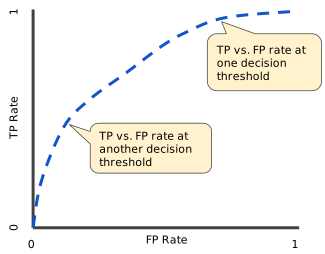
Let us use cardio model to verify accuracy using the testing dataset. See defintion of this dataset on Kaggle
cardio_data = pd.read_csv('https://drive.google.com/uc?export=download&id=1Sg6_70n13RF1feOykQYg1pepRXVg6FS8', sep=';').\
  drop('id', axis=1).\
  rename({'gluc':'glucose',
          'alco':'alcohol',
          'ap_hi':'sistolic_bp',
          'ap_lo':'diastolic_bp' }, \
         axis=1)
# Convert age to years
cardio_data['age'] = cardio_data['age'].apply(lambda x: round(x/365.0))
# Categorical gender
cardio_data['gender'] = cardio_data['gender'].apply(lambda x: {1: 'Female', 2: 'Male'}[x])
# Ordinal Cholesterol and Glucose
cardio_data['cholesterol'] = cardio_data['cholesterol'].apply(lambda x: {1: 'Normal', 2: 'Above Normal', 3: 'Way Above Normal'}[x])
cardio_data['glucose'] = cardio_data['glucose'].apply(lambda x: {1: 'Normal', 2: 'Above Normal', 3: 'Way Above Normal'}[x])
# Binary Columns
cardio_data[['smoke', 'alcohol', 'active', 'cardio']] = cardio_data[['smoke', 'alcohol', 'active', 'cardio']].applymap(lambda x: bool(x))
# Preview
display(cardio_data)
#X_train, X_test, y_train, y_test = train_test_split(X, y, test_size=0.33, random_state=42)| age | gender | height | weight | sistolic_bp | diastolic_bp | cholesterol | glucose | smoke | alcohol | active | cardio | |
|---|---|---|---|---|---|---|---|---|---|---|---|---|
| 0 | 50 | Male | 168 | 62.0 | 110 | 80 | Normal | Normal | False | False | True | False |
| 1 | 55 | Female | 156 | 85.0 | 140 | 90 | Way Above Normal | Normal | False | False | True | True |
| 2 | 52 | Female | 165 | 64.0 | 130 | 70 | Way Above Normal | Normal | False | False | False | True |
| 3 | 48 | Male | 169 | 82.0 | 150 | 100 | Normal | Normal | False | False | True | True |
| 4 | 48 | Female | 156 | 56.0 | 100 | 60 | Normal | Normal | False | False | False | False |
| ... | ... | ... | ... | ... | ... | ... | ... | ... | ... | ... | ... | ... |
| 69995 | 53 | Male | 168 | 76.0 | 120 | 80 | Normal | Normal | True | False | True | False |
| 69996 | 62 | Female | 158 | 126.0 | 140 | 90 | Above Normal | Above Normal | False | False | True | True |
| 69997 | 52 | Male | 183 | 105.0 | 180 | 90 | Way Above Normal | Normal | False | True | False | True |
| 69998 | 61 | Female | 163 | 72.0 | 135 | 80 | Normal | Above Normal | False | False | False | True |
| 69999 | 56 | Female | 170 | 72.0 | 120 | 80 | Above Normal | Normal | False | False | True | False |
70000 rows × 12 columns
# Convert to numerical format
numerical_cardio = pd.get_dummies(cardio_data)
display(numerical_cardio)

input_set = lambda df: df[[col for col in df.columns if col != 'cardio']]
label_set = lambda df: df.cardio| age | height | weight | sistolic_bp | diastolic_bp | smoke | alcohol | active | cardio | gender_Female | gender_Male | cholesterol_Above Normal | cholesterol_Normal | cholesterol_Way Above Normal | glucose_Above Normal | glucose_Normal | glucose_Way Above Normal | |
|---|---|---|---|---|---|---|---|---|---|---|---|---|---|---|---|---|---|
| 0 | 50 | 168 | 62.0 | 110 | 80 | False | False | True | False | 0 | 1 | 0 | 1 | 0 | 0 | 1 | 0 |
| 1 | 55 | 156 | 85.0 | 140 | 90 | False | False | True | True | 1 | 0 | 0 | 0 | 1 | 0 | 1 | 0 |
| 2 | 52 | 165 | 64.0 | 130 | 70 | False | False | False | True | 1 | 0 | 0 | 0 | 1 | 0 | 1 | 0 |
| 3 | 48 | 169 | 82.0 | 150 | 100 | False | False | True | True | 0 | 1 | 0 | 1 | 0 | 0 | 1 | 0 |
| 4 | 48 | 156 | 56.0 | 100 | 60 | False | False | False | False | 1 | 0 | 0 | 1 | 0 | 0 | 1 | 0 |
| ... | ... | ... | ... | ... | ... | ... | ... | ... | ... | ... | ... | ... | ... | ... | ... | ... | ... |
| 69995 | 53 | 168 | 76.0 | 120 | 80 | True | False | True | False | 0 | 1 | 0 | 1 | 0 | 0 | 1 | 0 |
| 69996 | 62 | 158 | 126.0 | 140 | 90 | False | False | True | True | 1 | 0 | 1 | 0 | 0 | 1 | 0 | 0 |
| 69997 | 52 | 183 | 105.0 | 180 | 90 | False | True | False | True | 0 | 1 | 0 | 0 | 1 | 0 | 1 | 0 |
| 69998 | 61 | 163 | 72.0 | 135 | 80 | False | False | False | True | 1 | 0 | 0 | 1 | 0 | 1 | 0 | 0 |
| 69999 | 56 | 170 | 72.0 | 120 | 80 | False | False | True | False | 1 | 0 | 1 | 0 | 0 | 0 | 1 | 0 |
70000 rows × 17 columns
# Split training and test set
from sklearn.model_selection import train_test_split
X_train, X_test, y_train, y_test = train_test_split(input_set(numerical_cardio),
                                                    label_set(numerical_cardio),
                                                    test_size=1.0/7)
display(X_train)| age | height | weight | sistolic_bp | diastolic_bp | smoke | alcohol | active | gender_Female | gender_Male | cholesterol_Above Normal | cholesterol_Normal | cholesterol_Way Above Normal | glucose_Above Normal | glucose_Normal | glucose_Way Above Normal | |
|---|---|---|---|---|---|---|---|---|---|---|---|---|---|---|---|---|
| 47699 | 56 | 155 | 59.0 | 120 | 80 | False | False | True | 1 | 0 | 0 | 1 | 0 | 0 | 1 | 0 |
| 13197 | 58 | 174 | 75.0 | 120 | 80 | True | False | True | 0 | 1 | 0 | 1 | 0 | 0 | 1 | 0 |
| 69968 | 44 | 157 | 61.0 | 110 | 90 | False | False | True | 0 | 1 | 0 | 1 | 0 | 0 | 1 | 0 |
| 60973 | 58 | 176 | 74.0 | 120 | 80 | False | False | True | 0 | 1 | 0 | 1 | 0 | 0 | 1 | 0 |
| 67236 | 42 | 157 | 51.0 | 110 | 70 | False | False | True | 1 | 0 | 0 | 1 | 0 | 0 | 1 | 0 |
| ... | ... | ... | ... | ... | ... | ... | ... | ... | ... | ... | ... | ... | ... | ... | ... | ... |
| 18889 | 44 | 167 | 65.0 | 120 | 80 | False | False | True | 1 | 0 | 0 | 1 | 0 | 0 | 1 | 0 |
| 2600 | 40 | 166 | 56.0 | 110 | 80 | False | False | True | 1 | 0 | 0 | 1 | 0 | 0 | 1 | 0 |
| 35483 | 56 | 163 | 130.0 | 140 | 80 | False | False | True | 1 | 0 | 0 | 1 | 0 | 0 | 1 | 0 |
| 20175 | 60 | 162 | 56.0 | 120 | 80 | False | False | True | 1 | 0 | 0 | 1 | 0 | 0 | 1 | 0 |
| 41407 | 54 | 163 | 62.0 | 90 | 70 | False | False | True | 1 | 0 | 0 | 1 | 0 | 0 | 1 | 0 |
60000 rows × 16 columns
Build the model
from xgboost import XGBClassifier
gboost = XGBClassifier()
gboost.fit(X_train, y_train)
/opt/conda/lib/python3.8/site-packages/xgboost/sklearn.py:888: UserWarning:
The use of label encoder in XGBClassifier is deprecated and will be removed in a future release. To remove this warning, do the following: 1) Pass option use_label_encoder=False when constructing XGBClassifier object; and 2) Encode your labels (y) as integers starting with 0, i.e. 0, 1, 2, ..., [num_class - 1].
[05:11:03] WARNING: ../src/learner.cc:1061: Starting in XGBoost 1.3.0, the default evaluation metric used with the objective 'binary:logistic' was changed from 'error' to 'logloss'. Explicitly set eval_metric if you'd like to restore the old behavior.
XGBClassifier(base_score=0.5, booster='gbtree', colsample_bylevel=1,
colsample_bynode=1, colsample_bytree=1, gamma=0, gpu_id=-1,
importance_type='gain', interaction_constraints='',
learning_rate=0.300000012, max_delta_step=0, max_depth=6,
min_child_weight=1, missing=nan, monotone_constraints='()',
n_estimators=100, n_jobs=4, num_parallel_tree=1, random_state=0,
reg_alpha=0, reg_lambda=1, scale_pos_weight=1, subsample=1,
tree_method='exact', validate_parameters=1, verbosity=None)
# Predict using the model on withheld test set
y_pred = gboost.predict(X_test)
display(pd.concat([pd.DataFrame(y_pred, columns=['Predicted Cardio']).reset_index(drop=True),
                   y_test.to_frame('Actual Withheld Cardio').reset_index(drop=True),
X_test.reset_index(drop=True)], axis=1))| Predicted Cardio | Actual Withheld Cardio | age | height | weight | sistolic_bp | diastolic_bp | smoke | alcohol | active | gender_Female | gender_Male | cholesterol_Above Normal | cholesterol_Normal | cholesterol_Way Above Normal | glucose_Above Normal | glucose_Normal | glucose_Way Above Normal | |
|---|---|---|---|---|---|---|---|---|---|---|---|---|---|---|---|---|---|---|
| 0 | False | True | 62 | 165 | 55.0 | 110 | 70 | False | False | True | 1 | 0 | 0 | 1 | 0 | 0 | 1 | 0 |
| 1 | True | True | 58 | 162 | 87.0 | 220 | 140 | True | True | True | 0 | 1 | 1 | 0 | 0 | 1 | 0 | 0 |
| 2 | True | False | 58 | 160 | 62.0 | 130 | 90 | False | False | True | 0 | 1 | 0 | 1 | 0 | 0 | 1 | 0 |
| 3 | True | True | 63 | 160 | 60.0 | 150 | 80 | False | False | True | 1 | 0 | 0 | 0 | 1 | 1 | 0 | 0 |
| 4 | True | True | 60 | 180 | 95.0 | 140 | 80 | False | True | True | 0 | 1 | 1 | 0 | 0 | 0 | 1 | 0 |
| ... | ... | ... | ... | ... | ... | ... | ... | ... | ... | ... | ... | ... | ... | ... | ... | ... | ... | ... |
| 9995 | False | False | 44 | 165 | 65.0 | 120 | 80 | False | False | True | 1 | 0 | 0 | 1 | 0 | 0 | 1 | 0 |
| 9996 | True | True | 62 | 184 | 96.0 | 140 | 80 | False | True | False | 0 | 1 | 0 | 0 | 1 | 0 | 1 | 0 |
| 9997 | False | True | 56 | 166 | 55.0 | 110 | 70 | False | False | True | 1 | 0 | 0 | 1 | 0 | 0 | 1 | 0 |
| 9998 | True | True | 58 | 171 | 80.0 | 180 | 100 | False | False | False | 0 | 1 | 0 | 0 | 1 | 0 | 0 | 1 |
| 9999 | True | True | 58 | 160 | 72.0 | 130 | 80 | False | False | True | 1 | 0 | 0 | 0 | 1 | 0 | 1 | 0 |
10000 rows × 18 columns
from sklearn.metrics import precision_score, accuracy_score, recall_score
from sklearn.metrics import confusion_matrix, plot_confusion_matrix


cf_matrix = confusion_matrix(y_pred, y_test, labels=[False, True])
tn, fp, fn, tp = cf_matrix.ravel()
fig = sns.heatmap(cf_matrix, annot=True, fmt='d', cmap='Blues')
display(pd.DataFrame([(round(precision_score(y_test, y_pred)*100, 2),
               round(accuracy_score(y_test, y_pred)*100, 2),
               tn, fp, fn, tp
               )], columns=['Precision',
                            'Accuracy',
                            'True Negatives',
                            'False Positives',
                            'False Negatives',
                            'True Positives'
                            ]).T.applymap(round))

fig| 0 | |
|---|---|
| Precision | 75 |
| Accuracy | 73 |
| True Negatives | 3867 |
| False Positives | 1541 |
| False Negatives | 1138 |
| True Positives | 3454 |
<AxesSubplot:>

Understanding ROC Curve
# Plot ROC Curve
from sklearn.metrics import plot_roc_curve
plot_roc_curve(gboost, X_test, y_test)
<sklearn.metrics._plot.roc_curve.RocCurveDisplay at 0x7fdcfabc6c70>

The EMNIST dataset is a set of handwritten character digits derived from the NIST Special Database 19 and converted to a 28x28 pixel image format and dataset structure that directly matches the MNIST dataset. Let us use this dataset to train and detect character scribes on a piece of white paper.
import tensorflow.compat.v2 as tf
import tensorflow_datasets as tfds

tf.enable_v2_behavior()

# Load MNIST dataset
(ds_train, ds_test), ds_info = tfds.load(
    'mnist',
    split=['train', 'test'],
    shuffle_files=True,
    as_supervised=True,
    with_info=True,
)

# Convert image into a flattened tensor
def normalize_img(image, label):
  """Normalizes images: `uint8` -> `float32`."""
  return tf.cast(image, tf.float32) / 255., label

ds_train = ds_train.map(
    normalize_img, num_parallel_calls=tf.data.experimental.AUTOTUNE)
ds_train = ds_train.cache()
ds_train = ds_train.shuffle(ds_info.splits['train'].num_examples)
ds_train = ds_train.batch(128)
ds_train = ds_train.prefetch(tf.data.experimental.AUTOTUNE)
ds_test = ds_test.map(
    normalize_img, num_parallel_calls=tf.data.experimental.AUTOTUNE)
ds_test = ds_test.batch(128)
ds_test = ds_test.cache()
ds_test = ds_test.prefetch(tf.data.experimental.AUTOTUNE)model = tf.keras.models.Sequential([
tf.keras.layers.Flatten(input_shape=(28, 28, 1)),
tf.keras.layers.Dense(128,activation='relu'),
tf.keras.layers.Dense(10, activation='softmax')
])
model.compile(
loss='sparse_categorical_crossentropy',
optimizer=tf.keras.optimizers.Adam(0.001),
metrics=['accuracy'],
)
model.fit(
ds_train,
epochs=10,
validation_data=ds_test,
)Epoch 1/10
469/469 [==============================] - 3s 3ms/step - loss: 0.6352 - accuracy: 0.8247 - val_loss: 0.1969 - val_accuracy: 0.9434
Epoch 2/10
469/469 [==============================] - 1s 1ms/step - loss: 0.1778 - accuracy: 0.9484 - val_loss: 0.1399 - val_accuracy: 0.9602
Epoch 3/10
469/469 [==============================] - 1s 1ms/step - loss: 0.1248 - accuracy: 0.9647 - val_loss: 0.1169 - val_accuracy: 0.9648
Epoch 4/10
469/469 [==============================] - 1s 1ms/step - loss: 0.0928 - accuracy: 0.9738 - val_loss: 0.1008 - val_accuracy: 0.9690
Epoch 5/10
469/469 [==============================] - 1s 1ms/step - loss: 0.0739 - accuracy: 0.9800 - val_loss: 0.0930 - val_accuracy: 0.9702
Epoch 6/10
469/469 [==============================] - 1s 1ms/step - loss: 0.0622 - accuracy: 0.9823 - val_loss: 0.0783 - val_accuracy: 0.9753
Epoch 7/10
469/469 [==============================] - 1s 1ms/step - loss: 0.0528 - accuracy: 0.9848 - val_loss: 0.0800 - val_accuracy: 0.9760
Epoch 8/10
469/469 [==============================] - 1s 1ms/step - loss: 0.0433 - accuracy: 0.9883 - val_loss: 0.0730 - val_accuracy: 0.9767
Epoch 9/10
469/469 [==============================] - 1s 1ms/step - loss: 0.0382 - accuracy: 0.9899 - val_loss: 0.0710 - val_accuracy: 0.9782
Epoch 10/10
469/469 [==============================] - 1s 1ms/step - loss: 0.0313 - accuracy: 0.9912 - val_loss: 0.0719 - val_accuracy: 0.9778
<tensorflow.python.keras.callbacks.History at 0x7fdcbc3b5370>
We achieved great accuracy on existing MNIST sample. But if we applied to a new handwriting -- aka Seshu's -- does it perform in real world? See my scribble
!wget --quiet -O file.png "https://drive.google.com/uc?export=download&id=1wpGcdElKL0GF4PlE8SheEFFOQiMUb0Vw"from IPython.display import Image, display
import PIL
from keras.preprocessing.image import img_to_array, load_img
import cv2
from skimage.transform import resize as imresize
# Read input scribble
img = cv2.imread('file.png', cv2.IMREAD_GRAYSCALE)
edged = cv2.Canny(img, 10, 100)
# Detect where areas of interest exis
contours, hierarchy = cv2.findContours(edged, cv2.RETR_EXTERNAL, cv2.CHAIN_APPROX_NONE)
# Create a blank copy to write-over
newimg = img.copy()
# Where each blotch of ink exists, clip and detect
for (x,y,w,h) in [rect for rect in [cv2.boundingRect(ctr) for ctr in contours]]:
if w >= 10 and h >= 50:
# Clip some border-buffer zone as well so the digit only covers 50% of the area
try:
digit_img = cv2.resize(edged[y-32:y+h+32,x-32:x+w+32], (28,28), interpolation=cv2.INTER_AREA)
# Convert clipped digit into black-n-white; MNIST standard is BW
(_, bw_img) = cv2.threshold(digit_img, 5, 255, cv2.THRESH_BINARY | cv2.THRESH_OTSU)
# Predict the scribbled letter
digit = model.predict_classes(tf.reshape(bw_img, (1,28,28,1)))[0]
# Overlay the recognized text right on top of the existing scribble
cv2.putText(newimg, str(digit), (max(30, x + 50), max(30, y + 50)), cv2.FONT_HERSHEY_SIMPLEX, 4, 0, 8)
except:
pass
# Show original image
dimage = lambda x: PIL.Image.fromarray(x).convert("L")
display(dimage(newimg).resize((500, 300)))