Repository navigation
EN 07 Tool check
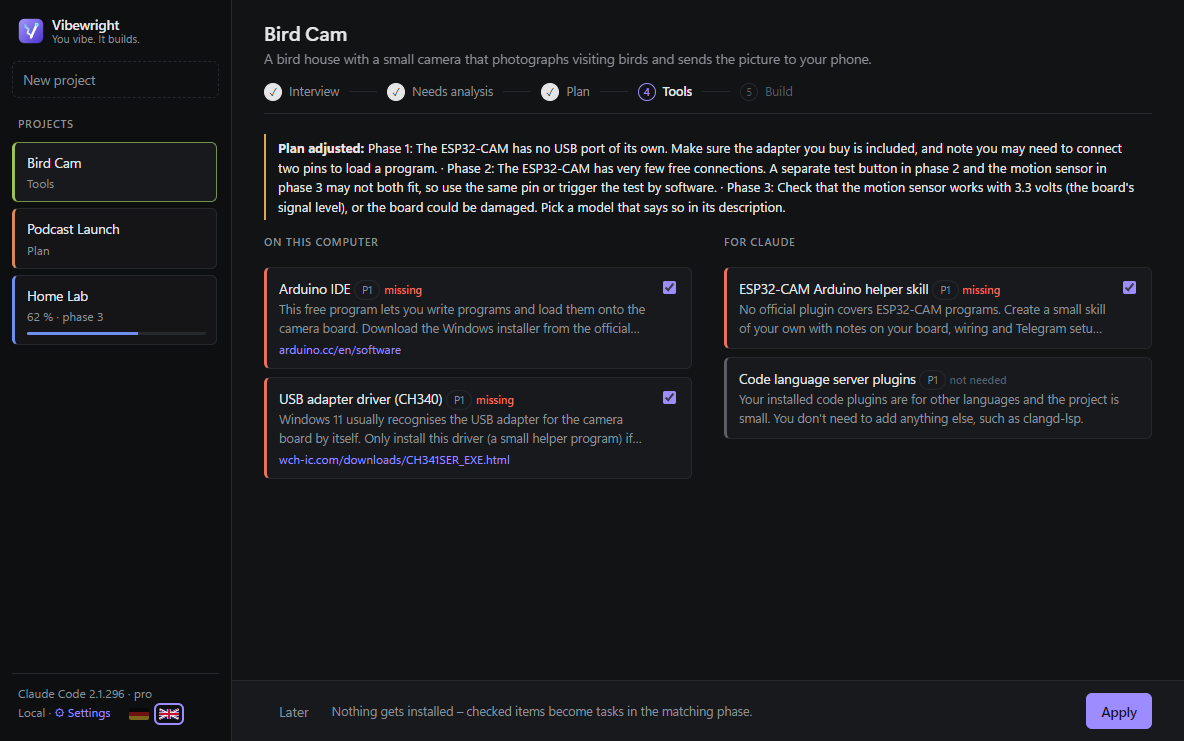
🚦 Third approval. Vibewright inspects your computer (installed programs, Windows edition) and your Claude setup (plugins, skills, MCP servers) and lists what the phases need:
| Bar | Meaning |
|---|---|
| 🟥 red | missing |
| 🟩 green | already available |
| ⬜ grey | not needed after all |
Missing items are pre-checked. Nothing gets installed – checked items become tasks: installations go to the top of the matching phase, "own project skills" to the end. If Claude finds a contradiction (e.g. a tool that does not run on your Windows edition), it adjusts the plan and tells you at the top.
Where the suggestions come from
- Your computer: installed programs (checked by Vibewright itself), your Claude plugins and the skills inside them, your own skills (also those in the project's code folder) and MCP servers.
- Plugin catalogs: every marketplace you have added to Claude Code (the official one first), plus the claude-skills catalog – even if you have not added it yet.
-
SkillsMP: if nothing in the catalogs fits, Vibewright searches for a ready-made skill. Only skills from GitHub repositories with at least 50,000 stars that are Claude-compatible count (a valid
SKILL.mdin a repository that is a Claude plugin or keeps the skill in.claude/skills). Claude picks one only if it really fits. - Download links are checked: if one is dead, Claude replaces it with the maker's current page; if that fails too, the item is marked with ⚠.
Click Apply – Vibewright writes all files and opens the cockpit.