Repository navigation
EN 10 Build with Claude
Click Build with Claude:
-
Code projects only, first time: choose a folder for the code (e.g.
Documents\Projects\Bird Cam). Vibewright remembers it. - If enabled in the settings and Git is installed, the folder becomes a Git project with a first commit.
- Vibewright writes a
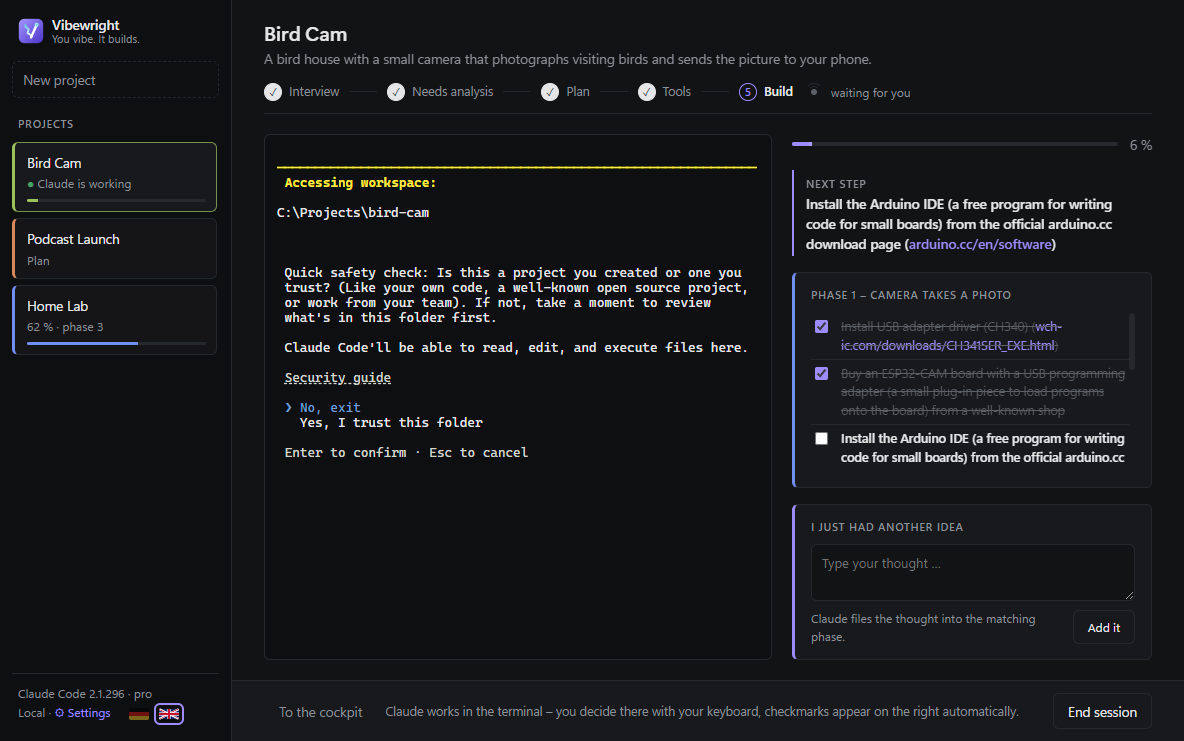
CLAUDE.mdinto the folder: project summary, links to your analysis and plan, the current phase, the next open step and some rules (plain language, nothing gets installed without your OK, tick finished steps, commit after each step if Git is used). Your own content in an existingCLAUDE.mdstays untouched. - Claude Code starts in the terminal inside the app. The first time, Claude asks whether you trust the folder – confirm with the arrow keys and Enter.
While Claude works:
- You answer Claude's questions and approvals in the terminal with your keyboard – it is the normal Claude Code, just inside Vibewright.
- Next to Build, an orb spins while Claude is working and turns into a calm dot with "waiting for you" when Claude needs you.
- When Claude finishes a step, it ticks it in the task file – the checklist on the right updates live.
- To the cockpit or switching projects keeps Claude running (the project shows "● Claude is working"); Back to the Claude session returns. End session stops Claude.
One Claude session can run at a time.