Pragmatic eval framework for LLM features.
It runs eval files as Bun tests, records scorer metrics and token/latency data, compares results against baselines, and prints a report that is useful during iteration.
# bun
bun add @goodit/evals

# npm
npm install @goodit/evals

# pnpm
pnpm add @goodit/evals
Requires Bun >= 1.3.9 as the test runner.
Optional peer dependencies: ai >= 6 (for traceModel() and semantic scorers), zod >= 3 (for semantic scorers).
- Declarative eval API (
evalSuite) for multi-case checks. - Built-in and custom scorers.
- LLM tracing via
traceModel()for token metrics. - Baseline files (
*.eval.baseline.json) with regression comparison. - Verbose diagnostics mode for low/failing scorer details.
- Variant eval support via
evalSuite.each(...). - Variant comparison tables for multi-option eval suites.
# from repo root
bun run eval

# choose eval files interactively in the terminal
# shows baseline-based wall/work/token estimates when available
bun run eval:select

# run only tests whose name matches a regex
bun run eval -- --test-name-pattern "Country Briefings"

# include per-test scorer diagnostics
bun run eval -- --verbose --test-name-pattern "Country Briefings"

# combine interactive selection with pass-through Bun test flags
bun run eval:select -- --verbose --test-name-pattern "Country Briefings"

# machine-readable output for agents/tooling
bun run eval -- --json --test-name-pattern "Country Briefings"

# update baselines
bun run eval:updateThe demo fixtures below are intentionally a little less sterile than foo and
bar, so Sam Altman, Demis Hassabis, Andrej Karpathy, Dario Amodei, and
Fei-Fei Li make cameo appearances in the terminal.
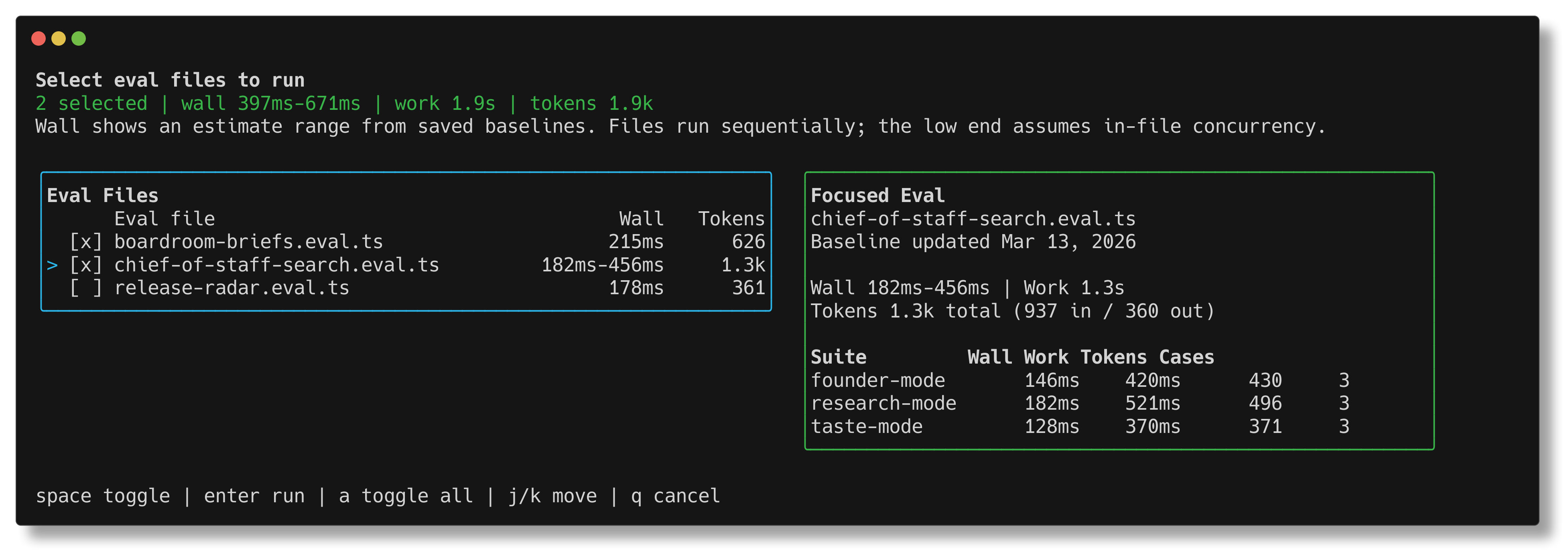
bun run eval:select shows saved wall-time, work-time, and token estimates
before you launch a run, with a focused suite breakdown for the currently
highlighted file.
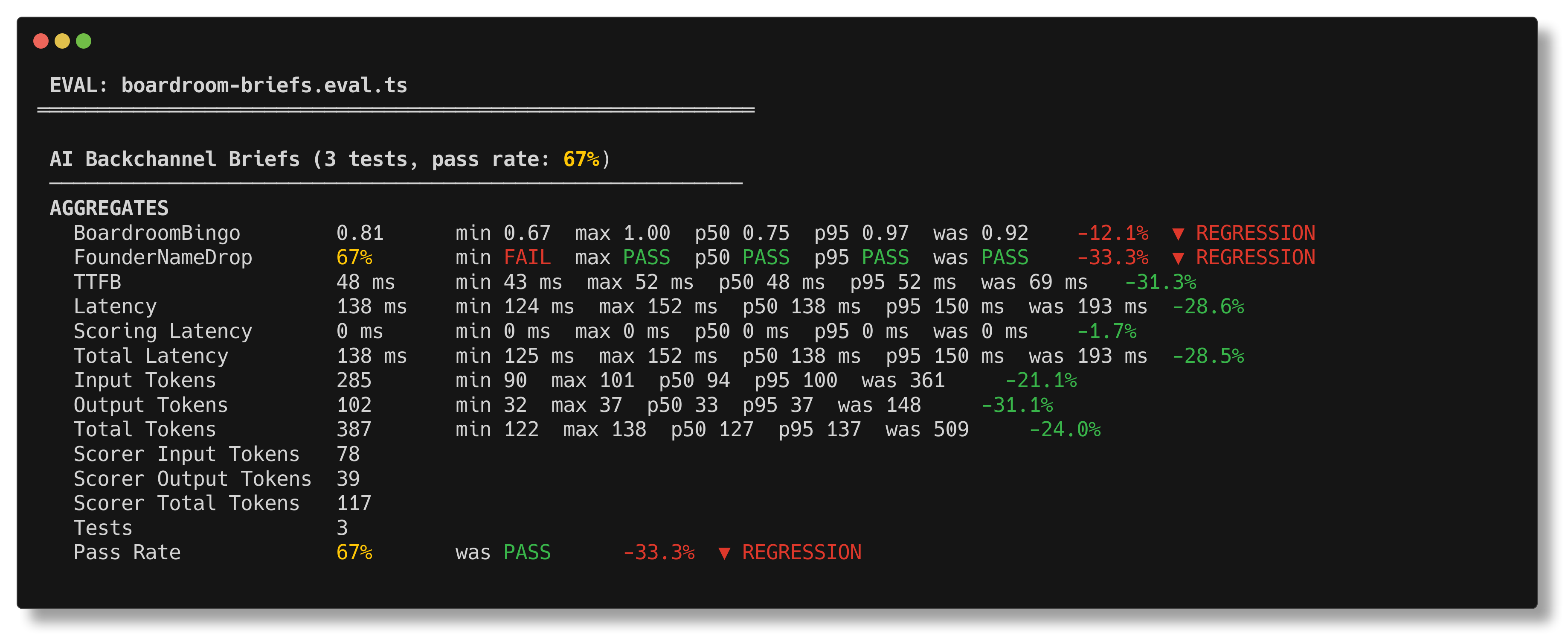
bun run eval prints the suite summary you actually want during iteration:
scores, pass rate, latency, tokens, and baseline regression markers in one
place.
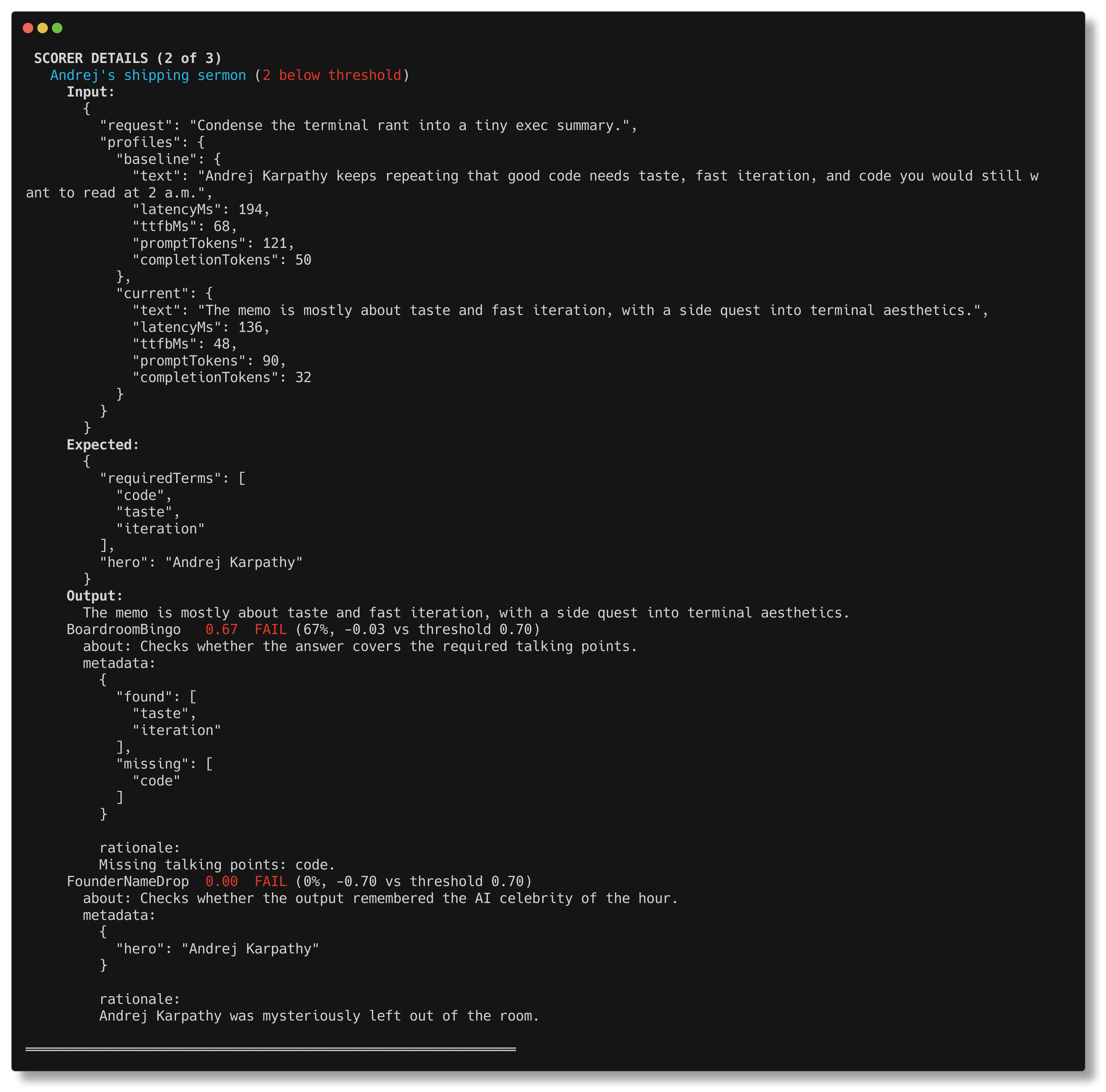
bun run eval -- --verbose drills into the exact case that went off the rails,
including scorer metadata and the missing pieces that caused the failure.
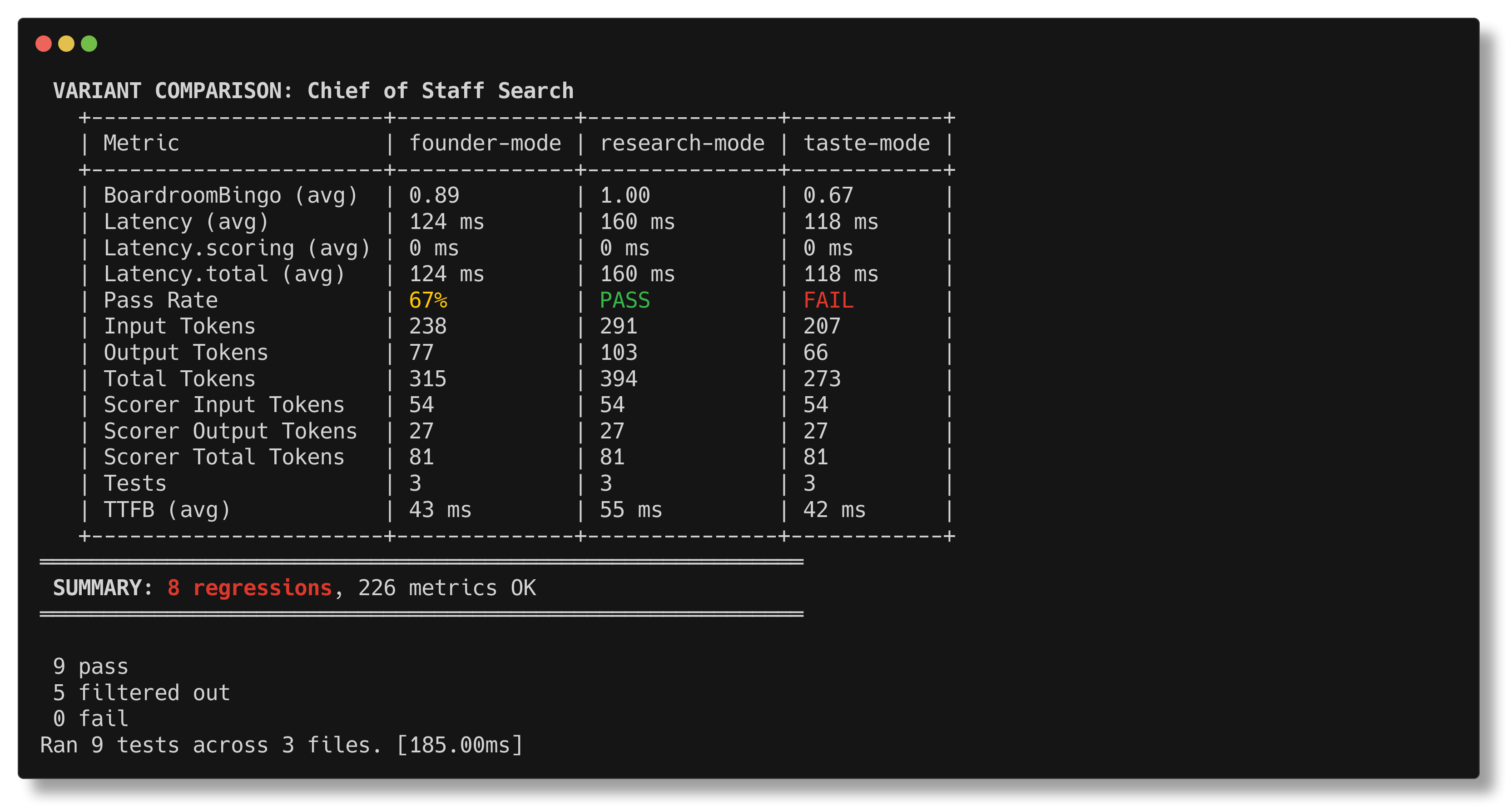
evalSuite.each(...) gets a dedicated comparison table so you can see, at a
glance, whether founder-mode, research-mode, or taste-mode deserves the
budget.
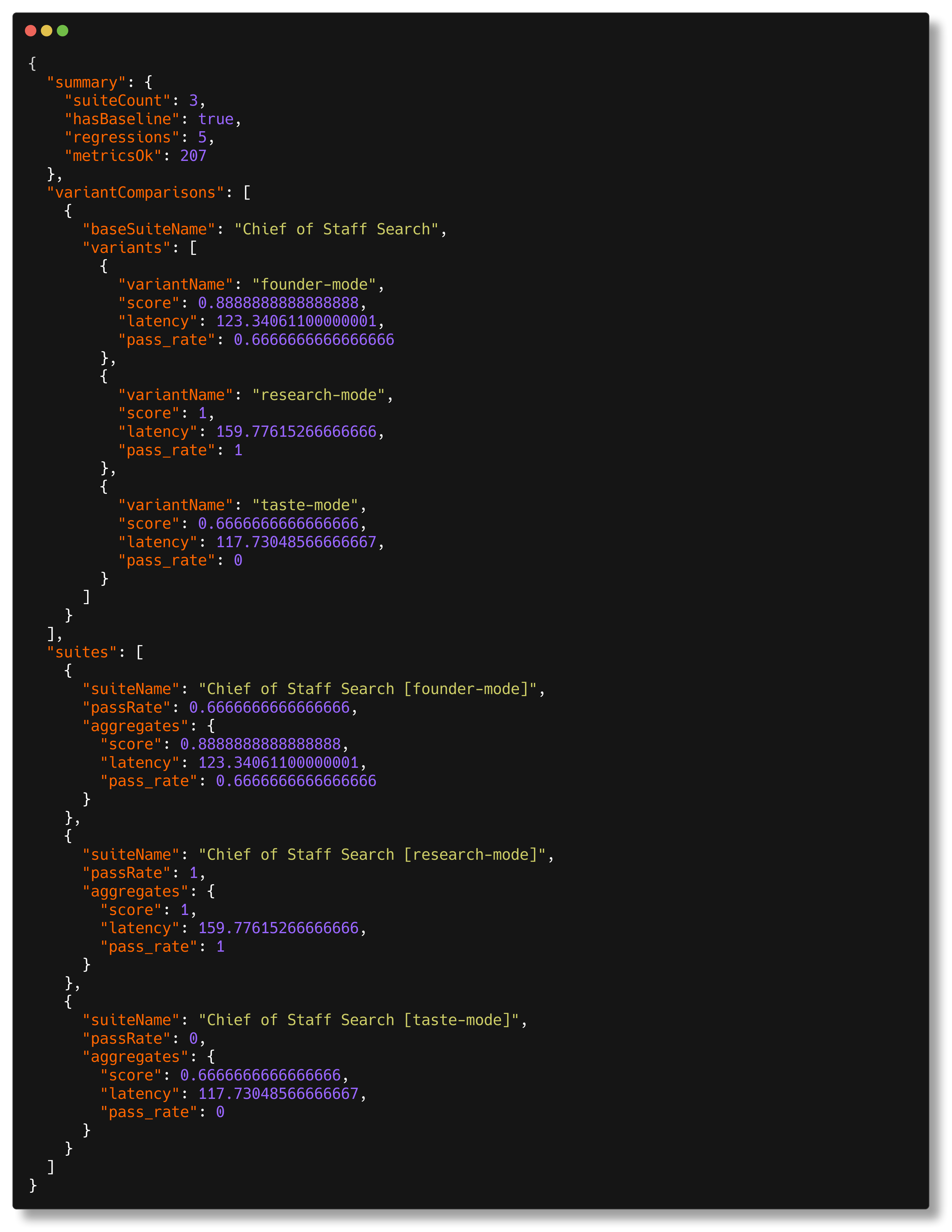
bun run eval -- --json emits structured output for agents, CI, and other
tooling without the human report wrapped around it.
bun run eval, bun run eval:select, and goodit-evals select execute
src/run.ts, which:
- Discovers all
**/*.eval.tsfiles in the repo. - Optionally opens an Ink-based selector UI for choosing specific eval files.
- Starts
bun testwith preload hook@goodit/evals/preload. - Aggregates metrics and prints suite reports.
- Optionally compares against baselines.
- Loads
.envand.env.localfrom the current working directory and passes them to eval test execution.
Important:
- Bun
>= 1.3.9is required for per-case concurrent test registration. - If an older Bun is detected, the runner prints a warning.
bun run eval:selectrequires an interactive TTY.
Interactive selector shortcuts:
spacetoggles the highlighted eval file.enterruns the selected eval files.aselects or clears all eval files.↑/↓orj/kmove through the list.qcancels the selector.- When a saved baseline exists, the selector shows per-file estimates for wall time, work time, token usage, and a focused suite breakdown.
// examples/capitals.ts
import { openai } from "@ai-sdk/openai"
import { traceModel } from "@goodit/evals"
import { generateText } from "ai"

export async function getCapital(country: string): Promise<string> {
  const { text } = await generateText({
    model: traceModel(openai("gpt-4o-mini")),
    prompt: `What is the capital of ${country}? Answer with just the city name.`,
  })

  return text.trim()
}// examples/capitals.eval.ts
import { ExactMatch, evalSuite } from "@goodit/evals"
import { getCapital } from "./capitals"
evalSuite("Country Capitals", {
data: () => [
{ input: "France", expected: "Paris" },
{ input: "Japan", expected: "Tokyo" },
{ input: "Brazil", expected: "Brasilia" },
],
task: async (input: string) => await getCapital(input),
scorers: [ExactMatch],
passThreshold: 0.8,
})bun run eval -- --test-name-pattern "Country Capitals"bun run eval -- --verbose --test-name-pattern "Country Capitals"bun run eval:update -- --test-name-pattern "Country Capitals"evalSuite(name: string, config: {
data:
| EvalData<TInput, TExpected>[]
| (() => EvalData<TInput, TExpected>[]
| Promise<EvalData<TInput, TExpected>[]>)
task: (input: TInput) => Promise<TOutput>
scorers: Scorer<TInput, TOutput, TExpected>[]
passThreshold?: number // default 0.5
aggregations?: Record<string, (entries: AggregationEntry[]) => number>
timeout?: number // per-case timeout, default 30000ms
})EvalData:
{
  name?: string // Optional explicit test label in reports/output
  input: TInput
  expected?: TExpected
  weight?: number
  only?: boolean
}
Execution model:
data: []or syncdata: () => []- Registers one Bun test per case.
- Uses
test.concurrentwhen Bun supports it.
data: async () => []- Registers one Bun test named
evaluate all. - Cases run in parallel internally.
- Registers one Bun test named
Run same eval with variant-specific task behavior.
evalSuite.each([
  { name: "mini", model: openai("gpt-4o-mini") },
  { name: "full", model: openai("gpt-4o") },
])("Country Capitals", {
  data: () => [{ input: "France", expected: "Paris" }],
  task: async (input, variant) => {
    // variant-aware task
    return input
  },
  scorers: [ExactMatch],
})
Each variant gets separate suite metrics and baseline entries.
const scorer = createScorer({
  name: "MyScorer",
  description: "What this score means",
  scorer: async ({ input, output, expected }) => {
    return {
      score: 0.9,
      metadata: { reason: "diagnostics" },
    }
  },
})
Return forms supported:
number{ score: number, metadata?: unknown }- async versions of both
Scorers have an optional kind field ("heuristic" | "judge"):
const myScorer = createScorer({
  name: "MyLLMScorer",
  kind: "judge",
  scorer: async ({ output }) => { /* ... */ },
})
kind: "judge" enables:
[judge]badge in verbose reports- Token/latency phase separation in
evalSuite
Built-in scorers (ExactMatch, Contains, etc.) omit kind — they are heuristic by default.
createLLMJudgeScorer and wrapAutoeval automatically set kind: "judge".
Use imperative APIs when eval flow does not fit evalSuite.
measure(fn) wraps your test logic and provides a context:
const { result } = await measure(async (m) => {
  m.weight(0.9) // optional, default 1
  m.metric("ttfb", 420, "ms")
  m.tokens({
    promptTokens: 120,
    completionTokens: 80,
  })
  m.score("completeness", 0.95)
  return "ok"
})
Context methods:
m.metric(name, value, unit?)m.score(name, value)(stored asscore.<name>)m.tokens({ promptTokens, completionTokens, totalTokens? })m.weight(weight)
score(name, value) is shorthand when you are already inside a measured test.
suite(name, config) sets optional suite-level config for imperative suites:
passThreshold?: numberaggregations?: Record<string, (entries) => number>
Built-in aggregate keys are inferred by metric name:
| Metric pattern | Aggregates |
|---|---|
latency, ttfb* |
.sum, .avg |
latency.scoring, latency.total |
.sum, .avg, .min, .max, .p50, .p95 |
throughput* |
.avg |
tokens.* |
.sum |
tokens.scorer.* |
.sum, .avg, .min, .max, .p50, .p95 |
score.* |
.avg, .min |
error |
.count, .rate |
| always | test.count, test.pass_rate |
Weight behavior:
- Weighted:
*.avg,*.rate,test.pass_rate - Unweighted:
*.sum,*.min,*.count,test.count
test.pass_rate semantics:
- A case fails if the test throws.
- If a case has
score.*metrics, it passes only when all are>= passThreshold. - If a case has no
score.*metrics, pass/fail follows test success only.
When using evalSuite, latency is automatically split:
latency— task execution time only (excludes scorer time)latency.scoring— time spent running scorerslatency.total— combined task + scorer time
For evals with only heuristic scorers, latency.scoring is near-zero.
For evals with LLM judge scorers, this separation shows true task performance.
When using measure() directly, call m.taskEnd() before running scorers to enable the split. Without taskEnd(), a single latency metric is recorded (backward compatible).
ExactMatchContainsContainsAllContainsAnyJsonMatchNumericClosenessLengthRatio
Model-agnostic wrapper for LLM-based scoring with retry logic:
import { createLLMJudgeScorer } from "@goodit/evals"

const ToneScorer = createLLMJudgeScorer({
  name: "ToneCheck",
  description: "Checks if output maintains professional tone",
  judge: async ({ output }) => {
    const result = await generateObject({
      model: myModel,
      schema: z.object({ score: z.number(), rationale: z.string() }),
      prompt: `Rate the professionalism of: ${output}`,
    })
    return { score: result.object.score, metadata: result.object }
  },
  retries: 2,        // default: 2
  retryDelayMs: 1000, // default: 1000 (exponential backoff)
  errorScore: 0,     // default: 0 (score on exhausted retries)
})
All LLM judge scorers automatically get kind: "judge", which:
- Shows
[judge]badge in verbose scorer details - Separates scorer tokens into
tokens.scorer.*metrics - Separates scorer latency into
latency.scoring
Adapter for autoevals functions:
import { wrapAutoeval } from "@goodit/evals"
import { Factuality } from "autoevals"

const FactualityScorer = wrapAutoeval({
  name: "Factuality",
  description: "LLM judge: factual consistency",
  autoeval: Factuality,
  normalizeScore: (raw) => raw >= 0.6 ? 1 : 0,
})Built-in LLM judge scorers using AI SDK generateObject. Require ai and zod peer dependencies.
import { SemanticMatch, MatchesIntent, SemanticContains } from "@goodit/evals"

// Semantic similarity between output and expected
const similarity = SemanticMatch({ model: myModel, threshold: 0.7 })

// Check if output matches a stated intent
const intentCheck = MatchesIntent({ model: myModel, intent: "Provides a helpful greeting" })

// Check if output contains specific concepts
const conceptCheck = SemanticContains({ model: myModel, concepts: ["price", "availability"] })Use traceModel(...) around AI SDK models inside tasks.
This records:
tokens.inputtokens.outputtokens.total
The report aggregates these automatically.
When using evalSuite, tokens are automatically separated by phase:
- Task phase (
tokens.input,tokens.output,tokens.total): tokens from your task function - Scoring phase (
tokens.scorer.input,tokens.scorer.output,tokens.scorer.total): tokens from LLM-based scorers
This separation happens automatically — no code changes needed.
bun run eval- Discover all eval files in the current working directory and run them.
bun run eval:select- Open the interactive Ink selector, then run only the files you choose.
goodit-evals select- Same interactive selector flow for the published CLI.
goodit-evals interactive- Alias for
goodit-evals select.
- Alias for
--verbose--eval-verbose--json--eval-json
--verbose and --eval-verbose enable scorer diagnostics
(same as EVAL_VERBOSE=1).
--json and --eval-json print only structured JSON output (no human report).
Any other flags are passed to bun test, for example:
--test-name-pattern "..."--timeout 120000--bail 1
UPDATE_BASELINE=1- Save/update baseline files after run.
EVAL_OUTPUT=<path>- Write raw suite aggregates and per-test metrics JSON.
EVAL_TRACE=1- Force trace capture outside standard eval-runner flow.
EVAL_VERBOSE=1- Enable verbose scorer diagnostics.
EVAL_JSON=1- Emit structured JSON report instead of terminal report.
EVAL_JSON_OUTPUT_FILE=<path>- Write the structured JSON payload to file.
--verbose mode adds a SCORER DETAILS block and prints, per interesting
(non-perfect) case:
InputExpectedOutput- scorer status and threshold margin
- full scorer metadata (including multiline judge rationale)
This is the primary mode to debug why a score is low.
Baseline files live next to eval files:
foo.eval.ts->foo.eval.baseline.json
Use:
bun run eval:updateComparisons are informational:
- regressions are shown in the report
- they do not fail the test run
- only actual test failures/exceptions fail CI
Comparison rule per metric:
- lower-is-better metrics regress when:
current > baseline * (1 + tolerance) - higher-is-better metrics regress when:
current < baseline * (1 - tolerance)
Direction defaults:
- higher is better:
score.*,throughput*,test.pass_rate - lower is better: everything else
Default tolerances used when baseline entry is a plain number:
| Metric pattern | Default tolerance |
|---|---|
latency*, ttfb* |
0.20 |
latency.scoring*, latency.total* |
0.20 |
tokens.* |
0.10 |
tokens.scorer.* |
0.10 |
score.* |
0.05 |
throughput* |
0.15 |
error* |
0.00 |
test.pass_rate |
0.05 |
test.count |
0.00 |
| other metrics | 0.10 |
Use consistent names so aggregation and baseline comparison behave as expected.
| Category | Metric name(s) | Unit | Direction |
|---|---|---|---|
| Latency | latency, ttfb* |
ms |
lower |
| Throughput | throughput* |
custom (items/s, chars/s) |
higher |
| Tokens | tokens.input, tokens.output, tokens.total |
count | lower |
| Scorer Tokens | tokens.scorer.input, tokens.scorer.output, tokens.scorer.total |
count | lower |
| Scoring Latency | latency.scoring, latency.total |
ms |
lower |
| Quality | score.<name> |
0..1 |
higher |
| Errors | error |
0 or 1 |
lower |
examples/country-briefing.eval.ts demonstrates LLM judging
with autoevals Factuality.
Important semantics:
Factualityis rubric-based, not linear quality.- Raw score buckets map to rubric choices.
- Example mapping used in docs:
1.00->C/E0.60->B0.40->A0.00->D
In the country briefing example, consistent supersets are normalized as acceptable for the specific task contract.
- Keep task output format constrained and explicit.
- Prefer several narrow scorers over one opaque scorer.
- Put diagnostics in scorer
metadata. - Use
requiredTermsor schema checks for deterministic invariants. - Set
passThresholdto reflect product acceptance, not model vanity metrics. - Use
--verbosebefore changing thresholds. - Normalize text where needed (case, accents) if semantics are equivalent.
When adding evals in this repo:
- Add a task file under
examples/or the target feature folder. - Add
*.eval.tswith at least one deterministic scorer. - If using LLM judges, include explicit metadata and rubric interpretation.
- Run:
bun run eval -- --test-name-pattern "<suite>"bun run eval -- --verbose --test-name-pattern "<suite>"
- Confirm diagnostics are actionable.
- Update baseline only after expected behavior is agreed.
From this package root:
bun run eval         # run eval discovery + report
bun run eval:select  # choose eval files interactively, then run them
bun run eval:update  # run and update baselines
bun run test         # unit/integration tests for framework
bun run typecheck
bun run build
bun run release -- --dry-runUse the local release command as the single entrypoint:
# preview the next release without changing files
bun run release -- --dry-run

# prepare changelog + docs, run validation, commit, tag, and push
bun run release

# prepare and push a release without posting to X/Twitter
bun run release -- --skip-tweet
What bun run release does:
- Requires a clean
mainbranch checkout. - Finds commits since the latest
v*tag, or the latest release-style commit if tags have not been backfilled yet. - Infers the semver bump from commit messages:
feat:-> minorfix:/docs:/chore:and similar -> patch!:orBREAKING CHANGE-> major
- Uses an LLM to draft the next
CHANGELOG.mdentry and optionally refreshREADME.md. - Runs
typecheck,test,build, andnpm pack --dry-run. - Commits
package.json,CHANGELOG.md, andREADME.mdasrelease: vX.Y.Z. - Creates tag
vX.Y.Zand pushesmainplus the tag. - Uses the LLM release draft to generate a short release tweet, then attempts
to post it via
twitter post "TEXT"unless--skip-tweetis passed. If thetwitterCLI is unavailable or errors, the release still succeeds silently.
The publish step happens in GitHub Actions on tag push. Configure:
- npm trusted publishing for repo
neoromantic/evalsand workflow.github/workflows/publish.yml GOODIT_RELEASE_LLM_PROVIDERlocally ascodex,claude, orcommand- Optional
GOODIT_RELEASE_LLM_MODELlocally to pin a non-default model GOODIT_RELEASE_LLM_COMMANDlocally if usingGOODIT_RELEASE_LLM_PROVIDER=command
This workflow uses GitHub OIDC trusted publishing, so NPM_TOKEN is not
required in GitHub secrets.
If v0.6.0 has already been published without a matching git tag, create that
tag once before the first automated release so future changelog ranges are
correct.
Examples:
# use Codex CLI
export GOODIT_RELEASE_LLM_PROVIDER=codex

# use Claude Code CLI
export GOODIT_RELEASE_LLM_PROVIDER=claude

# use a custom command that reads the prompt from stdin and prints JSON
export GOODIT_RELEASE_LLM_PROVIDER=command
export GOODIT_RELEASE_LLM_COMMAND='my-release-llm'.
CHANGELOG.md
README.md
scripts/
extract-changelog-entry.ts
release.ts
src/
aggregate.ts
baseline.ts
collector.ts
eval-suite.ts
measure.ts
preload.ts
reporter.ts
run.ts
scorer.ts
trace.ts
types.ts
examples/
capitals.ts
capitals.eval.ts
country-briefing.ts
country-briefing.eval.ts