Tag 14 HTML & CSS
- CSS erlaubt HTML zu designen und zu verändern
- CSS beschreibt das Design
- Auch CSS ist keine Programmiersprache
- Elemente können z.B. durch ihren Typ, Klassennamen, oder durch eine ID refrenziert werden.
- lemente können durch CSS beliebig verändert werden
<link rel="stylesheet" href="css/style.css" />
- wählen 1 oder mehrere Elemente aus und wenden darauf verschiedene Rules an.
- Selektoren können verknüpft werden um präzise Auswahl zu treffen.
p, div { /* Alle p und alle div Elemente */
  border: 1px solid red;
}

div .box { /* Klasse box innerhalb eines divs */
  width: 100px;
  height: 100px;
}

p:nth-child(2) { /* Jedes 2. p Element */
  background-color: #a0a0a0;
}
| Selector | Example | Example description |
|---|---|---|
| #id | #firstname | Selects the element with id="firstname" |
| .class | .intro | Selects all elements with class="intro" |
| element.class | p.intro | Selects only <p> elements with class="intro" |
| * | * | Selects all elements |
| element | p | Selects all <p> elements |
| element,element,.. | div, p | Selects all <div> elements and all <p> elements |
Every CSS selector has its place in the specificity hierarchy.
There are four categories which define the specificity level of a selector:
- Inline styles - Example:
<h1 style="color: pink;"> - IDs - Example: #navbar
- Classes, pseudo-classes, attribute selectors - Example: .test, :hover, [href]
- Elements and pseudo-elements - Example: h1, ::before
| Selector | Specificity Value | Calculation |
|---|---|---|
| p | 1 | 1 |
| p.test | 11 | 1 + 10 |
| p#demo | 101 | 1 + 100 |
| <p style="color: pink;"> | 1000 | 1000 |
| #demo | 100 | 100 |
| .test | 10 | 10 |
| p.test1.test2 | 21 | 1 + 10 + 10 |
| #navbar p#demo | 201 | 100 + 1 + 100 |
| * | 0 | 0 (the universal selector is ignored) |
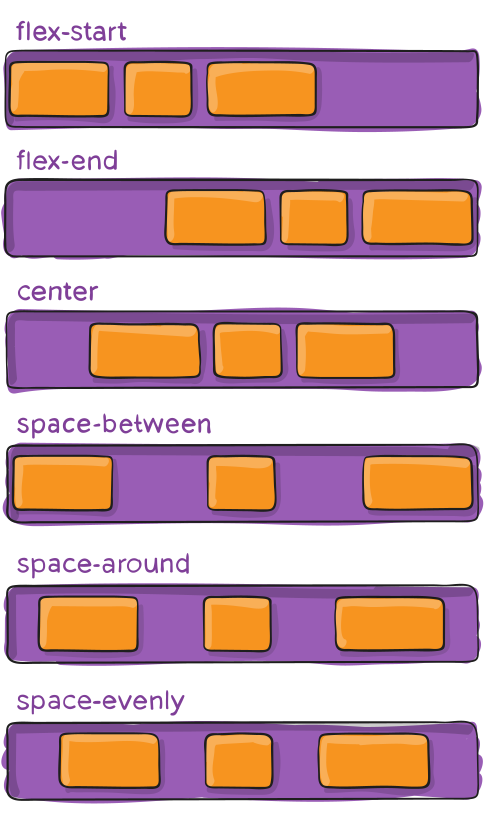
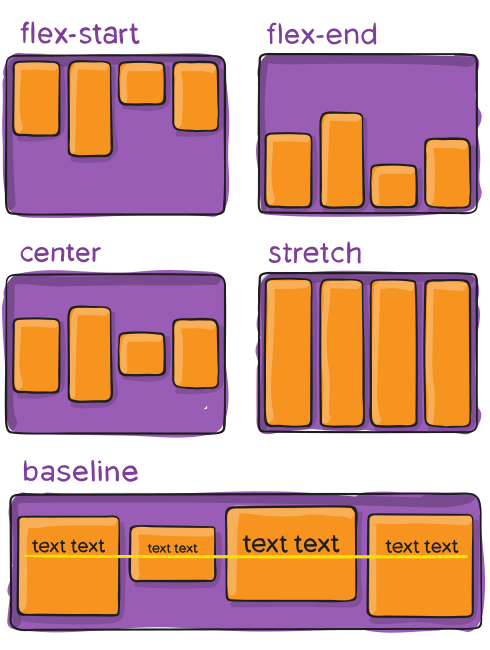
- Standardisiertes Layout das alle Browser unterstützen.
- Simple Regeln um Boxen zu positionieren, unabhängig von Bildschirmgröße.
- Flexboxen sind inkompatibel zu anderen Positionierungsangaben.
- Passt sich dynamisch an Bildschirmgrößen an.
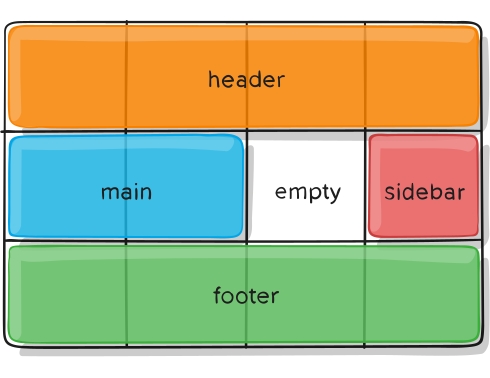
- Layout anhand eines fixen Gitternetzes
- Passt sich nur bedingt an die Bildschirmgröße an
- Gut für App-Layouts