This is just a sample app that implements gRPC protocol. The Source code is originally from gRPC repository.
For local development, it is required that you run it on Python 3.11 and Golang 1.21 or newer. It's also required that you install 3rd party dependencies.
Within services/go directory, please run the following command below:
$ go mod downloadIn order to run in Python, it's strongly recommended that you create a virtualenv environment, so you can keep track of all the required 3rd party libraries you need to install on your computer, as well as for adding newer ones as the app evolves. If you have never created a virtualenv, you may follow this guide.
If you already created your virtualenv, you can run the following command below:
$ pip install -r services/python/requirements.txtAlthough you can spin up everything on your computer, the best advice I can give you is to run everything inside a Docker container and create Docker images whenever you need them.
If you have never actually installed Docker on your machine, you may follow the official Docker documentation by clicking here.
To produce image containers, you may run the following commands below for creating the Python container:
$ make create-python-containerYou will also need to produce the Golang Docker image with this command below:
$ make create-go-containerNow, you can run the following commands to get your containers up (assuming that you have created the images using the command from above):
$ docker container run --rm -d -p 50051:50051 --name zeebo-python zeebo-python:latestYou can check that the container spawned by running the command below. The output may look almost the same:
$ docker container ls
CONTAINER ID   IMAGE                 COMMAND                  CREATED          STATUS          PORTS                      NAMES
dae6cfc28905   zeebo-python:latest   "python /usr/local/s…"   37 seconds ago   Up 36 seconds   0.0.0.0:50051->50051/tcp   zeebo-python
And now, this is the command for running the Golang service. Please be aware that we are using the same Docker container name from the Python service for the Golang container to be able to contact the Python service.
$ docker container run --rm -d -p 4458:4458 --name zeebo-go -e SERVICE_ENDPOINT=zeebo-python zeebo-go:latestThis will be the output after checking again with docker container ls, then:
$ docker container ls
CONTAINER ID   IMAGE                 COMMAND                  CREATED         STATUS         PORTS                      NAMES
7e95708ece90   zeebo-go:latest       "/usr/local/bin/go-s…"   7 seconds ago   Up 6 seconds   0.0.0.0:4458->4458/tcp     zeebo-go
dae6cfc28905   zeebo-python:latest   "python /usr/local/s…"   3 minutes ago   Up 3 minutes   0.0.0.0:50051->50051/tcp   zeebo-python
If everything goes well, you can run a curl into the Golang HTTP port exposed:
$ curl localhost:4458/ -v
*   Trying 127.0.0.1...
* TCP_NODELAY set
* Connected to localhost (127.0.0.1) port 4458 (#0)
> GET / HTTP/1.1
> Host: localhost:4458
> User-Agent: curl/7.58.0
> Accept: */*
>
< HTTP/1.1 200 OK
< Content-Type: text/plain
< Date: Wed, 17 Feb 2021 20:29:12 GMT
< Content-Length: 1
<
* Connection #0 to host localhost left intactTo deploy this service in Kubernetes, you should use the Helm chart created under the helm directory. This will dynamically create or update your Kubernetes cluster with the resources configured for you.
As we're talking about Kubernetes, be assured you already have the kubectl command to manage your Kubernetes connections. Any version from 1.25 and newer is acceptable. You can follow this documentation to install it.
To use the Helm chart, you must install Helm. You can follow this link to properly set it up on your platform.
Additionally, you can install Minikube to run local tests on your own personal Kubernetes cluster. Here is the installation procedure.
To run this chart in a remote cluster, you must have your kubectl already configured to connect towards the remote cluster and switched to the target context.
You can check if you are connected to the desired cluster by running the command below. In my sample output, my kubectl is configured to connect towards Minikube, which is magically configured by Minikube.
$ kubectl config current-context
minikube
Then, to install this app on Kubernetes, you may run the following command below:
$ make deploy-helm-chartYou may follow the output for further instructions.
When deploying on different clusters, it's desirable to inform the desired web address. You may either create a new "values" file and set it to new values, or you may use helm/targets/prod.yaml file that's specially prepared to set a different web address.
To deploy on different clusters, you may run the following command below under the helm/charts directory:
$ helm upgrade -i -f ../targets/prod.yaml --cleanup-on-fail v1 zeebo/ The app consists of two main services, one written in Golang and the other being the Python service. The Golang is responsible for receiving HTTP requests while it contacts the gRPC service in Python using the gRPC protocol.
Below is a simple diagram showing the connection flow from a Public Cloud perspective:
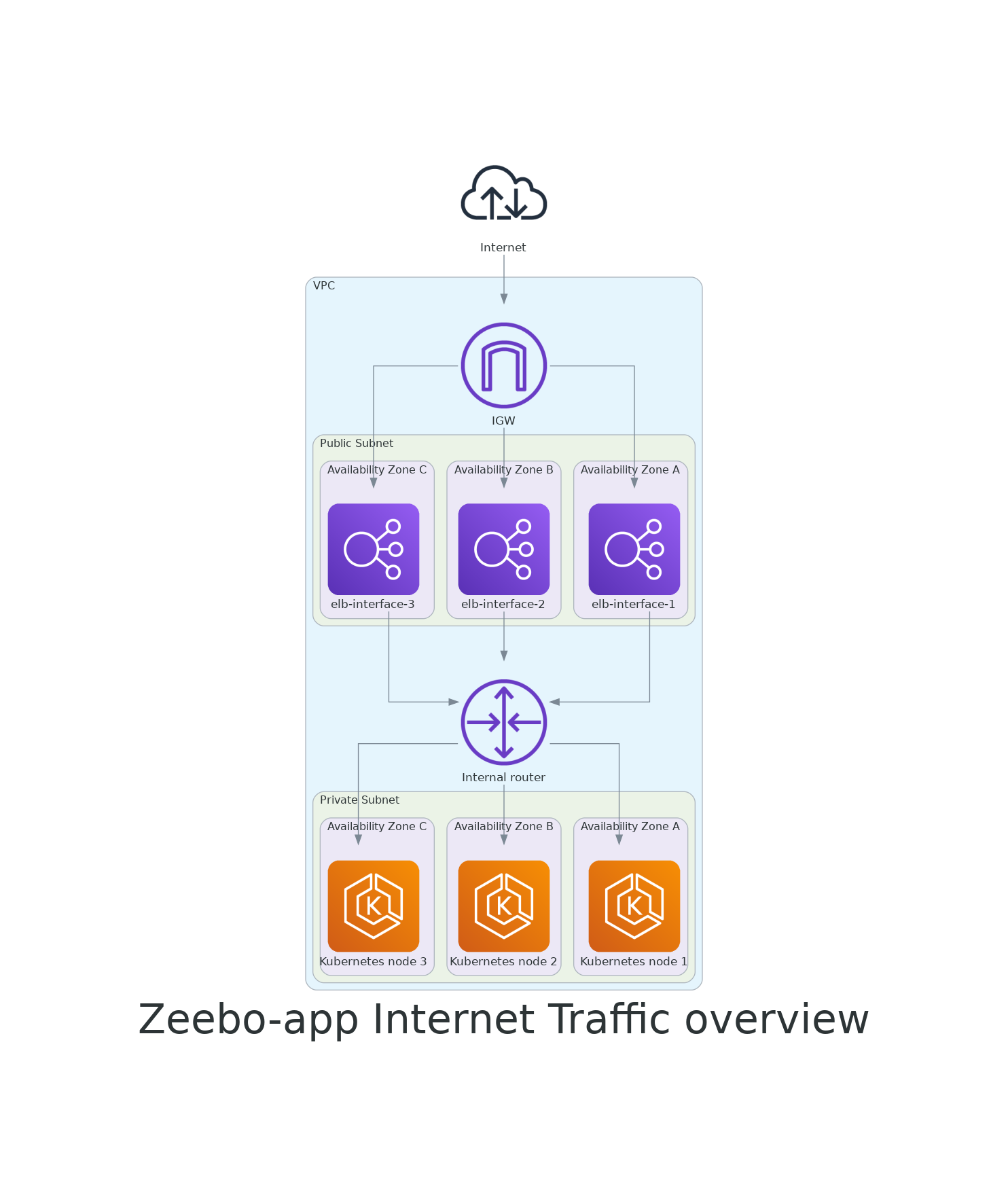
The connection will come from the Internet, passing through an Elastic Load Balancer and distributing the load among different Kubernetes nodes.
Within the Kubernetes Cluster, this is how it is configured:
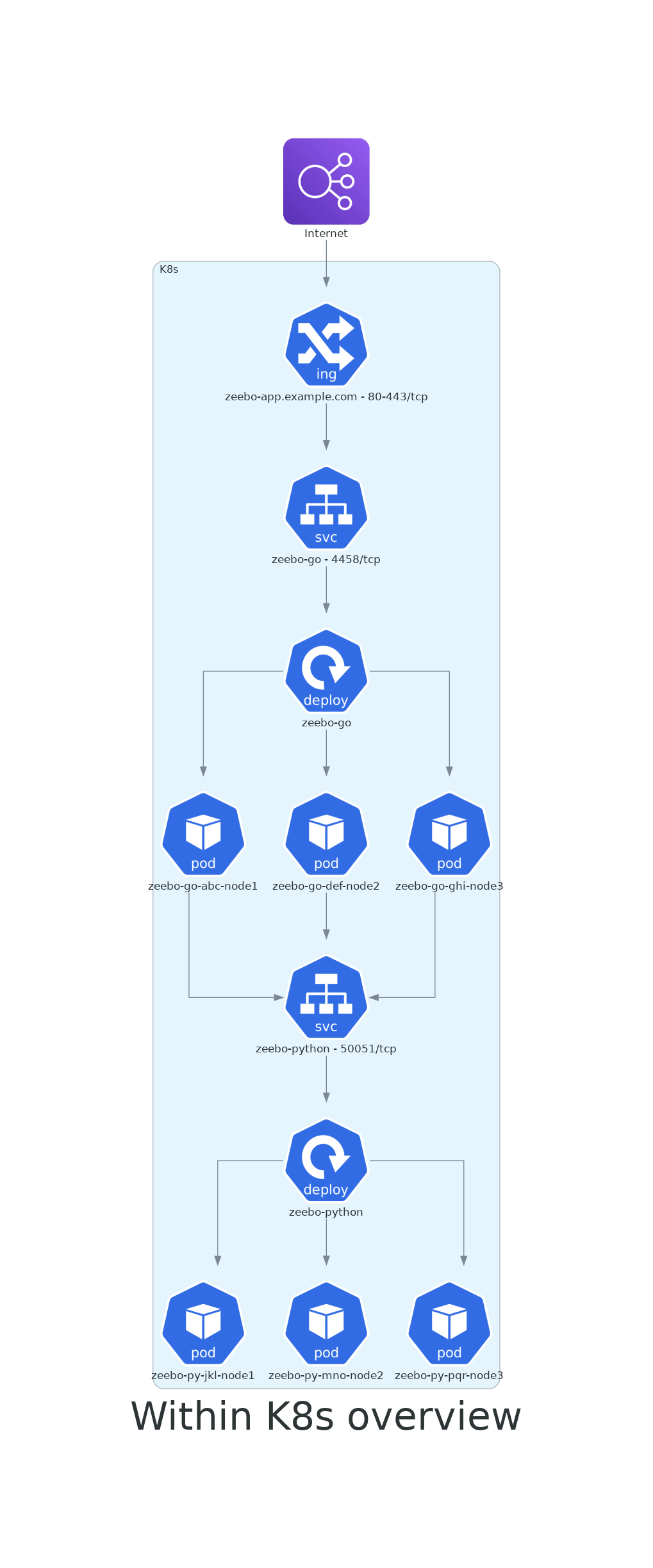
So the connection will be handled by an Ingress controller, which points towards the Go Service and then finally contacts the Python service in the end. Both rely on Service resources configured in ClusterIp to be fully isolated from the outside world. The only access point is via the Ingress controller.