Change width of app menu #2059
Change width of app menu #2059
Conversation


By "window width", do you mean "screen width"? If so I’d say the prospect of a tray menu half the screen width is a bit much. Don’t we have some max value for the height? I’d say that should be the maximum for the width, so it never goes "landscape mode". |

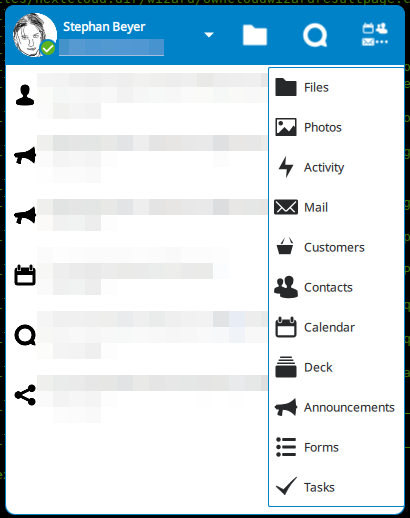
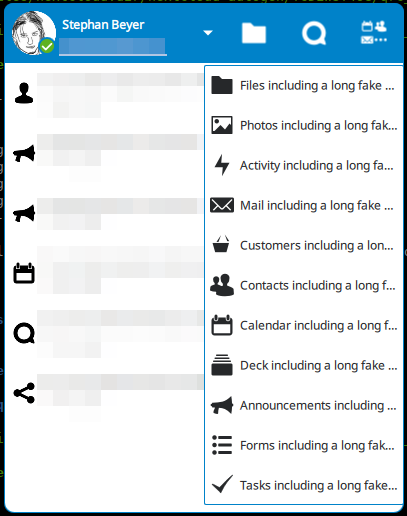
No, let two screenshots speak for themselves:
|

 jancborchardt
left a comment
jancborchardt
left a comment
jancborchardt
left a comment
There was a problem hiding this comment.
Sorry, misinterpreted "app menu" as "menu of the app" not as "the menu with the app list". ;)
Looks great now, thanks a lot for the screenshots – awesome work! :)
Ah, now your original comment makes more sense to me. I think I call that the "tray window", or is the "menu of the app" yet another menu? 😄 |
|
Yep, of course you're right, "tray window" is the word for that. I think a contributing factor to my confusion was that it was around 3 AM in the night. ;) |

The app menu had a width based on the header button size which was
way too narrow to display its content.

This commit changes the width based on the contents (menu items) of
the menu, however, limiting the maximum width to half the window width.

Signed-off-by: Stephan Beyer <s-beyer@gmx.net>
 sbeyer
force-pushed
the
sbeyer-fix-app-menu-width
branch
from
sbeyer
force-pushed
the
sbeyer-fix-app-menu-width
branch
from
c64b4db to
a0ad483
Compare


The app menu has a width based on the header button size which is
way too narrow to display its content, see #2012.
This PR changes the width based on the contents (menu items) of
the menu, however, limiting the maximum width to half the window width.