Collabora online not opening when Nextcloud is running in Docker with reverse proxy #1795

Description

Describe the bug
Collabora Online built-in instance is not opening when Nextcloud is running on docker with the environment variable "OVERWRITEHOST" is set, and nginx is running by reverse proxy
To Reproduce
Steps to reproduce the behavior:
- Run owncloud by
docker run -d --restart always -e OVERWRITEHOST=example.com -e OVERWRITEPROTOCOL=https -p 127.0.0.1:8080:80 nextcloud - Setup nginx reverse proxy (with SSL)
- Enable collabora built-in server in settings
- Try to edit a document
Expected behavior
The document should be opened, but instead an error page is shown. I suspect that the problem is that the host in OVERWRITEHOST is not taken by collabora online, because in "Network inspector" it is showing the host "localhost:8080", which is invalid.
Screenshots
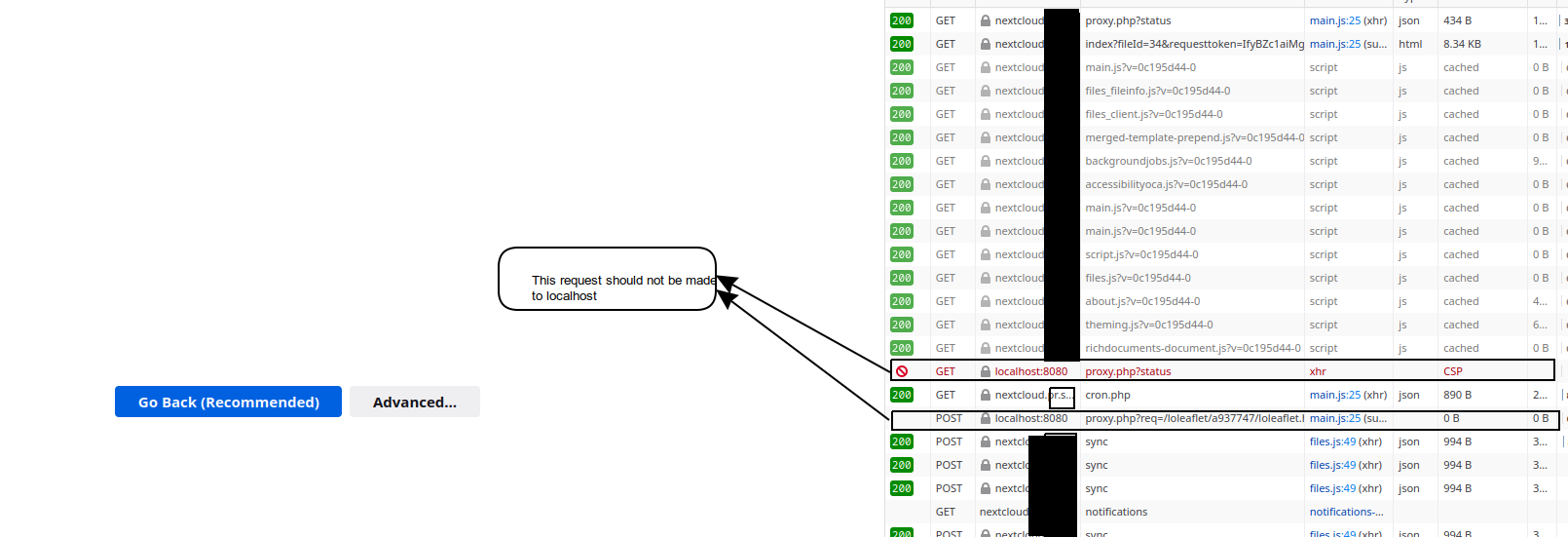
Client details:
- OS: Debian 10 buster
- Browser: any