Repository navigation
Battery Analysis
Purpose: Review electrical evidence from one ArduPlane DataFlash BIN log, organized by detected flight and battery-monitor instance. Battery Analysis is read-only: it does not assign a physical battery, modify the log or save battery history.
- A DataFlash
.binor.BINlog recorded by an ArduPlane aircraft. - Logged battery-monitor (
BAT) data for the flights you want to examine. - The APT desktop GUI running. See the README installation instructions if needed.
No EdgeTX CSV file or Battery Pack ID is needed for this module.
- In the APT main window, click Choose BIN… beside Source BIN: at the top.
- Select the ArduPlane BIN file, then confirm the selection in the file dialog. Its path appears in Source BIN:.
- Open Battery Analysis from the Overview page or click the Battery Analysis tab.
- Click Analyse on the Battery Analysis page.
- Read the report below the controls. APT reports each detected flight and logged battery-monitor instance in order.
- Click Docs on the same page for the shorter in-app description and glossary.
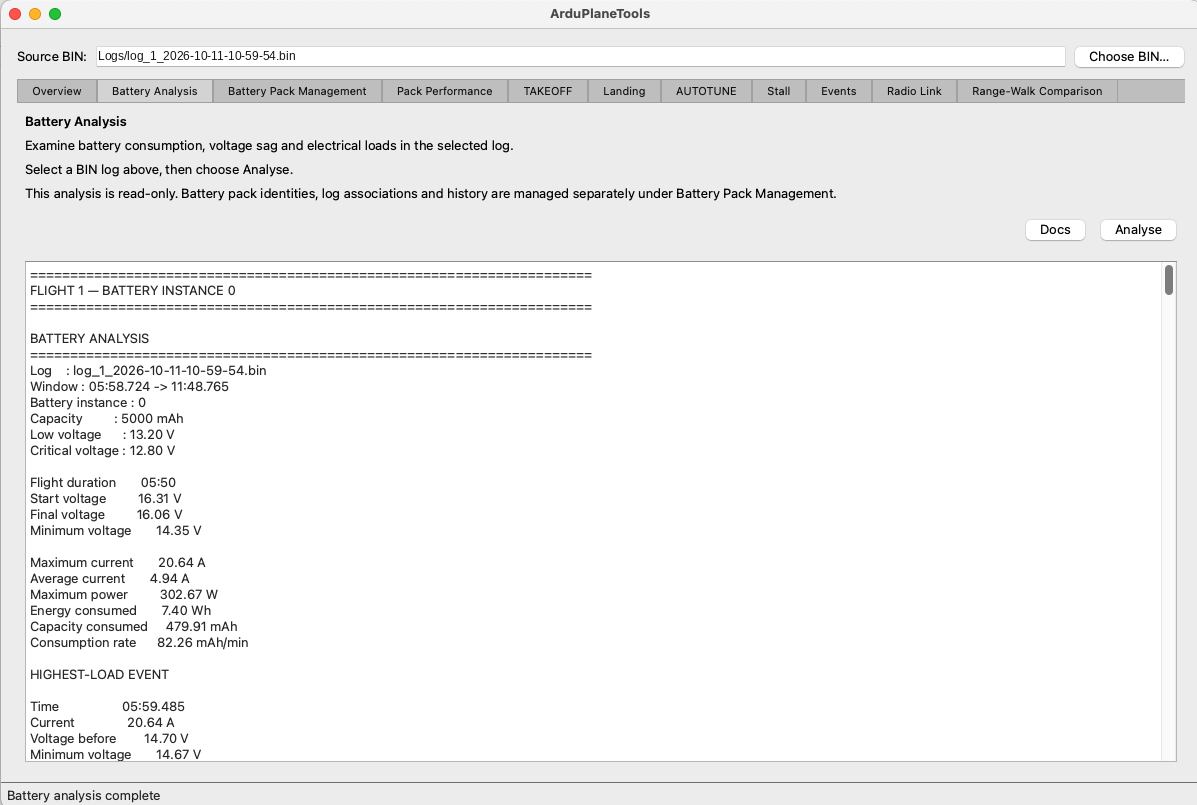
The selected BIN, Battery Analysis controls and beginning of a flight-scoped report.
A single BIN can contain more than one flight. If multiple battery-monitor instances were logged, APT shows a separate report for each instance in each detected flight.
Battery instance identifies a logged battery monitor, not the physical battery Pack ID. A flight without supported battery telemetry is reported as such rather than assigned an estimated value.
| Report field | How to interpret it |
|---|---|
| Flight duration | Duration of the detected flight being analyzed. |
| Start / Final / Minimum voltage | Logged pack-level voltages at the relevant points of the flight. |
| Maximum / Average current | Peak and average logged current over the analyzed flight. |
| Maximum power | Highest supported logged power observation. |
| Energy consumed (Wh) | Logged energy used during the analyzed flight. |
| Capacity consumed (mAh) | Logged capacity used during the analyzed flight. |
| Consumption rate (mAh/min) | Consumed capacity divided by the analyzed flight duration. |
Use these results to understand electrical loading and consumption within the recorded flight. Comparisons between flights also depend on aircraft, battery, environment and configuration.
The HIGHEST-LOAD EVENT section gives details of the strongest supported load observation, where available. It includes current, voltage before the load, minimum voltage, voltage sag, sag per ampere, a later voltage sample and reported recovery.
Voltage sag is the difference between the pre-load voltage and the minimum voltage observed during the load. It is useful evidence of how the electrical system behaved under load; by itself, it does not diagnose the battery's internal health or connector condition.
The BOUNDED LOAD EVENTS section records supported time-bounded load contexts, including takeoffs where detected. An event can include:
- Event start/end, duration, and TAKEOFF context where applicable.
- Capacity used before event — the logged capacity-consumption counter at or before the start of that event, not the amount consumed by the event itself.
- Maximum and average throttle, peak and average current, and current at minimum voltage.
- Pre-load and minimum voltage, sag, voltage after the recovery interval, and recovery.
- Margin to LOW and Margin to CRITICAL — differences from the relevant configured battery-voltage thresholds, when valid configuration evidence is available.
A missing event, threshold or sensor value may appear as unavailable. It should not be interpreted as a measured zero.
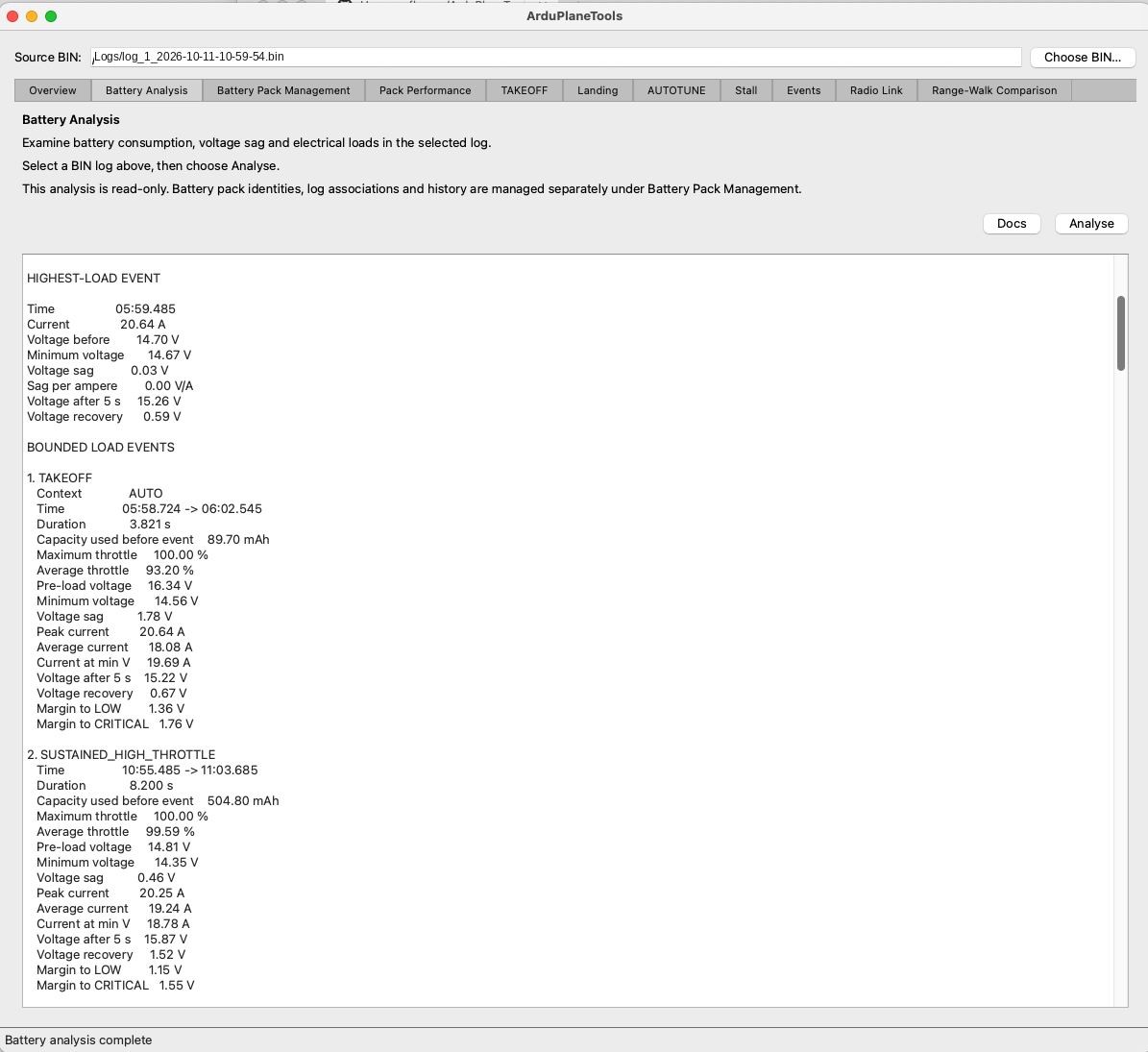
Highest-load and bounded load-event evidence from the same read-only report.
Depending on the log, APT may present counter or configuration warnings. Read these alongside the measurements: incomplete or inconsistent telemetry can limit what the report establishes. A reported Unavailable value is not silently reconstructed.
These are separate operations:
- Battery Analysis examines the selected BIN and is always read-only. Running it does not assign a Pack ID or save a history record.
- Battery Pack Management identifies the physical battery used for a BIN and, on explicit request, records supported AUTO-takeoff battery observations.
- Pack Performance presents those saved observations across logs for a selected physical battery.
Use Battery Pack Management and Pack Performance if your goal is to track the same physical battery over multiple flights.
Battery Analysis describes logged monitor evidence and any available configured thresholds. It cannot, from those results alone, determine cell-level health, actual remaining capacity under all future loads, connector condition, or safe endurance for a future flight. It is not a replacement for physical battery inspection, operational judgement or safe flight testing.