Repository navigation
Pack Performance
Purpose: Present read-only historical AUTO-takeoff battery observations for one physical Pack ID across currently owned BIN sessions. Pack Performance reads saved Pack IDs, associations and history; it does not open a flight log, record new observations or change pack identities.
- At least one physical Pack ID created in Battery Pack Management.
- Supported AUTO-takeoff history explicitly recorded from one or more assigned BIN logs.
- The APT desktop GUI running. See the README installation instructions if needed.
No Source BIN selection is required. Pack Performance works from APT's saved local records.
- Open Pack Performance from Overview or select its tab.
- Wait while APT loads the current Pack IDs and validates the stored history.
- Under Physical Pack ID:, select the battery you want to review.
- Click View report.
- Read the report below the controls.
- Click Docs for the shorter in-app description and glossary.
If no registered packs exist, the report shows No known Battery Pack IDs. If the selected pack has no retained observations, it reports that explicitly rather than inventing measurements.
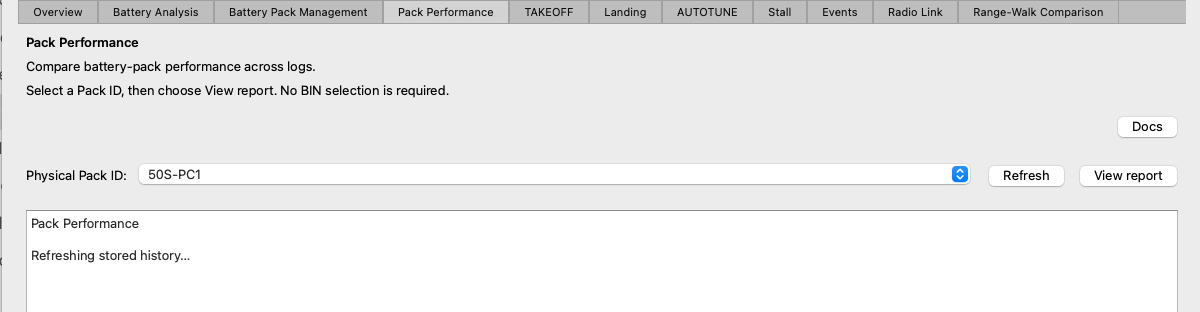
Choose a saved physical Pack ID, then use View report. Refresh reloads saved identities and history; no BIN selection is required.
Click Refresh after creating, renaming or reassigning Pack IDs, or after using Record history in Battery Pack Management.
Refresh reloads known Pack IDs and stored history. It retains the current selection if that Pack ID still exists. If the selected identity was renamed or removed, APT clears the selection and explains that it is no longer registered.
Refresh is read-only. It does not fingerprint a BIN, process DataFlash telemetry or add history observations.
The report begins with the selected Pack ID and separates the same retained evidence into two views.
A battery session is one source BIN. This section shows the earliest retained supported AUTO takeoff from each included source session. It is useful for comparing a consistent first-event view across recorded sessions without treating later takeoffs in the same BIN as separate sessions.
This section shows every retained supported AUTO-takeoff observation owned by the selected Pack ID, including later takeoffs from a source BIN.
Both sections use the same observation fields:
| Report field | How to interpret it |
|---|---|
| Date / Flight | Recorded session date where available, and detected flight number. A missing reliable date is shown as unavailable. |
| Source | Filename of the BIN from which the observation was recorded. |
| Capacity used (mAh) | Logged consumed-capacity counter before the bounded takeoff event, not capacity consumed by that takeoff alone. |
| Current (A): average / peak | Mean and maximum supported current during the bounded event. |
| Voltage (V): pre-load / minimum loaded | Supported voltage before the load and the lowest valid voltage during it. |
| Voltage response (V): sag / recovery | Voltage drop from pre-load to minimum, and the later reported rise from minimum to the recovery sample. |
Unavailable means that the stored observation does not support that measurement. It is not a measured zero.

The report separates the first takeoff in each battery session from all retained AUTO takeoffs. Dates and source filenames are redacted; the displayed electrical measurements are unchanged.
Pack Performance includes observations whose source-log fingerprints are currently assigned to the selected Pack ID. This ownership rule matters:
- Renaming a Pack ID moves its associations to the replacement name.
- Reassigning a BIN fingerprint changes which Pack Performance report includes that source's retained observations.
- The BIN file itself is not modified.
- Stored observations that are unseen, explicitly not tracked, assigned to another pack or unsupported by current history rules are excluded.
- When more than one supported stored version exists for the same event, APT applies its existing newest-supported-observation rule rather than showing duplicates.
Use Battery Pack Management to correct identities, assignments or recorded history, then return here and click Refresh.
Pack Performance is deliberately a reporting surface. View report and Refresh only read the Pack ID store and battery-history store. They do not call Battery Analysis, open a DataFlash BIN, write observations or mutate associations.
This separation prevents reviewing historical results from silently changing the data being reviewed.
The report compares logged electrical observations from bounded AUTO-takeoff events. Voltage sag, current and recovery depend on pack state, prior consumption, aircraft load, wiring, connectors, temperature, sensor quality, configuration and the event boundary. They are evidence of recorded behaviour, not a direct measurement of cell-level health or internal resistance.
APT does not turn these observations into a health score, condition rating, remaining-capacity prediction or safe-endurance guarantee. Missing measurements remain unavailable. Use the report alongside physical inspection, appropriate battery testing and operational judgement.