Weather CLI is a command-line application for retrieving weather information using the OpenWeatherMap API.
- Fetch weather details for specific locations: This CLI uses the OpenWeatherMap API to provide weather updates.
- Multilingual support: The CLI supports multiple languages. Configure the desired language using the
-langflag (e.g.,-lang enfor English or-lang rufor Russian). - Flexible updates: Get weather updates either as a one-time output or at regular intervals using the
-ntfflag. - Console output or notifications: View weather updates directly in the console or as system notifications (e.g., macOS notifications).
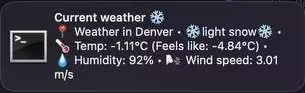
Example of a macOS notification generated by Weather CLI.
To install and use the Weather CLI globally:
npm install -g weather-cli-with-notificationsTo use this CLI, you need an API key from OpenWeatherMap. Register for a free API key here: https://openweathermap.org/
After obtaining the key, set it up using the following command:
weather -t <YOUR_API_KEY>If you prefer to work with the source code:
-
Clone the repository:
git clone <repository-url>
cd weather-cli
-
Install dependencies:
npm install
-
Run the CLI:
node weather.js
Run the application with the following commands:
Displays the weather for the default city.
-
-s [CITY]: Set up the default city. -
-h: Display help information. -
-t [API_KEY]: Set up the API key for the weather service.
To get a free API key, register at OpenWeatherMap. -
-ntf [NUMBER]: Set up the frequency for checking the weather in hours. -
-lang [LANGUAGE]: Set up the language. Supported options include:- 🇬🇧
en: English - 🇷🇺
ru: Russian - 🇪🇸
es: Spanish - 🇩🇪
de: German - 🇫🇷
fr: French - 🇯🇵
ja: Japanese - (and many others – see full list in the CLI help).
- 🇬🇧
- helpers/args.js: Handles argument parsing from the command line.
- services/log.service.js: Handles logging for the application.
- services/storage.service.js: Provides storage functionality for user settings and keys.
- services/api.service.js: Fetches data from weather APIs.
Feel free to fork this repository, make changes, and submit pull requests.
This project is licensed under the ISC License.