Technical Architecture Overview
Below is a diagram that shows the interaction between the different components of this application and how requests are handled and processed.
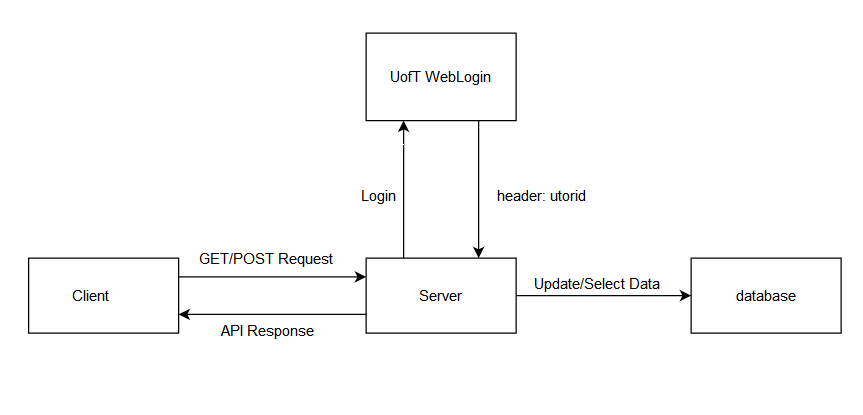
This is where the code for the front end is stored and this code is rendered on the application. Apart from the stylistic elements of the code, the client needs to request and send data to the back end, which is the server, so that the information can be rendered appropriately. These requests are usually made as axios post and axios get requests. Then the data attributes in these files are modified in accordance with the data received from server and displayed in the application.
An example is when the user is creating a new profile from '/connect/register', all the information entered by the user in the form is stored in the data attributes of the Register.vue file that is being rendered and an axios post request is made to the server, where all this information is sent to the back end and a new profile is made for the user. In axios get requests, the server sends an API response (user information, user projects etc.) back to the client, which is then rendered on the front end.
The server connects to and updates the database for the application. Depending on the type of request made by the client, the server either retrieves information from the database or updates it. The client can make two types of requests to the server.
- Post request- If the client makes an axios post request to the server, then data is being sent to the back end which needs to be saved or updated in the database for the application.
An example is when a user registers, data from Register.vue is sent as an axios post request to the server and the information of the user is stored in the database and a new profile is created for that user.
- Get request- If the client makes an axios get request to the server, that means the client is requesting for data from the server. The server then sends data (according to the request) and the front end then renders this data.
An example is when a user tries to search for projects. A request is made from '/connect/search' and the Search.vue file in client makes an axios get request to the server. The server then retrieves projects, which have the tags that were entered by the user, from the database and sends this information back to the client. This data is then rendered on the search page as project cards.